USD
  • EUR
  • INR
  • USD
Cart
Cart 0
  • You have no items in your shopping cart.
    Odoo Apps Extensions
    Cart
    Cart 0
    • You have no items in your shopping cart.
    Hire a Developer
    ×
    Contact Us!
    Send Again
    Close
    Please Login to Write Your Review
    Odoo Website Address City

    Odoo Website Address City

    x
    Free

    * Required Fields

    $25.00
    Add To Cart

    Ease city selection with Odoo Website Address City!


    • Allows you to add cities for selection from the backend.

    • Customers can choose the city from the drop-down.

    • Add the cities manually as per product availability.

    • Customers can add new city addresses or update existing cities.

    • Eases the process of address add and update.

    • Enable or disable city selection with just a click.


    Odoo Website Address City
    Odoo Website Address City
    $25.00
    Odoo Silver Partner
    Odoo Functional Certified Experts
    Check How It Works
    $25.00
    Configure and Buy
    X
    • Description
    • Reviews
    • FAQ
    • Customers ()
    • Specifications
    • Cloud Hosting
    • Changelog

    Deliver product quickly with Odoo Website Address City?

    As per EasyPost data, 4.7% of the time, customers are likely to make an error while filling out an address form. And this mistake cost millions of dollars yearly to the businesses.

    Odoo Website Address City overrides the default city entering functionality of Odoo and provides a drop-down for city selection. On selecting the state, a drop-down will appear in the city block for customers to choose one.

    Apart from that, this dropdown helps avoids typo errors in city names so product packages can reach the correct address. Admin can enable/disable the city selection drop-down as per their convenience.

    You can use Odoo Website Address City to let customers know the cities where you transit products. Also, by Address City, you ensure the correct city address to avoid losses on return on undelivered products.
    Odoo Website Address City

     Odoo Website Address City Features

    Set up Website Address City In the Odoo Backend

    • You need to manually enter cities in the Odoo Backend so customers can select them on the website.
    • Also, you can enable or disable city selection from the Odoo backend.
    • You can add the zip code while entering the address.

     Selecting The City From The Website

    • Customers can select the city from the dropdown while entering the address.
    • They can add or edit addresses easily while placing the order for product(s).
    • Also, customers can change their address from their profile too.

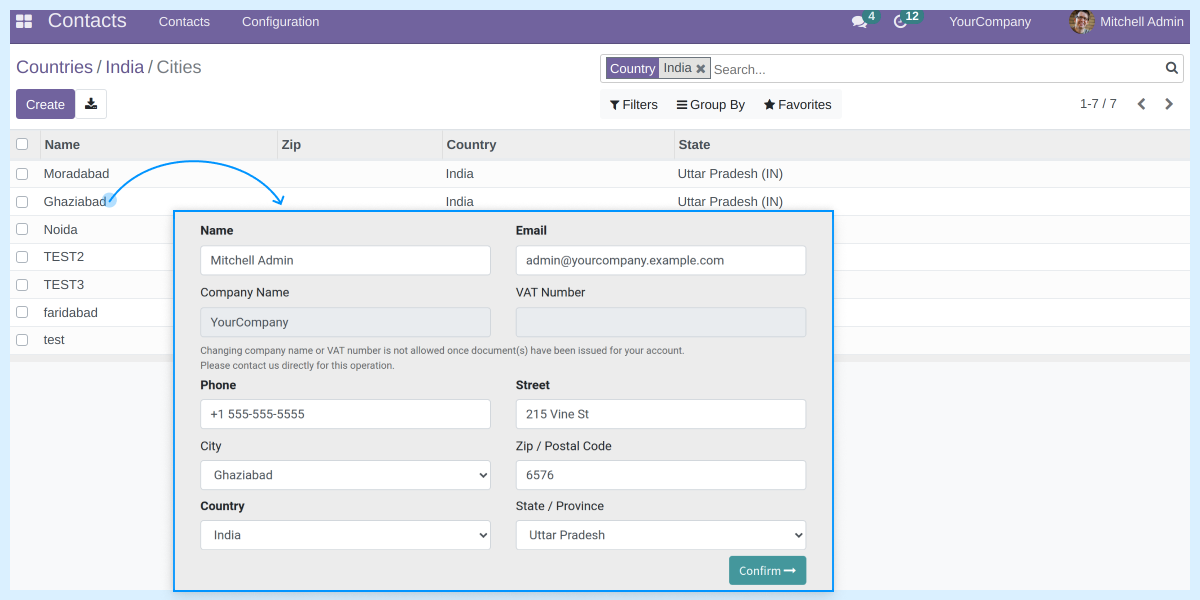
    Adding Cities In The Odoo Backend

    • With this module, the admin can add a number of cities to their website.
    • Eliminate the need for customers to enter the city address manually.
    • Easy to configure, and you can add the city name and enter its zip code.
    • While entering the city, choose the country and state from the dropdown.
    • The module depends upon Odoo core module base_address_city.
    • Let you reduce the chances of return of undelivered parcels.
    • Easy to configure and manage from the backend.
    • Add new cities or delete existing ones.
    Setting Up Website Address City

     Selecting Address While Placing The Order

    Add or Update City Address
    • Customers can add or edit the city address while placing an order from the website.
    • Similarly, customers can add or edit addresses from their profile section.
    • The module allows customers to add a city just by selecting the city from the dropdown, making it easier for customers to choose the desired city.
    • Also, customers can add their city manually as well.
    • Adding cities enables you to define your reach and helps you calculate the necessary resources you need within that reach.

    Odoo Website Address City-

    Webkul's dedicated support provides you with the customizations and troubleshooting solutions for Odoo Website Address City.

    For any query or issue please CREATE A TICKET HERE

    You may also check our other top-quality Odoo Extensions.

    Specifications

    Product Version1.0.3
    Released4 years ago
    Last UpdatedMarch 9, 2026 (5 months ago)
    Supported VersionsOdoo  15.x  16.x  17.x  18.x  19.x  

    Ratings

    We'd love to hear your thoughts! Share your feedback and help us craft an even better experience tailored just for you.

    5.0
    1 Reviews
    based on verified customer feedback
    Write a review
    Mohamed Shorbagi
    🇦🇪 United Arab Emirates

    Excellent service

    Posted On - June 21, 2023

    Great service and a great support team who always fix your problems

    Specification

    Detailed technical features and requirements to help you understand the module’s capabilities and ensure smooth integration with your system.

    Cloud Hosting

    Detailed technical features and requirements to help you understand the module’s capabilities and ensure smooth integration with your system.

    Default Configuration Details of Server

    1 GB
    RAM
    1 Core
    Processor
    30 GB
    Hard Disk
    1 GB RAM & 1 Core Processor
    Database

    Want to know more how exactly we are going to power up your eCommerce Website with Cloud to fasten up your store

    * Server Configuration may vary as per application requirements.

    Change Logs

    Not Available


