Pimcore Odoo Connector connects Pimcore with Odoo and syncs the catalog both ways. Admins export and import categories, attributes, products, and variants.
- Export categories, attributes, products, and variants from Pimcore to Odoo.
- Import Odoo product, category, and attribute records back into Pimcore.
- Map every Odoo field to a Pimcore attribute from the Studio screen.
- Run exports and imports as background jobs over Symfony Messenger.
- Track each run with read, created, and updated counts per job.
- Scope every API call to one Odoo company, locale, and currency.
- Sync product images and eCommerce category cover images.
- Control access with nine permission keys for the Odoo Connector.
- Re-run any job without creating duplicate records in Odoo.
- Description
- Reviews
- FAQ
- Customers ()
- Specifications
- Cloud Hosting
- Changelog
Pimcore Odoo Connector is a Pimcore bundle that keeps the product catalog in sync with Odoo. It moves categories, attributes, products, and variant products in both directions.
Admins add an Odoo credential in Pimcore Studio, test the connection, and mark one credential active. Every export and import job then runs against that host.
An export pushes Pimcore objects into Odoo as product.category, product.attribute, and product.template records. An import pulls those records back into Pimcore data objects.
One field map drives both directions. Admins pair each Odoo field with a Pimcore attribute per entity, and only mapped fields move between the two systems.
The bundle supports self-hosted and SaaS Odoo, and ships a pre-built Pimcore Studio plugin. Jobs run in the background, so a large catalog does not block the screen.
Additionally, if you want to send the same Pimcore catalog to a Shopware storefront, then check Pimcore Shopware 6 Connector.
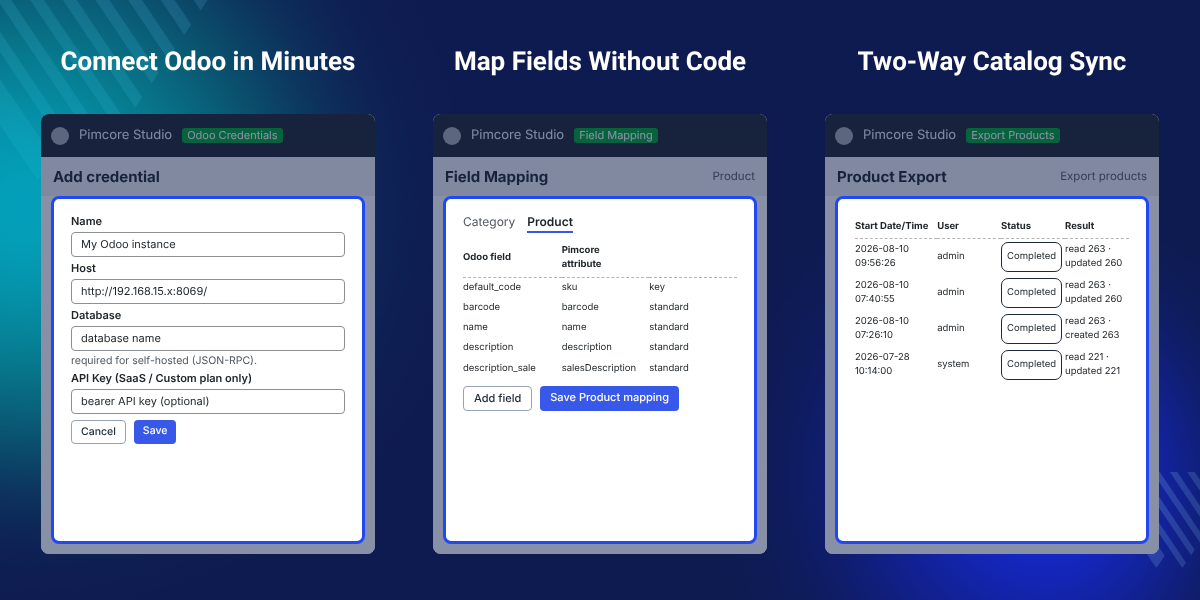
Highlighted Features
Two-Way Catalog Sync
Export Pimcore objects to Odoo and pull Odoo records back, with the same field map used for both runs.
Live Connection Test
Saving a credential calls Odoo first, so a wrong host or API key is caught before any job starts.
Field Mapping in Studio
Pair each Odoo field with a Pimcore attribute per entity, without editing bundle code or config files.
Variant Products Sync
Parent products and their variant axes move as product.template records with attribute values attached.
Background Job Engine
Reader, Processor, and Writer stages run over Symfony Messenger, so a long sync never blocks Studio.
Duplicate-Safe Reruns
Stored id-mappings let admins run the same export twice without creating a second Odoo record.
Why Do We Need Pimcore Odoo Connector?
Pimcore holds the product data and Odoo runs the business. Neither system reads the other, so a team moves the catalog by hand or writes a custom script.
Manual transfer costs hours on every catalog change. Exported files drift out of date, product images get uploaded twice, and a second run creates duplicate records in Odoo.
Pimcore Odoo Connector removes that gap. A Pimcore Odoo integration takes one setup. Admins map the fields, then run an export or an import from Pimcore Studio and watch the job finish.
Each entity carries a match key, such as default_code for products. The job looks that key up before it writes, so a repeat run updates the existing Odoo record instead of adding one.
Also, if you want to translate the same catalog data into more languages inside Pimcore, you can check our extension Pimcore DeepL Translation Connector.
Use Cases
-
Catalog Handover to ERP
Teams enrich products in Pimcore and push the finished catalog to Odoo for sales, stock, and invoicing.
-
Odoo Data Into a New PIM
A store already running on Odoo imports its categories, attributes, and products to start a Pimcore catalog.
-
Multi-Company Odoo Setups
Each credential holds one Odoo company, so a group runs separate jobs per company from one Pimcore.
-
Variant-Heavy Catalogs
Fashion and furniture teams move size and colour variants as Odoo templates with their attribute values.
-
Repeat Catalog Updates
A weekly export refreshes prices and descriptions in Odoo, and updates the records created by earlier runs.
-
Audited Catalog Changes
Job history records who started each run, so a team can see which user changed the Odoo catalog and when.
Odoo Credentials and Connection Test
The credentials screen stores the Odoo hosts the bundle can reach. Admins add a credential, test it, and mark one active for every job.
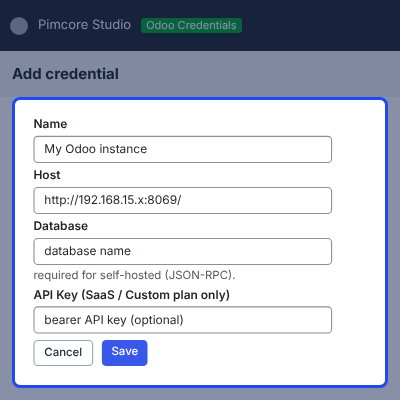
- Add a credential with a name and the Odoo host URL.
- Use the bearer API Key for Odoo.com SaaS and Custom plan hosts.
- Saving calls Odoo first, so a bad host or key never gets stored.
- Run Test connection on any saved row to check the host again.
- Keep several credentials and switch with Set active, Edit, or Delete.

Object Mapping for Pimcore Classes
Object Mapping decides which Pimcore class backs each Odoo entity. The installer seeds the four rows, and admins change them when a project uses its own classes.
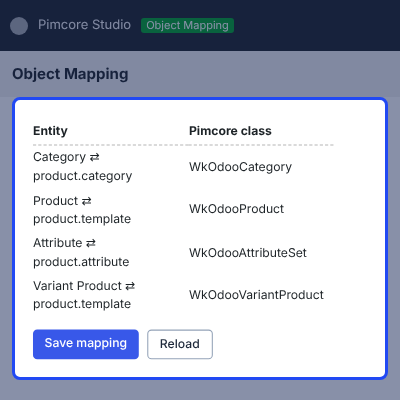
- Bind Category to a Pimcore class, seeded as WkOdooCategory.
- Bind Product to a Pimcore class, seeded as WkOdooProduct.
- Bind Attribute to a Pimcore class, seeded as WkOdooAttributeSet.
- Bind Variant Product to a Pimcore class, seeded as WkOdooVariantProduct.
- Save mapping writes the binding, and Reload restores the stored rows.

Field Mapping for Odoo and Pimcore Fields
Field Mapping pairs each Odoo field with a Pimcore attribute, one tab per entity. Both import and export read the same map, so admins configure a field once.
Only mapped fields move, so a project can start with a small map and grow it later.
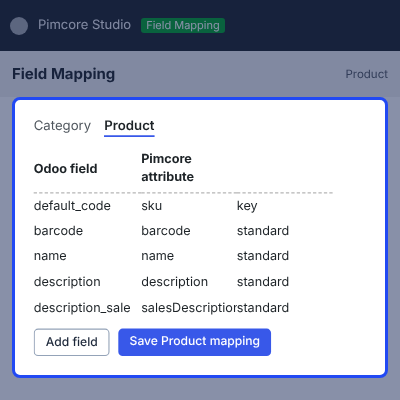
- Open the Category, Product, or Attribute tab and add field rows.
- Enter the Odoo field code and pick the Pimcore attribute next to it.
- Mark the key field used to match records, such as default_code for products.
- Map the image field to sync product images, which stays off until mapped.
- Save the mapping per entity with the Save mapping button.

Export Products, Categories, and Attributes to Odoo
The export screens push Pimcore objects into Odoo. Each entity has its own screen, and the screen lists every run below the button with its result.
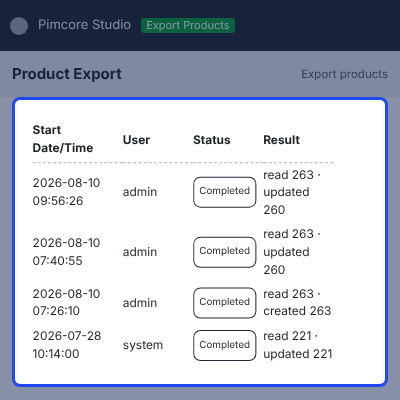
- Export categories into Odoo as product.category records.
- Export attributes into Odoo as product.attribute records.
- Export products, prices, and the main image as product.template records.
- Export variant products with their attribute values as Odoo variants.
- Run categories and attributes first, so products link to records that exist.

Import Odoo Records Into Pimcore
The import screens pull Odoo records into Pimcore data objects. Import uses the class chosen in Object Mapping and the same field map as export.
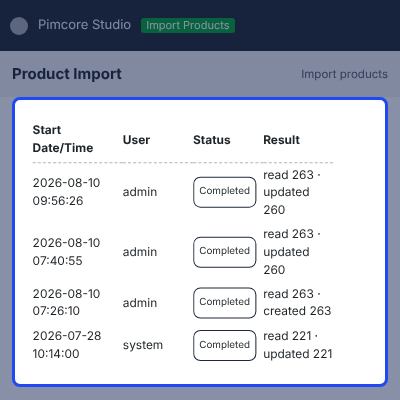
- Import Odoo product.category records into the mapped Pimcore Category class.
- Import product.attribute records with their option values.
- Import product.template records, with sku taken from default_code.
- Link imported products to categories through the category mapping.
- Keep the parent and child order, so imported category trees stay intact.

Support
For any query or issue, please create a support ticket here http://webkul.uvdesk.com/
You may also check our other top-quality Odoo Modules.
Specifications
Frequently Asked Questions
Pimcore Odoo Connector adds an Odoo Connector section to Pimcore Studio. Admins save an Odoo credential, map the classes and fields, then run export or import jobs for categories, attributes, products, and variant products.
Yes, Export sends Pimcore objects to Odoo and import pulls Odoo records into Pimcore. Both directions read the same field map and the same id-mapping rows.
No, each entity has a match key, such as default_code for products, and stored id-mappings point at the record already created. A repeat run updates that record.
Running the export again recreates it. The job detects that the mapped target is gone and writes a new Odoo record, so the mapping does not need manual cleanup.
Images move when the field map includes the image field, and stay out of the job when it does not. Category cover images need Odoo product.public.category, which comes from the website_sale module.
Yes, Object Mapping binds each Odoo entity to a Pimcore class, and the field map then points at the attributes of that class. The installer seeds four classes to start from.
No, jobs run in the background over Symfony Messenger. Admins can leave the screen, come back later, and open the run to read its status and log lines.
Yes, nine permission keys sit under an Odoo Connector category in user settings. Admins grant view, manage, test, export, import, and job control separately, and ungranted routes return 403.
Specification
Detailed technical features and requirements to help you understand the module’s capabilities and ensure smooth integration with your system.
Cloud Hosting
Detailed technical features and requirements to help you understand the module’s capabilities and ensure smooth integration with your system.
Move to Cloud Today
We’re partnered with top-tier, trusted providers!
Default Configuration Details of Server
RAM 1 Core
Processor 30 GB
Hard Disk
Database
Want to know more how exactly we are going to power up your eCommerce Website with Cloud to fasten up your store
* Server Configuration may vary as per application requirements.
Change Logs
- - Feature Add (+)
- - Feature remove (-)
- - Bug Fixed (!)
- - Modification (*)
- First release for Pimcore 2026.x / PHP 8.4+ with two-way Odoo integration using the legacy JSON-RPC API and modern JSON-2 API.
- Added Pimcore Studio plugin with Credentials, Object Mapping, Export, Import, and live Job History screens with per-step progress.
- Added Odoo to Pimcore import for Categories with parent hierarchy, Products with list price, cost price and main image, Attributes, and Variant Products with parent and variant child objects.
- Added Pimcore to Odoo export for Categories, Products with SKU, list price, cost price and main image, and Variant Products with attributes, values, variant codes and images.
- Added configurable and variant product synchronization in both directions with template-level and per-variant images.
- Added dual transport support for legacy JSON-RPC and modern JSON-2 APIs, automatically selected per credential through OdooClientFactory.
- Added fully dynamic Object Mapping to select the Pimcore class for each Odoo entity without hard-coded class references.
- Added two-way image synchronization using Odoo image_1920 and Pimcore image assets for product templates and variants.
- Added deterministic asset filenames so re-imports update existing images instead of creating duplicates.
- Added idempotent ID mapping through ConnectorDataMapping with match-before-create logic to prevent duplicate records during repeated imports and exports.
- Added shared product and variant mapping rows for clean round-trip synchronization between Pimcore and Odoo.
- Added self-healing export to recreate deleted Odoo records automatically, including product templates, attribute axes, and variants.
- Added automatic activation of Odoo's group_product_variant feature during variant export.
- Added asynchronous export and import through the Messenger worker with live progress, per-step read, write, and update counts, Stop control, and unified Job History.
- Added one-command installer through odoo:install to create Pimcore classes, VariantAxis field collection, support tables, and default object mapping configuration.
- Added odoo:uninstall to reverse the installation, with the --keep-data option available to drop only the schema.
- Added support for App\Webkul\CoreBundle as the connector framework dependency.
- Added support for Pimcore 2026.x / PHP 8.4+ and Odoo 19 with JSON-RPC for self-hosted instances or JSON-2 API for Odoo.com Custom and SaaS plans.
- Added lean Pimcore classes containing only the fields required by the connector, which can be extended in Pimcore Studio.
- Added an installation requirement to run odoo:install before opening the connector screens.


