USD
  • EUR
  • INR
  • USD
Cart
Cart 0
  • You have no items in your shopping cart.
    Akeneo Extensions
    Cart
    Cart 0
    • You have no items in your shopping cart.
    Hire a Developer
    ×
    Contact Us!
    Send Again
    Close
    Please Login to Write Your Review
    Pimcore SAP S/4HANA Connector

    Pimcore SAP S/4HANA Connector

    x
    Free

    * Required Fields

    $699.00
    Add To Cart
    Annual Billing

    Pimcore SAP S/4HANA Connector links Pimcore with SAP S/4HANA over the OData APIs. Admins import and export products, customers, orders, stock, price, and media.


    • Sync products, categories, customers, orders, and attributes both ways.

    • Import stock levels, prices, and product media from SAP S/4HANA.

    • Connect with OAuth 2.0 client credentials or an api.sap.com APIKey.

    • Match records on SKU, category code, customer number, or order number.

    • Run every sync as a background job through Symfony Messenger.

    • Set an auto sync schedule for each entity and each direction.

    • Map Pimcore classes and fields to SAP entities from the Studio UI.

    • Track read, created, and updated counts on every job run.

    • Stop or retry any import or export run from the job list.

    • Store client secrets and API keys encrypted with libsodium.

    Pimcore SAP S/4HANA Connector
    Pimcore SAP S/4HANA Connector
    $699.00
    Check How It Works
    $699.00
    Configure and Buy
    Annual Billing
    X
    • Description
    • Reviews
    • FAQ
    • Customers ()
    • Specifications
    • Cloud Hosting
    • Changelog

    Pimcore SAP S/4HANA Connector connects your PIM with SAP S/4HANA through OData APIs to sync catalog and business data in both directions.

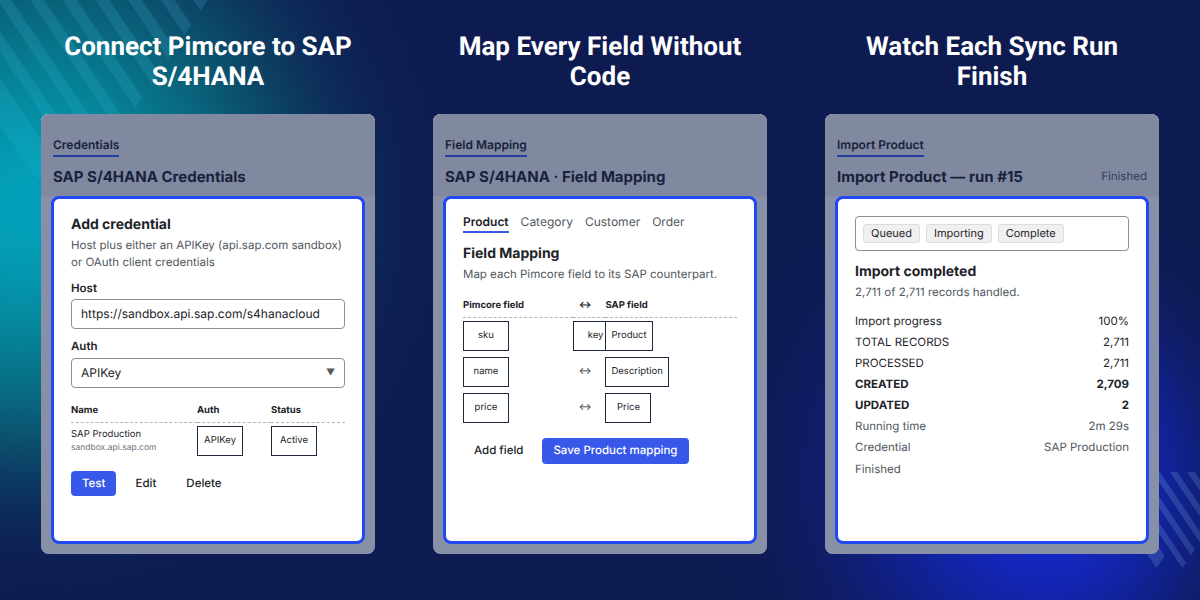
    Admins add credentials in Pimcore Studio, select the Pimcore class for each SAP entity, and map the fields, with the same mapping used for both import and export.

    Product data sync creates or updates Pimcore objects from SAP materials, product groups, business partners, and sales orders, while media is added to the Pimcore DAM as assets.

    The job view reports total records, processed, created, and updated counts, with the elapsed time and the credential that was used.

    The bundle targets Pimcore 12 with the Studio UI and PHP 8.4 or later. A Symfony Messenger worker handles the queue, so a long import never blocks a screen.

    Additionally, if you want to connect Pimcore with an ERP that also covers sales and inventory, then check Pimcore Odoo Connector.
    Pimcore SAP S/4HANA Connector

    Highlighted Features of Pimcore SAP S/4HANA Connector

     Two-Way Data Sync

    Bidirectional sync moves products, categories, customers, orders, and attributes from SAP to Pimcore and back.

     Idempotent Runs

    Records match on their business key, so a repeat run updates in place and never creates a duplicate.

     Background Job Queue

    Symfony Messenger runs each import and export in the queue, so no admin screen waits on SAP.

     Encrypted Secrets

    Client secrets, API keys, and passwords are stored encrypted with libsodium, never as plain text.

    Why Do We Need Pimcore SAP S/4HANA Connector?

    Pimcore SAP S/4HANA Connector integrates Pimcore with SAP S/4HANA to sync materials, prices, and customer data across both systems.

    Someone manually exports a CSV from SAP, cleans the data, and imports it into Pimcore, which can leave stock outdated and create duplicate products.

    It reads the SAP OData APIs directly, matches every record on its business key, and writes curated Pimcore data back to SAP.

    Auto Sync screen lists every entity twice, once for import and once for export, so stock and price can refresh every 30 minutes while orders run hourly and media stays off.

    Also, if you want to load catalog data into Pimcore from files instead of an ERP, you can check our bundle Pimcore DataImport Bundle.

    Use Cases

    • Seed A New PIM Catalog

      A brand starting with Pimcore pulls its full material master out of SAP in one import run.

    • Keep Stock And Price Current

      The Stock & Price import refreshes existing Pimcore products, so listed prices match SAP.

    • Enrich Once, Publish Back

      Marketing writes copy and adds media in Pimcore, then exports the finished record to SAP.

    • Sync Customers And Orders

      Business partners and sales orders land in Pimcore, giving reporting one place to read from.

    Object Mapping and Field Mapping

    Object Mapping decides which Pimcore class backs each SAP entity. Field Mapping then aligns the single fields inside that class with their SAP counterparts.
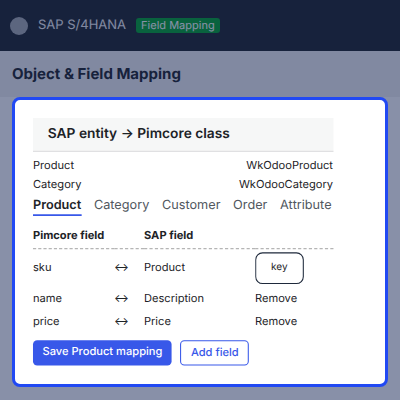
    • Bind Product, Category, Customer, Order, and Attribute to a Pimcore class.
    • Choose an entity tab, then list each Pimcore field beside its SAP field.
    • Mark the match key row that identifies a record on both sides.
    • Use Add field and Remove to grow or trim the map.
    • Save each entity map on its own with Save Product mapping.
    • One saved map is read by both the import and the export.
    Object Mapping and Field Mapping

    Import Data from SAP S/4HANA to Pimcore

    Import pulls seven entity types from SAP S/4HANA by letting admins select an entity, choose a credential, and press Start Import to queue the run.
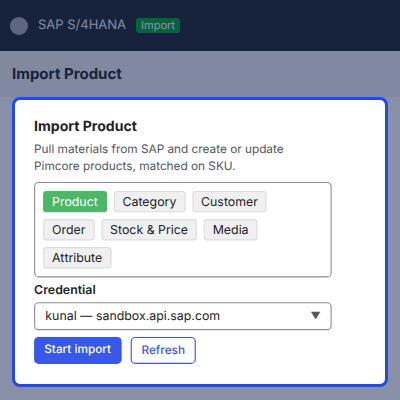
    • Import products from A_Product, matched on SKU.
    • Import categories from A_ProductGroup, matched on category code.
    • Refresh Stock & Price on products that already exist in Pimcore.
    • Pull SAP attachments into the DAM, with identical images de-duplicated.
    • Import business partners as customers, matched on customer number.
    • Import sales orders from A_SalesOrder, matched on order number.
    • Read per-locale text from the OData to_* expands.
    • Skip products SAP has flagged for deletion, and skip unchanged saves.
    Import Data from SAP S/4HANA to Pimcore

    Export Pimcore Data to SAP S/4HANA

    Export writes curated Pimcore records to SAP by following the SAP create contract, where the root is written first and child collections follow.
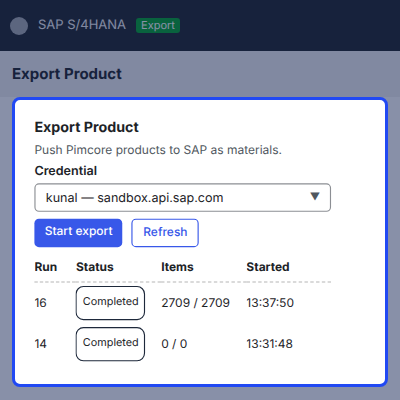
    • Export Pimcore products to SAP as materials with their descriptions.
    • Send attributes as characteristics, each with its description row.
    • Write a business partner, its role, and the customer record together.
    • Push an order header with its item lines in one call sequence.
    • Export categories as classification Classes, since SAP product groups are read-only.
    • Read every failed record and its reason on the run detail page.
    Export Pimcore Data to SAP S/4HANA

    Auto Sync Schedules for Each Entity

    Auto Sync lets admins set individual schedules for each entity, with the grid showing separate import and export entries along with their frequency and last run time.
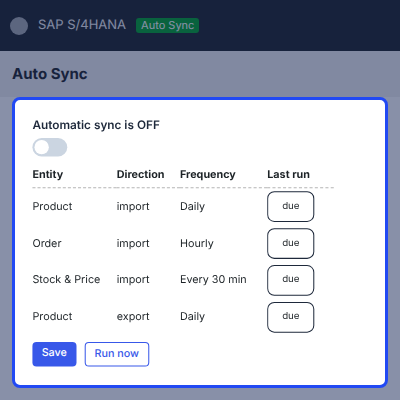
    • Turn the whole schedule on or off with one toggle.
    • Set Daily, Hourly, Every 30 min, or Off for each row.
    • Read the Last run column and the due or off badge beside it.
    • Press Run now to fire the due jobs without waiting.
    • A job still sitting in the queue is never queued a second time.
    Auto Sync Schedules for Each Entity

    Job History and Run Monitoring

    Each import and export screen keeps its own run history, showing Run, Status, Credential, Items, Started, and Ended details, with Open providing access to each run.
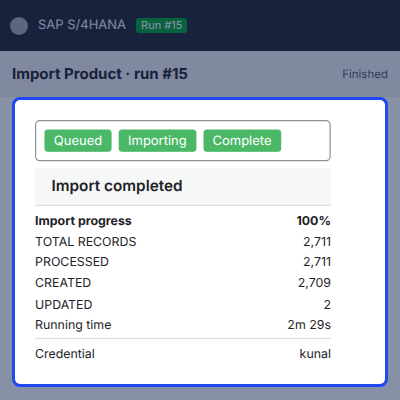
    • Read Total records, Processed, Created, and Updated as separate tiles.
    • Check the running time and the credential the job used.
    • Watch the progress bar and the completion message while a job runs.
    • Stop a run mid-flight, or while it is still queued.
    • Retry a finished run without setting it up again.
    • Open the error list to see each rejected record and its SAP message.
    Job History and Run Monitoring

    Support

    For any query or issue, please create a support ticket here http://webkul.uvdesk.com/

    You may also check our quality Magento 2 Extensions.

    Specifications

    Product Version1.0.0
    Released18 days ago
    CategoryAkeneoPimcore
    Last UpdatedSeptember 2, 2026 (18 days ago)
    Supported VersionsPimcore  2026.x  12.x  

    Ratings

    We'd love to hear your thoughts! Share your feedback and help us craft an even better experience tailored just for you.

    Write a review

    Frequently Asked Questions

     How does Pimcore SAP S/4HANA Connector work?
    Pimcore SAP S/4HANA Connector calls the SAP OData APIs from a Pimcore bundle. Admins save a credential, map SAP entities to Pimcore classes and fields, then run an import or an export as a background job.
     
     Which data does it sync between Pimcore and SAP?
    Products, categories, customers, orders, and attributes move in both directions. Stock, price, and media are imported from SAP, with stock and price applied to products that already exist.
     
     What happens if I run the same import twice?
    Nothing is duplicated. Each record is matched on its business key, such as SKU for a product or customer number for a business partner, so a second run updates the record in place.
     
     How do I connect without a live SAP tenant?
    Use an api.sap.com sandbox APIKey on the credential instead of the OAuth fields. The bundle also ships a dev-only mock S/4HANA, so the whole flow can be tested with no SAP system at all.
     
     Are my SAP credentials stored safely?
    Client Secret, API Key, and Password are encrypted at rest with libsodium and are never returned as plain text. The grid shows them masked, and every connector route checks a permission first.
     
     Can I use my own Pimcore classes?
    Yes. Object Mapping lets you point each SAP entity at any Pimcore class, and Field Mapping aligns the fields inside it. The installer classes are a starting point, not a requirement.
     
     What happens when one record fails to export?
    The run keeps going. The failed record is collected as a warning, and the run detail page lists it with the message SAP returned, so the rest of the batch is not lost.
     
     Do I need a cron entry for automatic sync?
    No. Auto Sync runs on the Pimcore maintenance task, so no extra cron entry is needed. Each entity and direction is set to Daily, Hourly, Every 30 min, or Off.
     
     Can I stop a long import once it has started?
    Yes. Stop is honoured while a job runs and while it is still queued. A finished run can be started again with Retry, without setting the job up a second time.
     
     What does the bundle need on the server?
    Pimcore 12 with the Studio UI bundle, PHP 8.4 or later, Symfony 7.4, and MariaDB 10.11 or MySQL 8.0. A Symfony Messenger worker must be running to process the job queue.

    Specification

    Detailed technical features and requirements to help you understand the module’s capabilities and ensure smooth integration with your system.

    Cloud Hosting

    Detailed technical features and requirements to help you understand the module’s capabilities and ensure smooth integration with your system.

    Default Configuration Details of Server

    1 GB
    RAM
    1 Core
    Processor
    30 GB
    Hard Disk
    1 GB RAM & 1 Core Processor
    Database

    Want to know more how exactly we are going to power up your eCommerce Website with Cloud to fasten up your store

    * Server Configuration may vary as per application requirements.

    Change Logs

    • - Feature Add (+)
    • - Feature remove (-)
    • - Bug Fixed (!)
    • - Modification (*)
    Version 1.0
    • First release of the two-way SAP S/4HANA Connector for Pimcore 2026.x and PHP 8.4+.
    • Added Pimcore Studio plugin with Credentials, Object Mapping, Field Mapping, Auto Sync, Import, Export, and Job History screens.
    • Added SAP S/4HANA to Pimcore import for Products, Categories, Customers, Orders, Attributes, Stock, Price, and Media.
    • Added Pimcore to SAP S/4HANA export for Products, Attributes, Customers, Orders, Categories, Stock, Price, and Media.
    • Added idempotent synchronization using business keys and the ConnectorDataMapping ID ledger.
    • Added dynamic Object Mapping and Field Mapping through the Pimcore Studio UI.
    • Added OAuth2 client credentials authentication and api.sap.com sandbox APIKey authentication.
    • Added configurable token endpoint with cached bearer tokens and CSRF fetch and replay for write operations.
    • Added per entity Auto Sync schedules through the Pimcore maintenance task.
    • Added asynchronous import and export through Symfony Messenger with live job progress and per step counters.
    • Added Stop and Retry controls for background jobs, including Stop support for queued and running jobs.
    • Added console commands for import, export, connection testing, Auto Sync, installation, uninstallation, and credential encryption.
    • Added one command installer and uninstaller scripts for bundle registration, schema creation, Studio asset publishing, and Messenger consumer setup.
    • Added a development only mock S/4HANA environment for end to end import and export testing without a live SAP system.
    • Added encryption at rest for Client Secret, API Key, and Password credentials using libsodium.
    • Added granular fail closed permission checks for SAP S/4HANA API routes covering credentials, mapping, import, export, and jobs.
    • Modified credential saving to use field validation instead of requiring a successful live connection.
    • Improved connection test responses with categorized authentication, host, network, rate limit, endpoint, and SAP API errors.
    • Fixed quota exhaustion being incorrectly reported as invalid credentials.
    • Added warnings and counters for import rows dropped because of missing key fields.
    • Improved reader error handling so quota blocked jobs report failures instead of completing with zero records.
    • Added success and error toast notifications for Studio actions inside the Module Federation widget.
    • Added an inlined R→P→W step engine under src/Framework/ and src/Interfaces/, removing the need for a separate CoreBundle.
    • Added default Pimcore classes including WkSapProduct, WkSapCategory, WkSapCustomer, WkSapOrder, WkSapAttribute, and WkSapOrderItem.
    • Added shared ApiCredential and ConnectorDataMapping classes, support tables, and default mappings during installation.
    • Modified uninstall behavior to keep imported objects, assets, shared classes, and wk_config_table.
    • Added dev mock based verification for SAP write acceptance, with a live S/4HANA tenant required for real write round trips.
    • Added Studio asset build requirements for frontend changes under assets/js.


