- Description
- Reviews
- FAQ
- Customers ()
- Specifications
- Cloud Hosting
- Changelog
UnoPim Nextcloud DAM Integration helps businesses connect UnoPim DAM with Nextcloud storage, Nextcloud Files, and WebDAV clients for controlled digital asset access.
UnoPIM WebDAV integration lets teams upload, download, move, rename, delete, and sync DAM files using desktop apps, mobile apps, and supported WebDAV tools.
The module is useful for ecommerce, catalog, media, and marketing teams that manage product images, videos, documents, and brand assets in UnoPim Digital Asset Management.
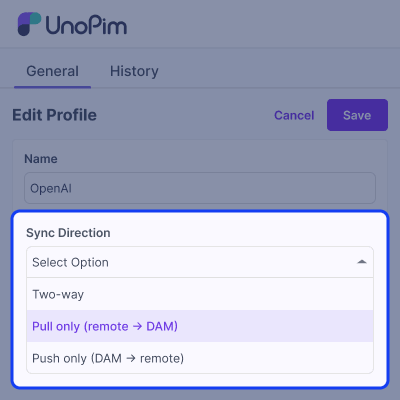
Admins can create sync profiles to control each device or job. They can allow two-way sync, pull-only sync, push-only sync, or access to selected DAM folders.
The integration also supports WebDAV asset management and external source sync. Teams can pull assets from remote servers or push approved DAM files to private cloud storage.
With app passwords, QR code pairing, DAM trash recovery, DAM audit logs, dashboard reports, ACL permissions, and tested sync flows, the module gives safer file control.
Also, for users who want to integrate OpenAI Search to generate AI-powered product discovery, then they can check UnoPIM AI Product Feed for OpenAI Search module.
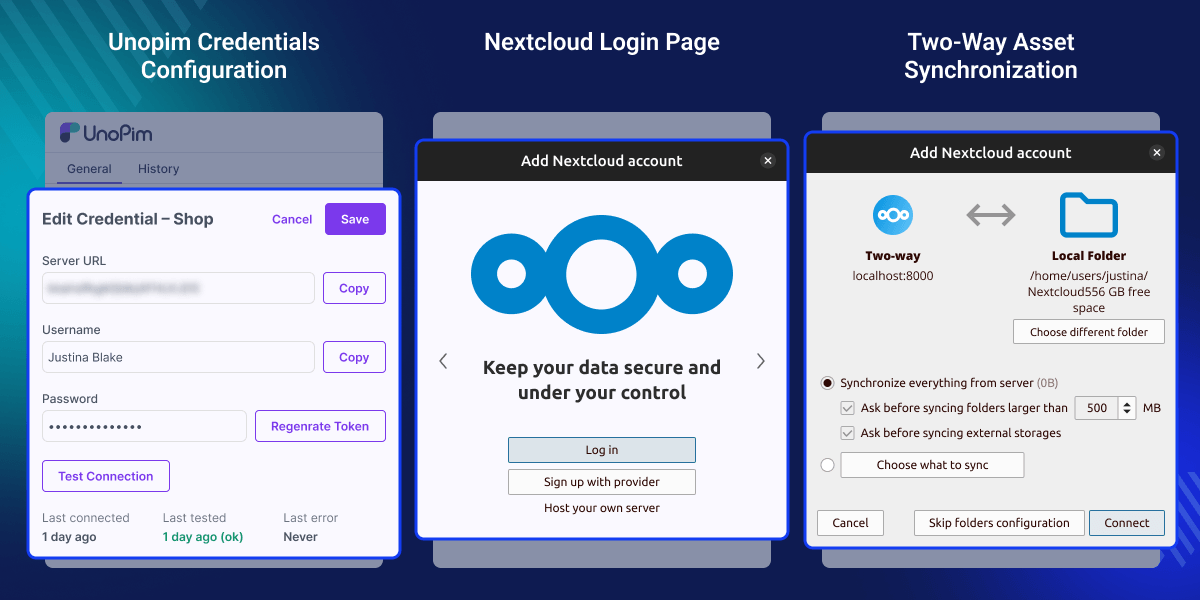
Highlighted Features of UnoPim Nextcloud DAM
Nextcloud Desktop and Mobile Sync
Connect UnoPim DAM with Nextcloud desktop clients and mobile apps so users can work with approved assets across devices.
WebDAV File Access
Expose UnoPim DAM through a standard WebDAV file access layer for supported clients, file managers, and sync tools.
Two-Way Asset Synchronization
Move files between UnoPim DAM and connected clients while keeping admin rules active for uploads, updates, and deletes.
Pull-Only and Push-Only Sync
Set one-way sync rules when teams need to protect DAM assets or deliver files to external storage without changes coming back.
Per-Device App Passwords
Give each device its own credential, app password, expiry, status checks, and revoke option for safer access control.
QR Code Mobile Pairing
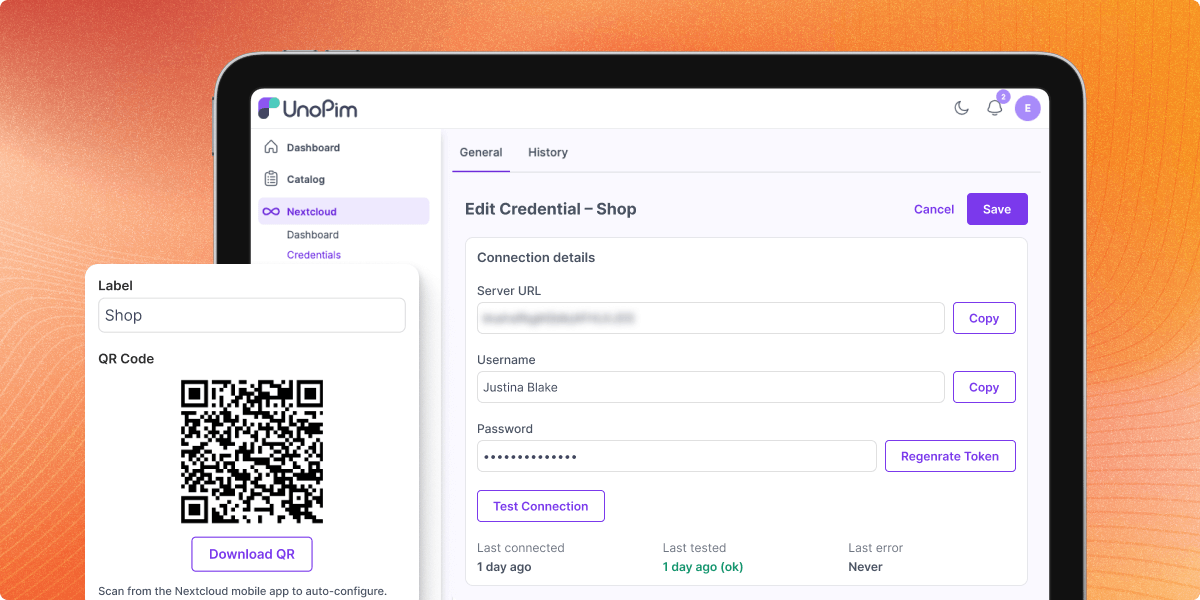
Pair Nextcloud mobile apps with QR code login so users can connect faster without manually copying long credentials.
Remote WebDAV Source Sync
Connect external WebDAV storage, private cloud storage, or remote file servers to pull or push DAM assets on schedule.
Trash Recovery for DAM Files
Recover deleted assets from a managed trash bin and restore files to their original DAM location when needed.
Why Your UnoPim DAM Needs Nextcloud File Sync?
Many teams store product assets in DAM, but they also need simple access from desktop folders, mobile apps, and cloud storage tools. Default systems often depend on manual exports, shared drives, repeated uploads, or separate file sharing workflows. This creates delays and duplicate files.
UnoPIM Nextcloud DAM Integration solves this by enabling Nextcloud DAM sync with file synchronization, WebDAV storage, and remote file access. Admins can control who can read, create, update, delete, and sync assets. This keeps UnoPim digital asset management as the source of truth while users work faster.
In real catalog and ecommerce operations, this helps teams reduce manual file handling, protect approved assets, and review sync issues with clear logs. Additionally, you can also check UnoPIM Dynamic Pricing Rule, which helps create dynamic pricing strategies and simplify catalog pricing management.
Use Cases
-
Product Asset Sync for Ecommerce Teams
Sync product images, catalogs, and media files from UnoPim Digital Asset Management to Nextcloud desktop clients for faster daily work.
-
Marketing File Access Across Devices
Give marketing users access to approved DAM assets from Nextcloud mobile apps during campaigns, events, or remote work.
-
Private Cloud Storage for DAM Assets
Use Nextcloud cloud storage or self-hosted cloud storage as a controlled access layer for selected DAM folders.
-
External WebDAV Server Sync
Pull files from an external WebDAV file server into UnoPim DAM or push DAM assets to a remote network share.
-
Controlled One-Way Asset Delivery
Use push-only sync to send approved files from DAM to external storage without allowing remote users to edit DAM assets.
-
Secure Vendor or Agency Access
Create limited credentials and sync profiles for agencies, partners, or vendors that only need access to selected folders.
-
Recovery From Accidental Deletes
Use trash recovery to restore deleted DAM files when users remove assets by mistake from a connected client.
-
Audit and Debugging for File Sync
Track file actions, errors, IP addresses, bytes transferred, and client details to review sync issues and user activity.
Sync UnoPim DAM Assets with Nextcloud Desktop and Mobile
This module lets Nextcloud desktop and mobile clients connect to UnoPim digital asset management. Users can work with DAM files through familiar sync tools.
- Supports Nextcloud desktop client sync
- Works with Nextcloud mobile app access
- Uses Login Flow v2 for native pairing
- Supports Nextcloud Files style access
- Includes status and OCS compatibility endpoints
- Returns Nextcloud-compatible file properties
- Helps teams use DAM assets without manual export
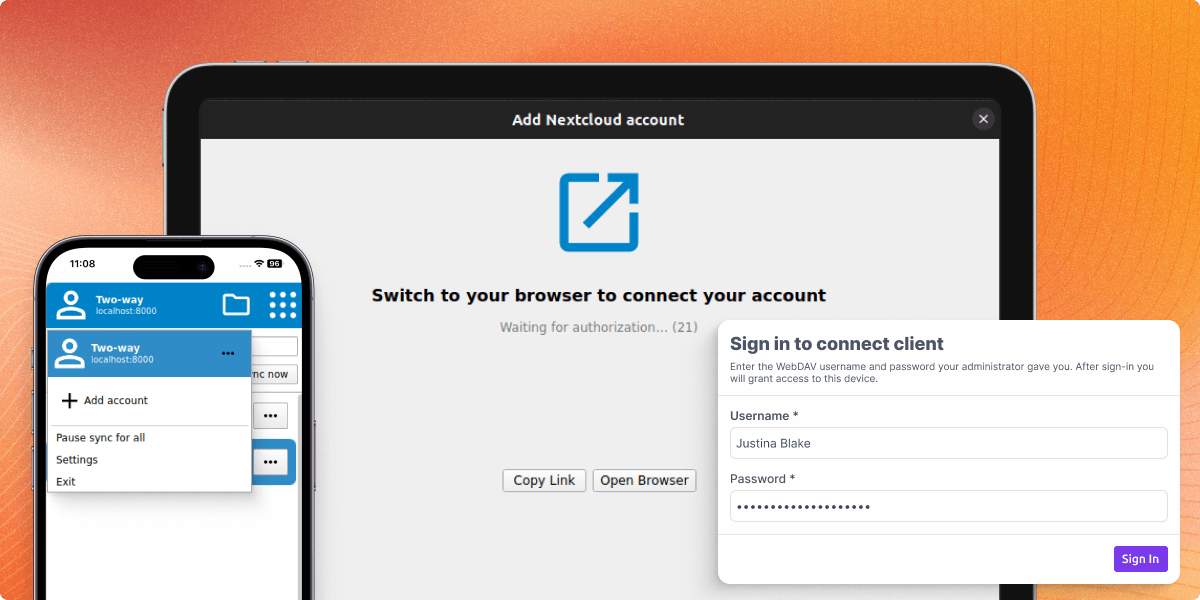
WebDAV File Access for UnoPim DAM
The integration makes UnoPim DAM available through a configurable WebDAV path. This gives teams protocol-based file access over the web.
- Configurable WebDAV base path
- Nextcloud-compatible remote path support
- Supports common WebDAV file operations
- Allows upload, download, move, copy, and delete
- Can be enabled or disabled at runtime
- Includes request throttling for safer access
- Helps build a WebDAV DAM integration layer
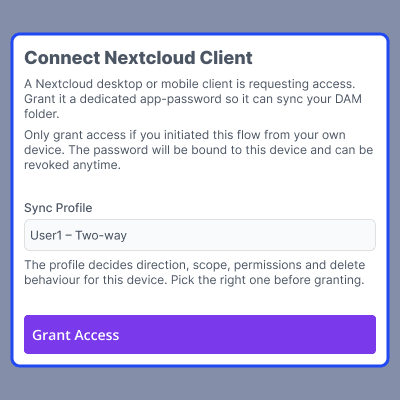
Secure Per-Device Credentials and QR Code Pairing
Each connected device gets a unique username and one-time app password. This removes the need for shared admin passwords.
- Unique credential for each connected device
- One-time app password shown only once
- Passwords stored as secure hashes
- Optional expiry for device credentials
- Test connection from the admin panel
- Regenerate token without losing history
- Revoke lost or unused devices quickly
Sync Profiles for Two-Way, Pull-Only, and Push-Only Control
Sync profiles define how each device or scheduled job can interact with DAM files. Admins can set direction, folder scope, and write rules.
- Set two-way, pull-only, or push-only sync
- Limit access to a selected root directory
- Allow or block file and folder creation
- Control overwrite and update actions
- Allow, block, or manage delete actions
- Set hard delete, soft delete, or trash mode
- Apply file size and MIME type rules
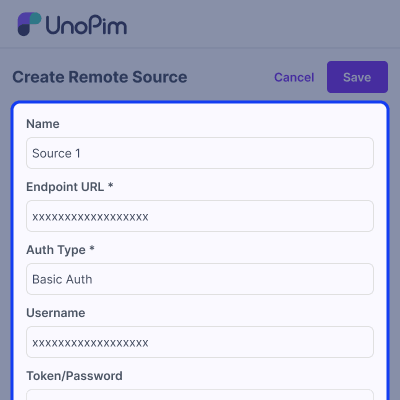
Remote WebDAV Source Sync for External File Servers
Remote sources allow scheduled sync between UnoPim digital asset management and external WebDAV servers.
- Pull files from external WebDAV servers
- Push DAM assets to remote file storage
- Configure endpoint URL and remote path
- Select local DAM directory per source
- Use Basic Auth or Bearer Token access
- Run sync on schedule or on demand
- Avoid repeated transfer with mtime checks
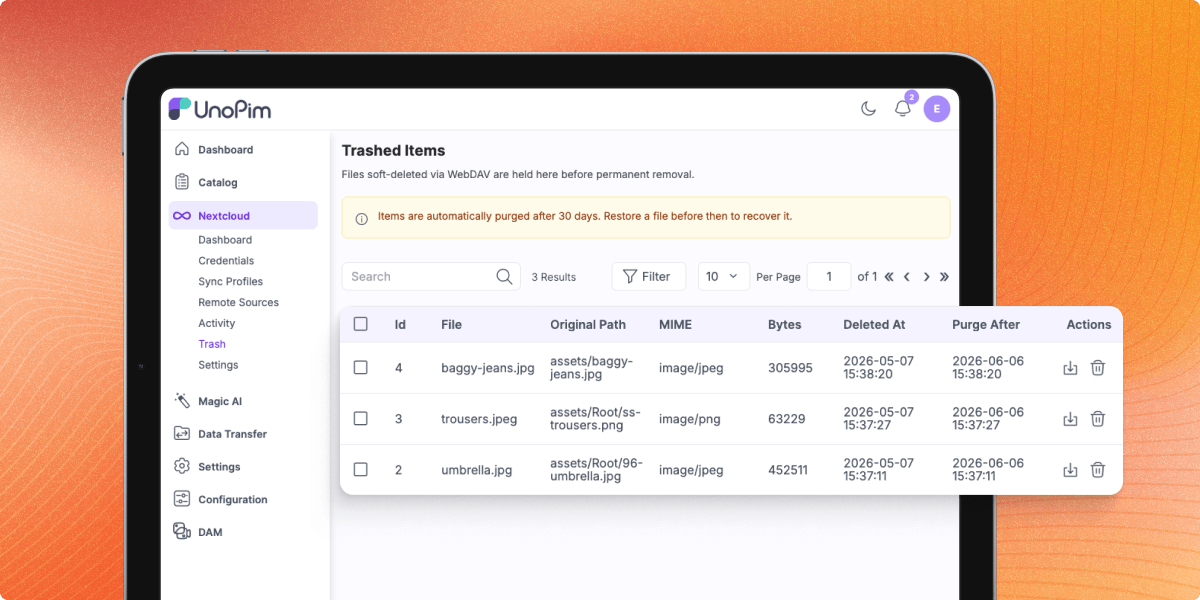
Trash Recovery for Deleted DAM Assets
The module includes a trash bin for delete actions. Admins can recover deleted DAM files based on the configured profile delete mode.
- Support hard delete, soft delete, and trash mode
- Store original path and directory metadata
- Restore files inside a database transaction
- Resolve path conflicts without overwriting files
- Delete trashed files permanently when needed
- Use mass restore and mass delete actions
- Purge expired trash entries automatically
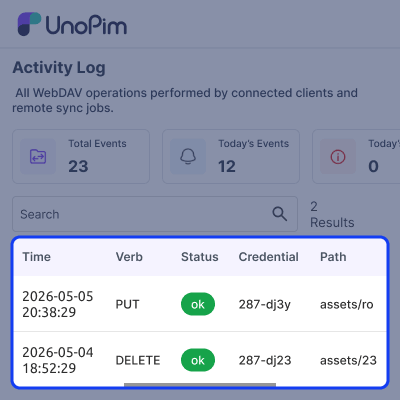
Activity Log and Audit Trail for File Sync Events
Every file operation and scheduled sync run is recorded as a sync event. This gives admins a clear view of asset movement.
- Track GET, PUT, DELETE, MOVE, COPY, and SYNC
- Record file path, asset ID, and directory ID
- Capture bytes transferred and sync status
- Store errors for failed file operations
- Link events to credentials and profiles
- Capture client IP and user agent
- Use async logging to keep sync fast
Admin Dashboard, Settings, and Access Permissions
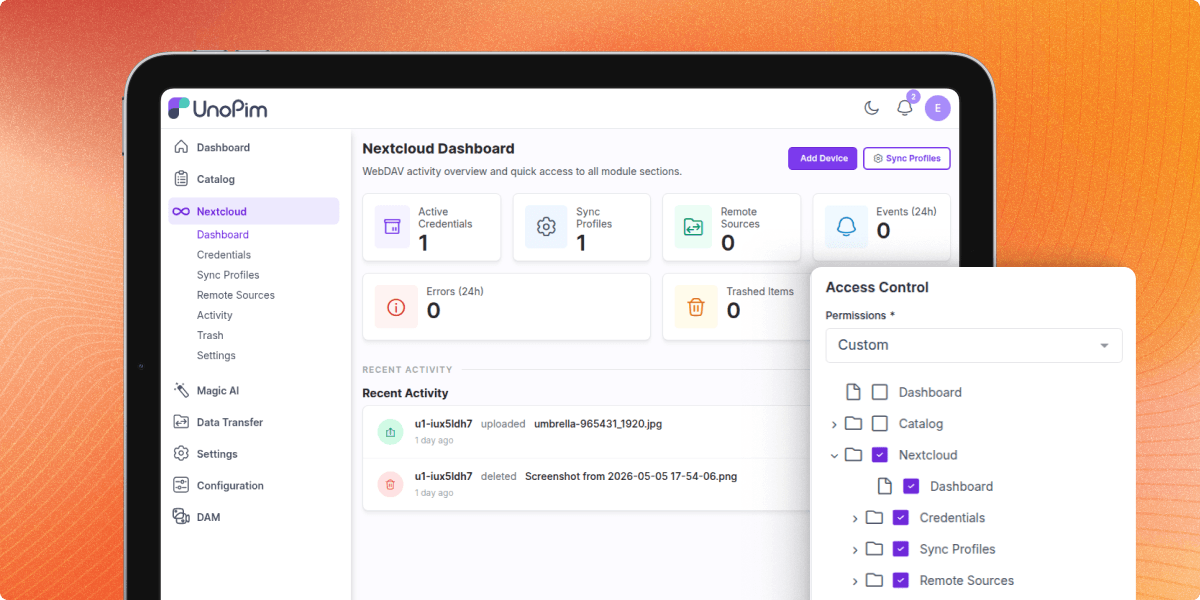
The admin area gives teams one place to manage credentials, sync profiles, remote sources, activity, trash, and settings.
- Dashboard for credentials and sync profiles
- View remote sources and recent sync events
- Check errors from the last 24 hours
- Manage trash count and recent activity
- Configure global upload size limits
- Enable or disable WebDAV access
- Manage ACL permissions through admin roles
Nextcloud Compatibility and Private Cloud Storage Support
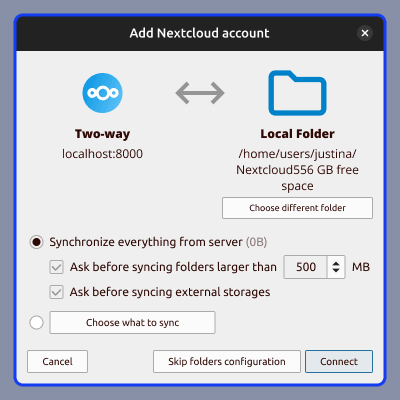
The module is built for Nextcloud-compatible file access. It supports the client flows and endpoints needed for desktop and mobile sync.
- Supports Nextcloud Login Flow v2
- Includes OCS capability endpoints
- Supports status probe for discovery
- Provides Nextcloud file property extensions
- Works with WebDAV storage workflows
- Helps connect DAM with file sharing tools
- Supports content collaboration use cases
Security and Access Control for DAM File Sync
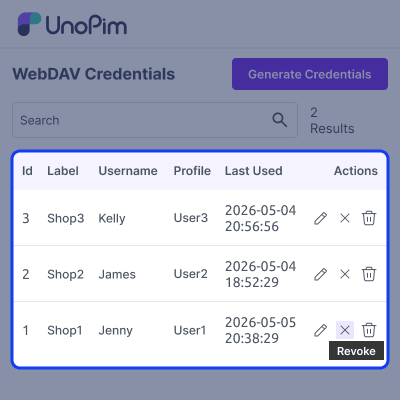
The integration uses strong access control to protect DAM assets. Admins can manage credentials, profile rules, remote auth, and role permissions.
- HTTP Basic Auth support for file access
- App passwords stored as Bcrypt hashes
- Bearer tokens stored encrypted
- Credential revocation works on next request
- Root directory sandboxing for each profile
- Path traversal outside profile scope is blocked
- Permission keys managed through UnoPim roles
Global Admin UI and Localization Support
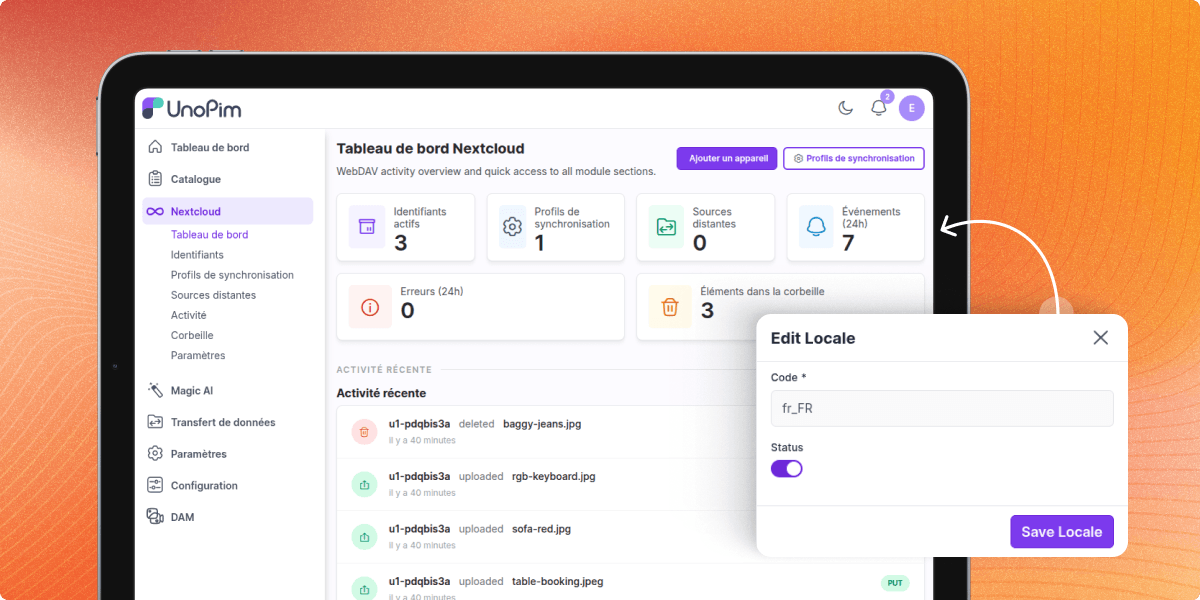
The module is designed for real admin teams that need clear controls, searchable grids, and role-based actions inside UnoPim.
- Top-level Nextcloud admin menu
- DataGrids with sorting and filters
- Row actions for edit, test, run, and revoke
- Mass actions for trash restore and delete
- Confirmation modals for destructive actions
- Native dark-mode admin support
- Translation support across 33 locales
Support
For any query or issue, please create a support ticket here http://webkul.uvdesk.com/. You may also check our all UnoPim Extensions.
Specifications
Frequently Asked Questions
Specification
Detailed technical features and requirements to help you understand the module’s capabilities and ensure smooth integration with your system.
Cloud Hosting
Detailed technical features and requirements to help you understand the module’s capabilities and ensure smooth integration with your system.
Move to Cloud Today
We’re partnered with top-tier, trusted providers!



Default Configuration Details of Server
RAM 1 Core
Processor 30 GB
Hard Disk
Database
Want to know more how exactly we are going to power up your eCommerce Website with Cloud to fasten up your store
* Server Configuration may vary as per application requirements.
Change Logs
- - Feature Add (+)
- - Feature remove (-)
- - Bug Fixed (!)
- - Modification (*)
- * Requirements raised to UnoPim ^3.0, PHP ^8.4.1, and Laravel ^13.0.
- * Admin screens rebuilt on core's
x-admin::pageandx-admin::page-header, with breadcrumbs on every screen, AJAX saves without full page reloads, and the shared unsaved-changes save/discard bar instead of per-page Save buttons.
- + Initial public release for UnoPim Nextcloud DAM Integration.
- + Added WebDAV endpoint support for UnoPim DAM storage.
- + Added Nextcloud-compatible layer with status, capabilities, OCS, and PROPFIND/REPORT support.
- + Added support for Nextcloud desktop, iOS, and Android clients.
- + Added compatibility with macOS Finder, Windows Explorer, davfs2, DAVx5, and Cyberduck.
- + Added custom DAV nodes for DAM directories, assets, and trash collections.
- + Added Nextcloud Login Flow v2 support for native client pairing.
- + Added app-password authentication with QR code pairing support.
- + Added credential expiry, revoke, regenerate, and connection testing options.
- + Added hard delete support for credentials.
- + Added sync profiles with read, write, delete permissions, and directory restrictions.
- + Added default sync profile generation during installation.
- + Added ACL enforcement for every WebDAV request.
- + Added delete policy controls for soft delete and purge handling.
- + Added two-way sync support for external WebDAV and Nextcloud servers.
- + Added queue worker support for incremental pull and push sync.
- + Added remote source schedules, credentials, root path, and conflict policy controls.
- + Added "Run Now" and "Test Connection" actions in admin panel.
- + Added sync event audit logs for create, update, and delete actions.
- + Added trash bin support with restore, purge, and bulk actions.
- + Added retention-based cleanup with scheduled purge commands.
- + Added admin dashboard for credentials, profiles, sources, and sync activity.
- + Added DataGrids with filter, search, sort, and row actions.
- + Added settings screen for global package configuration.
- + Added ACL permissions with nextcloud.* access keys.
- + Added Concord module support with publishable configurations.
- + Added database migrations for wk_dam_webdav_* tables.
- + Added Eloquent models with audit history tracking.
- + Added artisan commands for sync and installation.
- + Added Pest Unit, Feature, and Playwright E2E test support.
- + Added translation support for 33 UnoPim-supported locales.
