USD
  • EUR
  • INR
  • USD
Cart
Cart 0
  • You have no items in your shopping cart.
    Cart
    Cart 0
    • You have no items in your shopping cart.
    Hire a Developer
    ×
    Contact Us!
    Send Again
    Close
    Please Login to Write Your Review

    WooCommerce Agora Live Stream

    WooCommerce Agora Live Stream lets store owners host real-time live shopping events and showcase products directly on their WooCommerce store.


    • Connect WooCommerce with Agora using secure App ID and Certificate.

    • Create and manage live shopping events from the admin panel.

    • Broadcast live video and audio with low-latency streaming.

    • Enable real-time chat between hosts and live viewers.

    • Display featured WooCommerce products during live sessions.

    • Let customers purchase products without leaving the stream.

    • Record live streams and replay them after events end.

    • Create WordPress blog drafts from completed live sessions.

    Screenshots
    WooCommerce Agora Live Stream WooCommerce Agora Live Stream WooCommerce Agora Live Stream WooCommerce Agora Live Stream WooCommerce Agora Live Stream WooCommerce Agora Live Stream WooCommerce Agora Live Stream
    Show More Hide All
    $199.00

    * Required Fields

    Add To Cart
    30 Days Refund*
    Only One Time Payment
    $199.00
    Configure and Buy
    • Description
    • Reviews
    • FAQ
    • Customers ()
    • Specifications
    • Cloud Hosting
    • Changelog

    WooCommerce Agora Live Stream plugin helps businesses bring live commerce directly to their WooCommerce store. This plugin integrates WooCommerce with Agora to provide real-time live video streaming, live chat, and product showcasing.

    Store owners can create live events, promote products, engage with customers, and increase sales through interactive shopping experiences. Admins can create streams from the backend and assign products to each event.

    During the broadcast, customers can watch the live stream, interact through chat, and view featured products without leaving the stream page. The module also supports stream recording.

    Store owners can automatically or manually record broadcasts and make them available for playback later. This helps businesses continue generating engagement even after the live event ends.

    Viewer counts are tracked in real time, allowing hosts to monitor audience activity. The system also prevents multiple streams from running at the same time to avoid conflicts.

    Additionally, completed streams can be converted into WordPress blog drafts. This helps businesses reuse live stream content for SEO and marketing purposes.

    Also, if you want to provide instant answers to customer queries and enable AI-powered conversations in your store, then check out WooCommerce AI Chatbot.
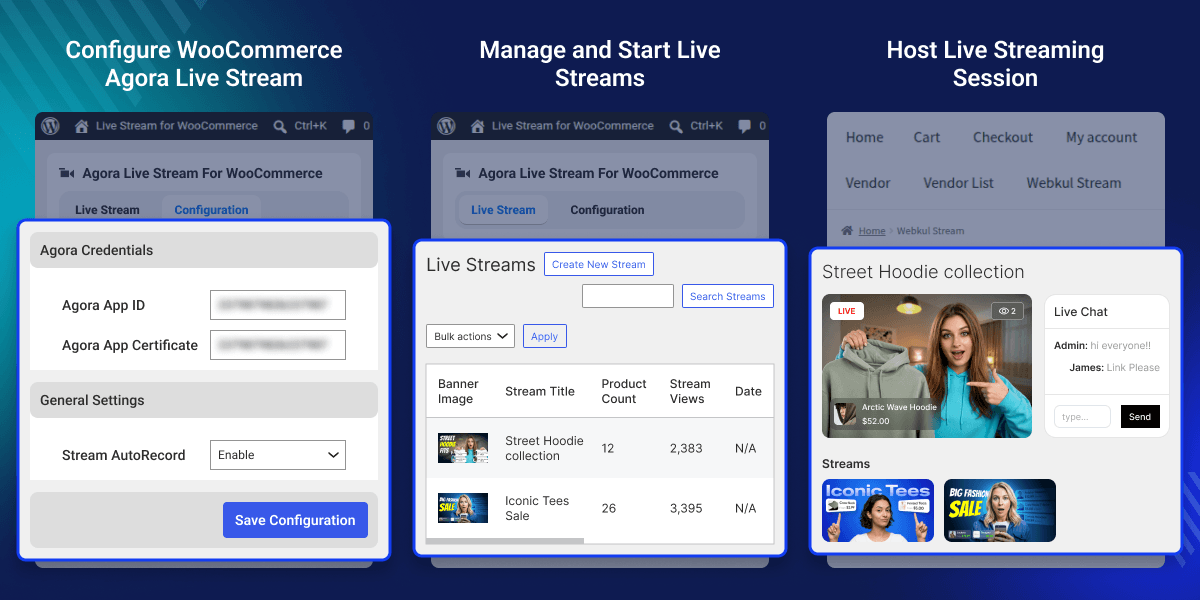
    WooCommerce Agora Live Stream

    Highlighted Features of WooCommerce Agora Live Stream Plugin

     Real-Time Live Streaming

    Host live shopping sessions with smooth video and audio streaming. Customers can watch product demos and shop during live events.

     Interactive Customer Chat

    Let hosts and viewers talk during live sessions. Answer questions in real time and improve customer engagement.

     Live Product Display

    Show products to viewers while streaming live. Help customers open product pages and buy with ease.

     Stream Recording and Replay

    Save live sessions and play them again later. Keep stream content available for future viewers and promotions.

    Why Do We Need WooCommerce Agora Live Stream plugin?

    Traditional product pages often lack real-time engagement. Customers may have questions before purchasing, and businesses miss opportunities to interact directly with buyers.

    Live shopping creates a more engaging experience. Businesses can demonstrate products, answer questions instantly, and encourage purchases during the broadcast.

    This module helps increase customer engagement, improve product discovery, and create interactive shopping experiences. It also helps businesses reuse stream content through recordings and blog creation features.

    Use Cases

     Product Launch Events

    Show new products through live demos and explain their features. Help customers learn about products before they buy.

     Live Shopping Sessions

    Answer customer questions during live streams and guide buyers. Make shopping more engaging with real-time interaction.

     Seasonal Sales Campaigns

    Promote deals and special offers during live events. Create urgency and increase sales during campaigns.

     Blog Content Creation

    Turn past live streams into WordPress blog posts. Reuse stream content to reach more customers.

    Live Stream Management

    Create and manage live shopping events from the admin panel. Set up streams with product details and control all sessions from one place.

    This helps store owners plan product promotions and manage live events with ease.
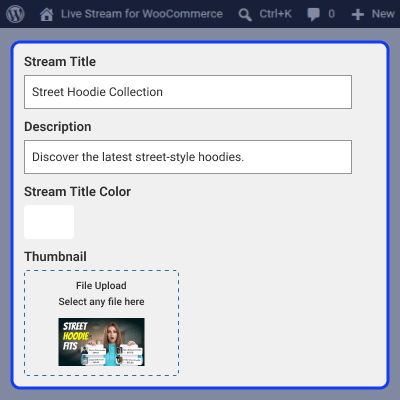
    • Create and manage live shopping events
    • Add stream titles and product details
    • Upload custom thumbnails for streams
    • Assign WooCommerce products to sessions
    • Schedule upcoming live stream events
    • Update stream status from the admin panel
    Live Stream Management

    Interactive Shopping Experience

    Make live sessions more engaging by showing products and interacting with viewers in real time. This helps customers explore products and complete purchases quickly.
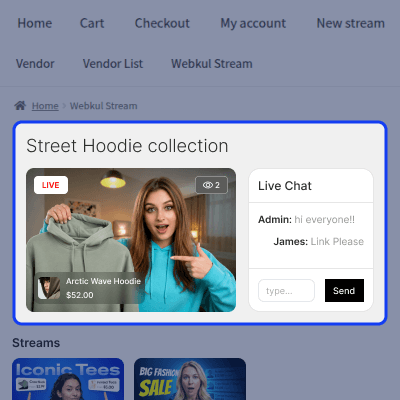
    • Enable real-time chat during streams
    • Display featured products while streaming
    • Show active viewer count in real time
    • Let customers open product pages instantly
    • Improve engagement during live shopping
    • Create a smooth buying experience
    Interactive Shopping Experience

    Recording and Playback

    Save live sessions and keep them available after the event ends for future viewers. Recorded streams help stores continue product promotion after live sessions.
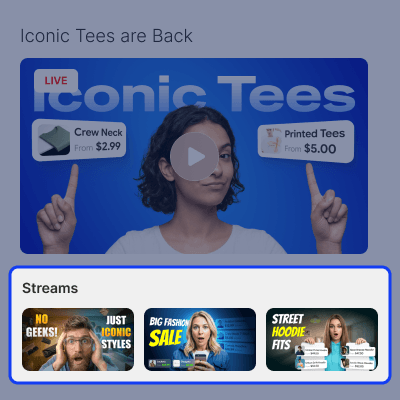
    • Record live sessions automatically or manually
    • Save stream videos in the Media Library
    • Play recorded videos on stream pages
    • Recommend past streams to viewers
    • Keep stream content available after events
    • Reuse recordings for future promotions
    Recording and Playback

     Support

    For any query or issue please create a support ticket here http://webkul.uvdesk.comYou may also check our other top-quality CS-Cart Add-ons.

    Specifications

    Product Version1.0.0
    Released3 days ago
    CategoryWooCommerce
    Last UpdatedJune 17, 2026 (2 days ago)
    Supported VersionsWordPress  6.x.x  7.x.x  WooCommerce  9.x.x  10.x.x  
    Write a review

    Frequently Asked Questions

     What is WooCommerce Agora Live Stream used for?
    This plugin helps businesses host live shopping events, showcase products, and engage customers directly on their store.
     
     Can customers chat during live streams?
    Yes, customers and guests can join the live chat, ask questions, and interact with the host during the broadcast.
     
     Can products be displayed during the live stream?
    Yes, admins can assign WooCommerce products to streams and display them while broadcasting to increase product visibility.
     
     Does the module support stream recording?
    Yes, live streams can be recorded automatically or manually and stored in the WordPress Media Library for replay.
     
     Can customers purchase products while watching?
    Yes, customers can open product pages directly from the live stream and continue shopping without interrupting the viewing experience.

    Move to Cloud Today

    AWS Free tier hosting for one year by amazon web services, for more details please visit AWS Free Tier.

    GCP Free tier hosting for one year with 300 credit points by google cloud platform, for more details please visit GCP Free Tier.

    Azure free tier hosting for one year with 25+ always free services, for more details please visit Azure Free Tier.

    In our default configuration we will provide tremendous configuration for your eCommerce Website which is fast to load and response.

    Default Configuration Details of Server

    • 1 GB RAM
    • 1 Core Processor
    • 30 GB Hard Disk
    • DB with 1 GB RAM and 1 Core Processor

    * Server Configuration may vary as per application requirements.

    Want to know more how exactly we are going to power up your eCommerce Website with Cloud to fasten up your store. Please visit the Cloudkul Services.

    Get Started with Cloud
    • - Feature Add (+)
    • - Feature remove (-)
    • - Bug Fixed (!)
    • - Modification (*)
    Version 1.0.0
    • + Intial Release


