USD
  • EUR
  • INR
  • USD
Cart
Cart 0
  • You have no items in your shopping cart.
    Cart
    Cart 0
    • You have no items in your shopping cart.
    Hire a Developer
    ×
    Contact Us!
    Send Again
    Close
    Please Login to Write Your Review

    WooCommerce AI Image Editor

    WooCommerce AI Image Editor adds AI image editing tools to WooCommerce product pages and the Media Library to enhance images without leaving the admin panel.


    • AI-powered image editing inside WooCommerce admin.

    • Edit product images directly from the product edit page.

    • Use AI image editing tools from WordPress Media Library.

    • Edit product images from WooCommerce product edit pages.

    • Configure AI models and image generation providers easily.

    • Support OpenAI, Qwen, Google, and custom AI endpoints.

    • Draw lines, circles, and brush marks to guide AI changes.

    • Generate and fill selected image areas with AI tools.

    Screenshots
    $99.00

    * Required Fields

    Add To Cart
    30 Days Refund*
    Only One Time Payment
    $99.00
    Configure and Buy
    • Description
    • Reviews
    • FAQ
    • Customers ()
    • Specifications
    • Cloud Hosting
    • Changelog

    AI Image Editor for WooCommerce plugin helps store owners edit images with AI tools inside WooCommerce. Users do not need to switch to another platform. Admin can edit images for product pages and the WordPress Media Library using this plugin.

    Store admins can load or upload images, add marks, and use AI to generate changes. The edited output is saved in the Media Library. This plugin supports OpenAI, Qwen-compatible APIs, Google endpoints, and custom OpenAI-compatible APIs.

    It helps stores manage image changes from one place and reduces manual work. Since everything works inside WordPress, teams can manage product images with less effort.

    Also, if you want customers to search products using natural language queries and image-based search, then check out WooCommerce AI Image & Semantic Search.
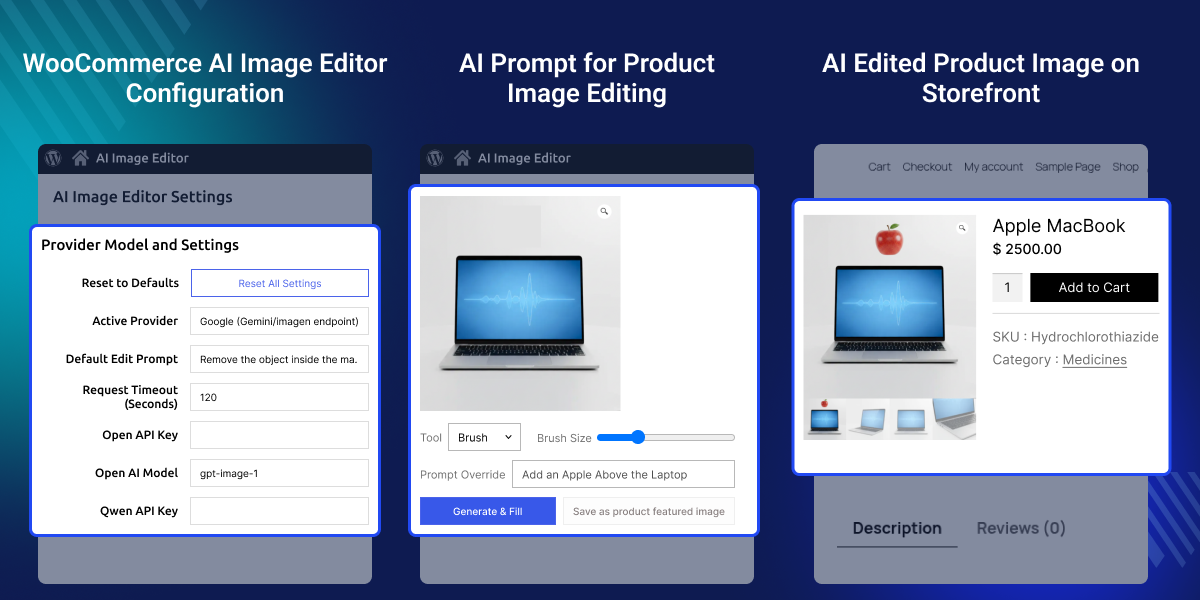
    WooCommerce AI Image Editor

    Highlighted Features

     AI Image Editing Inside WooCommerce

    Edit images from WooCommerce product pages without leaving the admin panel.

     Media Library Integration

    Open AI image tools from WordPress Media Library and manage image changes easily.

     Support for Multiple AI Providers

    Use OpenAI, Qwen-compatible APIs, Google endpoints, or custom AI providers.

     Generate and Fill Image Editing

    Use AI Generate and Fill to create new image content based on selected areas.

     Save Images to Media Library

    Store the edited image in the Media Library for future use.

     Set Product Featured Images

    Use the generated image as the featured image for WooCommerce products.

    Why Do You Need an AI Image Editor for WooCommerce?

    Editing product images with many tools takes time. It also makes image management harder. WooCommerce does not provide AI image editing features. Store owners often depend on outside tools.

    WooCommerce AI Image Editor plugin solves that problem by bringing AI image editing into WooCommerce. Admins can edit images from product pages and the Media Library without leaving WordPress.

    In practical use, managing images from one place helps stores save time and speed up catalog updates. Apart from this, if you want to edit and enhance images directly from WooCommerce, then check out AI Image Background Remover for WordPress WooCommerce.

    Use Cases

    Product Image Updates

    Edit product images directly from WooCommerce product page.

    AI-Based Image Generation

    Use Generate and Fill to create new image content from selected areas.

    Product Featured Image Management

    Save AI-generated images and set them as featured product images.

    Multi-Provider AI Integration

    Choose different AI providers based on your business needs.

    AI-Powered Editing Workflow

    This feature lets users edit images inside WooCommerce. It helps reduce image management time and keeps image work simple.
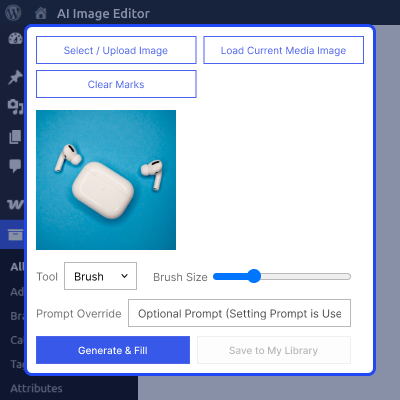
    • Open the AI image editor directly from WooCommerce product pages.
    • Load an existing image or upload a new image for editing.
    • Mark specific areas with line, circle, or brush drawing tools.
    • Use Generate and Fill options to create or update image sections.
    • Save the final output to the Media Library for future use.
    AI-Powered Editing Workflow

    Media Library Editing

    Manage image updates from one place. This helps keep image files easy to handle and reuse.
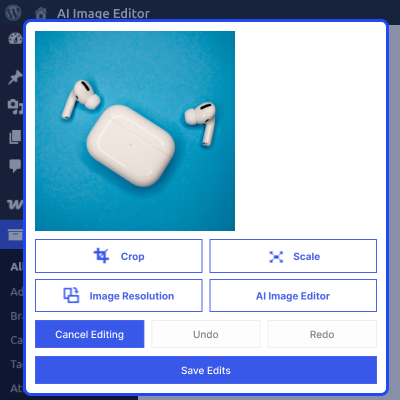
    • Access existing images directly from the WordPress Media Library.
    • Open the AI image editor quickly without using external tools.
    • Generate new image content or enhance selected image areas.
    • Save edited images and organize them inside the Media Library.
    • Reuse saved images across products, pages, and marketing content.
    Media Library Editing

    Product-Level Image Control

    Manage product images from WooCommerce edit page. This helps keep product visuals updated and ready to use.
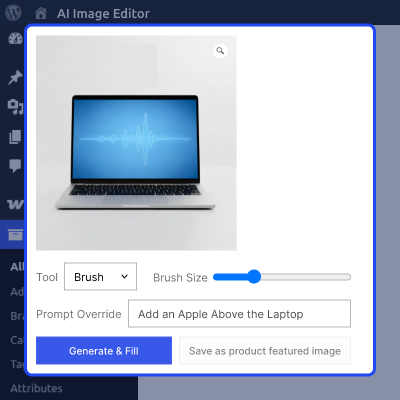
    • Edit product images directly from the WooCommerce product page.
    • Create new image content to improve product presentation.
    • Save generated outputs to the Media Library with ease.
    • Set edited images as featured images in a few clicks.
    • Manage and update product images without using extra software.
    Product-Level Image Control

     Support

    For any query or issue please create a support ticket here http://webkul.uvdesk.comYou may also check our other top-quality CS-Cart Add-ons.

    Specifications

    Product Version1.0.0
    Released22 days ago
    CategoryWooCommerce
    Last UpdatedJune 12, 2026 (22 days ago)
    Supported VersionsWordPress  6.x.x  WooCommerce  10.x.x  
    Write a review

    Frequently Asked Questions

     Does this plugin require external image editing software?
    No, this plugin adds AI image editing tools inside WooCommerce, so users can edit and manage images without relying on external software.
     
     Can I edit images from the Media Library?
    Yes, WooCommerce AI Image Editor plugin lets you edit images from WooCommerce product pages and WordPress Media Library with the same AI tools.
     
     Which AI providers does this plugin support?
    This plugin supports OpenAI, Qwen-compatible APIs, Google endpoints, and custom OpenAI-compatible providers.
     
     Does this plugin provide drawing tools?
    Yes, it includes line, circle, and brush tools that help users mark image areas before running AI image changes.
     
     What is Generate and Fill?
    Generate and Fill uses AI to update selected image areas and create new content based on the marked section.
     
     Where are edited images stored?
    This plugin saves edited images to WordPress Media Library, making them easy to access and use later.
     
     Can I use edited images as featured images?
    Yes, generated images can be saved and assigned as WooCommerce featured images directly from the editor.
     
     Is this plugin useful for catalog updates?
    Yes, it helps stores update product images faster and manage image changes without leaving WooCommerce.

    Move to Cloud Today

    AWS Free tier hosting for one year by amazon web services, for more details please visit AWS Free Tier.

    GCP Free tier hosting for one year with 300 credit points by google cloud platform, for more details please visit GCP Free Tier.

    Azure free tier hosting for one year with 25+ always free services, for more details please visit Azure Free Tier.

    In our default configuration we will provide tremendous configuration for your eCommerce Website which is fast to load and response.

    Default Configuration Details of Server

    • 1 GB RAM
    • 1 Core Processor
    • 30 GB Hard Disk
    • DB with 1 GB RAM and 1 Core Processor

    * Server Configuration may vary as per application requirements.

    Want to know more how exactly we are going to power up your eCommerce Website with Cloud to fasten up your store. Please visit the Cloudkul Services.

    Get Started with Cloud
    • - Feature Add (+)
    • - Feature remove (-)
    • - Bug Fixed (!)
    • - Modification (*)
    Version 1.0.0
    • + Intial Release


