USD
  • INR
  • USD
Cart
Cart 0
  • You have no items in your shopping cart.
    Cart
    Cart 0
    • You have no items in your shopping cart.
    Hire a Developer
    ×
    Contact Us!
    Send Again
    Close
    Please Login to Write Your Review

    WooCommerce Multi Vendor Printify Integration

    WooCommerce Multi Vendor Printify Integration enables the admin to connect their marketplace with the Printify store. It facilitates vendors to import and sell Printify products.


    • Both Admin and Seller can connect their Printify stores with the help of API tokens.

    • Seamless import of products from Printify to WooCommerce marketplace.

    • After importing, Products are created for them to be listed on the marketplace.

    • Separate buttons are provided for importing and creating products.

    • Products can be selected in bulk to delete them.

    • Auto Sync feature can be enabled for setting default category, and product status on import and auto exporting orders.

    Additional Info

    Screenshots
    WooCommerce Multi Vendor Printify Integration WooCommerce Multi Vendor Printify Integration WooCommerce Multi Vendor Printify Integration WooCommerce Multi Vendor Printify Integration WooCommerce Multi Vendor Printify Integration WooCommerce Multi Vendor Printify Integration WooCommerce Multi Vendor Printify Integration WooCommerce Multi Vendor Printify Integration WooCommerce Multi Vendor Printify Integration WooCommerce Multi Vendor Printify Integration WooCommerce Multi Vendor Printify Integration WooCommerce Multi Vendor Printify Integration
    Show More Hide All
    $149.00
    $149.00 Get it Now
    Only One Time Payment
    $149.00
    Configure and Buy
    • Description
    • Reviews
    • FAQ
    • Customers ()
    • Specifications
    • Cloud Hosting
    • Changelog

    WooCommerce Multi Vendor Printify Integration plugin allows the admin to connect their marketplace with the Printify store. The admin and seller then both can connect their individual Printify stores with the WooCommerce store.

    Separate buttons are provided to first import products from Printify and then create them on the WooCommerce store. Printify products can be deleted in bulk after creation. A Manage Orders page is given where orders can be exported to Printify for fulfilment either in bulk or selectively.

    The integration also comes with an Auto Sync function which allows to perform actions on syncing such as Category assignment, publishing the product or keeping it in draft upon import and enabling or disabling the auto export of orders.

    This integration helps to create your own Print on Demand Marketplace in WordPress with the powerful features of our Marketplace Printify plugin. Apart from that, if you would like to connect your WooCommerce marketplace with Shopify, then check the WooCommerce Multi Vendor Shopify Connector.
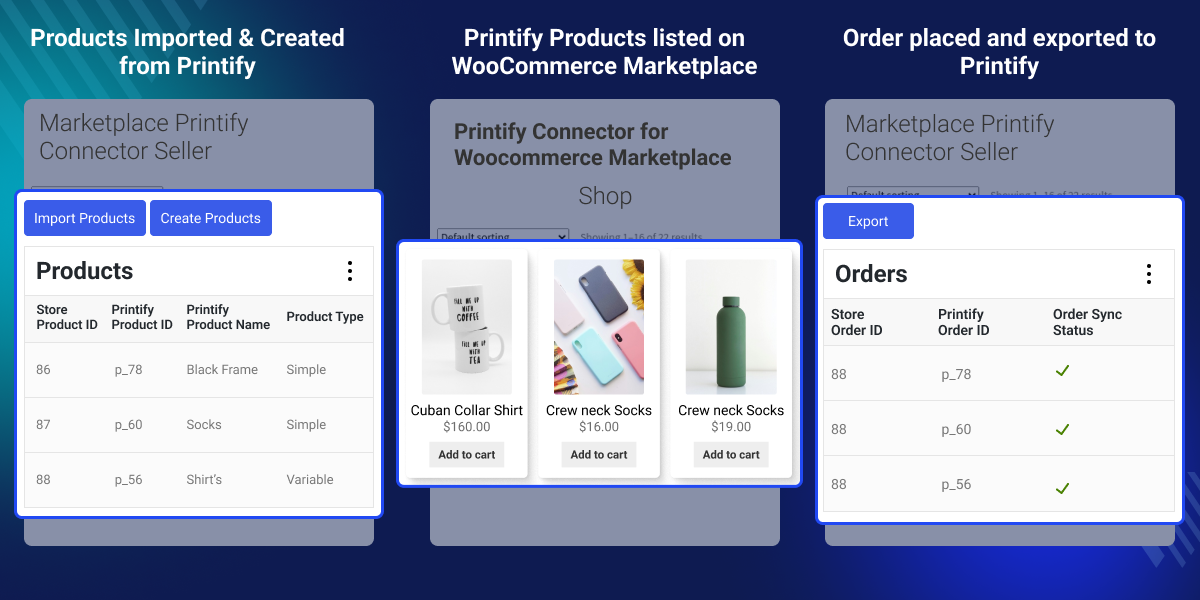
    WooCommerce Multi Vendor Printify Integration

    Highlighted Features of WooCommerce Multi Vendor Printify Integration

     Simple Connection Process

    The connection process between WooCommerce and Printify is made simple and efficient using this integration as just a single API token is required to establish a connection.

     One Click Product Import and Creation

    After installation and connection, product import and creation over WooCommerce from Printify can be done in one click through their respective buttons.

     Standard Integration for Marketplace

    The plugin provides the same and standardized functionality to both the marketplace admin and the vendors registered on it.

     Auto Syncing

    Functions like exporting orders, assigning categories on import and product status on import can be set to auto sync.

    Why do we need WooCommerce Multi Vendor Printify Integration?

    WooCommerce Multi Vendor Printify Integration helps in the smooth integration of Printify and WooCommerce. Printify is a platform to create and sell custom products and with the help of this integration, those products can be sold on WooCommerce as well.

    Utilizing it, both the admin and vendors of the marketplace can import and sell printify products. They’ll simply receive the orders and then export it to Printify which will then take care of the order fulfillment.

    This integration enables to establish a Print on Demand Marketplace in WordPress, utilizing robust functionalities offered by our Marketplace Printify plugin. Additionally, if you are looking to get split order functionality for your marketplace, then do check the Marketplace Split Order for WooCommerce.

    Manage Account and Create Connection

    After successful installation of the WooCommerce Multi Vendor Printify Integration, the admin and vendor have to do the following -
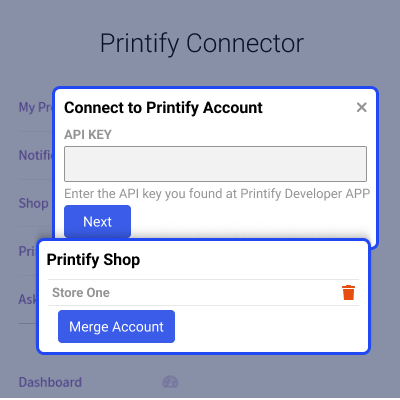
    • Connect their Printify account by adding the API key.
    • After connection, check the status and Token details.
    • Can delete the connected account also.
    Manage Account and Create Connection

    Import and Create Products

    Once a connection has been successfully established, the next steps can be performed which are as follows -
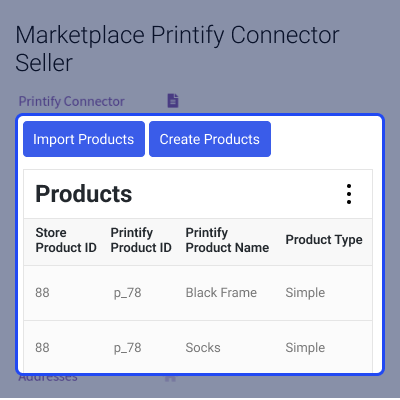
    • Import products from the Printify store.
    • Create those products in WooCommerce.
    • Delete products selectively or in Bulk.
    Import and Create Products

    Orders Management

    Once an order has been received for the Printify products, they will be listed and can be viewed in the Manage Orders section. Here the user will -
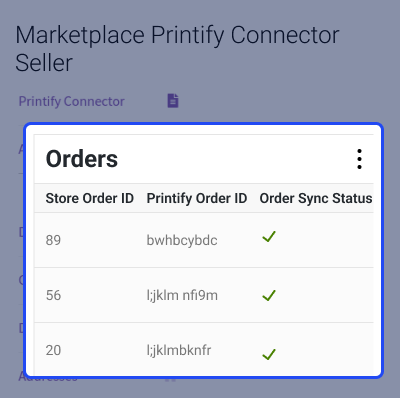
    • For further processing and fulfilment, Export the orders to the Printify store.
    • Order export can be done selectively or in bulk.
    • Fields like Order Sync Status, Printify Order ID and Store Order ID are available to view.
    Orders Management

    Settings for Auto Sync

    The admin and vendor both have automatic syncing functions available. They can set auto-syncing for the following -
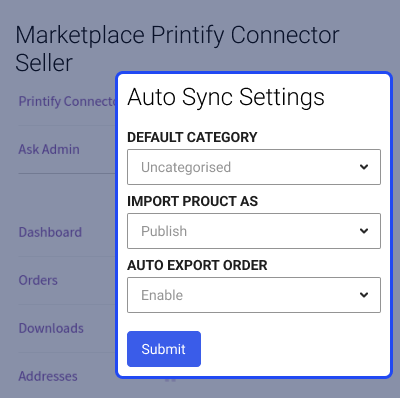
    • Set the default category of the product after importing it.
    • Import the product either in Draft or Published state.
    • Auto export of orders can be enabled/disabled.
    Settings for Auto Sync

    Support

    For any query or issue, please create a support ticket here http://webkul.uvdesk.com/

    You may also check our quality WooCommerce Plugins.

    Specifications

    Product Version1.0.0
    Released1 year ago
    Last UpdatedJuly 25, 2024 (1 year ago)
    Supported VersionsWordPress  6.x.x  WooCommerce  8.x.x  
    Write a review

    Frequently Asked Questions

     How to connect Printify store with the WooCommerce Marketplace?
    Both the Admin and Seller can their respective Printify stores by API tokens which will be generated from their Printify accounts.
     
     Is it possible to connect multiple Printify accounts?
    No, Admin and Vendor can connect only a single Printify account at a time using this integration.
     
     How are the orders fulfilled for Printify products?
    Once an order has been placed over WooCommerce, it’ll be exported to Printify for further processing and order fulfilment.
     
     Can the orders be exported to Printify automatically?
    Yes, you can enable the Auto export order from the auto sync settings.
     
     Can sellers have their own Printify connections?
    Yes, it allows the admin and seller both to connect their own Printify stores.

    Move to Cloud Today

    AWS Free tier hosting for one year by amazon web services, for more details please visit AWS Free Tier.

    GCP Free tier hosting for one year with 300 credit points by google cloud platform, for more details please visit GCP Free Tier.

    Azure free tier hosting for one year with 25+ always free services, for more details please visit Azure Free Tier.

    In our default configuration we will provide tremendous configuration for your eCommerce Website which is fast to load and response.

    Default Configuration Details of Server

    • 1 GB RAM
    • 1 Core Processor
    • 30 GB Hard Disk
    • DB with 1 GB RAM and 1 Core Processor

    * Server Configuration may vary as per application requirements.

    Want to know more how exactly we are going to power up your eCommerce Website with Cloud to fasten up your store. Please visit the Cloudkul Services.

    Get Started with Cloud
    • + Features
    • - Bugs
    Version 1.0.0
    • Initial release


