USD
  • INR
  • USD
Cart
Cart 0
  • You have no items in your shopping cart.
    Cart
    Cart 0
    • You have no items in your shopping cart.
    Hire a Developer
    ×
    Contact Us!
    Send Again
    Close
    Please Login to Write Your Review

    WooCommerce Product Import - XML CSV URLs

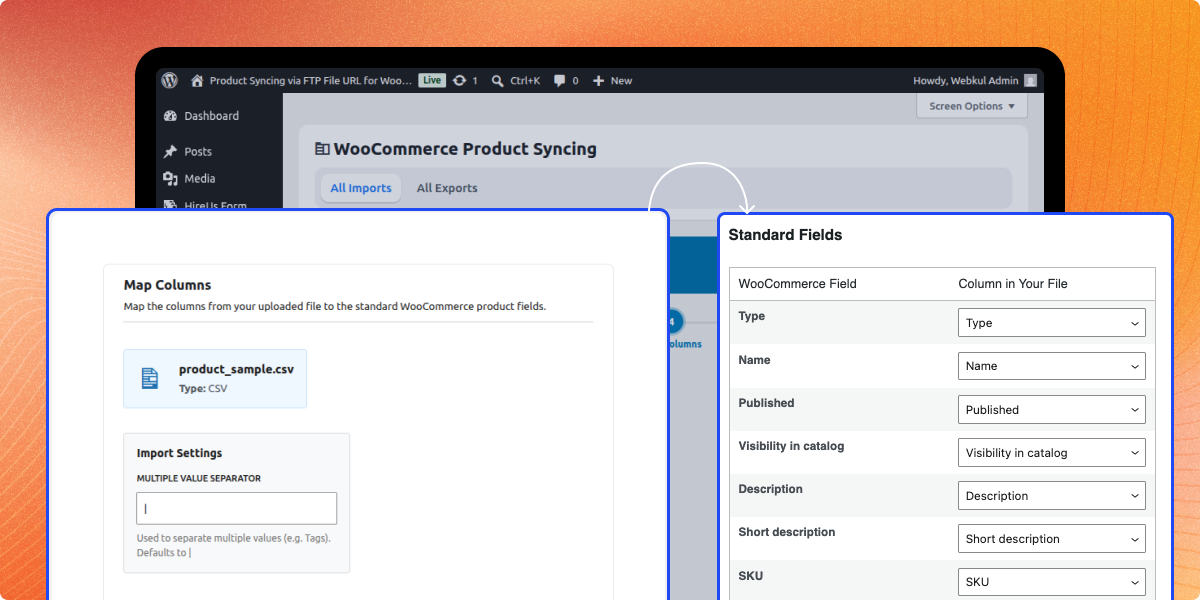
    The WooCommerce store admin can use this plugin to easily import products from XML & CSV URLs or through FTP/SFTP details.


    • Import products directly from CSV or XML URLs.

    • Supports manual CSV or XML file uploads.

    • Update existing products to prevent duplicates.

    • Preview product details before importing.

    • Track import progress and status in real time.

    • View products or manage imports/exports.

    • Include product tags while importing.

    • Detailed logs for import and export process.

    • Export all products in CSV or XML format.


    Screenshots
    WooCommerce Product Import - XML CSV URLs WooCommerce Product Import - XML CSV URLs WooCommerce Product Import - XML CSV URLs WooCommerce Product Import - XML CSV URLs WooCommerce Product Import - XML CSV URLs WooCommerce Product Import - XML CSV URLs WooCommerce Product Import - XML CSV URLs WooCommerce Product Import - XML CSV URLs WooCommerce Product Import - XML CSV URLs WooCommerce Product Import - XML CSV URLs
    Show More Hide All
    $79.00
    $79.00 Get it Now
    Only One Time Payment
    $79.00
    Configure and Buy
    • Description
    • Reviews
    • FAQ
    • Customers ()
    • Specifications
    • Cloud Hosting
    • Changelog

    WooCommerce Product Import - XML CSV URLs simplifies product import for WooCommerce stores, allowing admin to import products seamlessly. It enables importing from XML & CSV URLs and supports manual file uploads or importing via FTP/SFTP.

    Admin can update existing products to prevent duplicates and preview product details before importing. The plugin provides real-time import tracking, detailed logs, and ensures product tags are retained during imports.

    Additionally, it allows exporting all products in CSV or XML format, streamlining store management.

    WooCommerce Product Import - XML CSV URLs

    Highlighted Features of WooCommerce Product Import - XML CSV URLs

     Import from XML & CSV URLs

    Easily import products directly from XML and CSV URLs, simplifying bulk product uploads.

     Manual File Uploads & FTP/SFTP Support

    Supports manual CSV/XML file uploads and importing via FTP/SFTP for added flexibility.

     Update Existing Products

    Automatically updates existing products to avoid duplicates and maintain accurate inventory.

     Product Preview Before Import

    Review product details before importing to verify accuracy, prevent errors, and ensure proper data entry.

     Real Time Import Tracking & Logs

    Monitor import progress in real time with detailed logs for better tracking and management.

     Export Products in CSV/XML Format

    Export all WooCommerce store products in CSV or XML files for easy data backup and management.

    Why do we need WooCommerce Product Import - XML CSV URLs?

    WooCommerce Product Import - XML CSV URLs plugin lets store admin bulk import products via XML & CSV URLs or FTP/SFTP, saving time and effort. It keeps the product catalog organized by automatically updating existing products and preventing duplicates, ensuring accurate inventory management.

    Store admin can review product details before importing, helping avoid mistakes and ensuring all information is correct before it goes live. The plugin provides real time tracking and logs, allowing admin to monitor the entire import process and keep a clear record of all changes.

    With the ability to export all products in CSV or XML format, managing, backing up, and transferring store data becomes easier and more efficient.

    Explore our WooCommerce Matrix Multi Level Marketing plugin, which allows the admin to integrate a matrix MLM system into their WooCommerce store.

    Easy Product Imports

    Quickly import products into WooCommerce from XML & CSV URLs or via FTP/SFTP without any hassle.

    • Bulk import products directly from XML & CSV URLs.
    • Upload files manually or import via FTP/SFTP.
    • Save time by bulk importing products.
    Easy Product Imports

    Update Existing Products

    Prevent duplicate listings and keep product details accurate by updating existing products automatically.

    • Detect and update existing products.
    • Avoid duplicate entries in the product catalog.
    • Maintain clean and organized store inventory.
    Update Existing Products

    Live Import Tracking & Logs

    Track the import process in real time and keep detailed logs for easy monitoring and management.

    • View live progress while importing products.
    • Access logs to track and fix import issues.
    • Keep a complete record of all import actions.
    Live Import Tracking & Logs

    Simple Product Export

    Export WooCommerce products in CSV or XML format for easy backups, transfers, and data management.

    • Export all product details in a structured format.
    • Make store backups and migrations effortless.
    • Manage and share product data with ease.
    Simple Product Export

    Support

    For any query or issue, please create a support ticket here http://webkul.uvdesk.com/

    You may also check our quality WooCommerce Plugins.

    Specifications

    Product Version1.0.1
    Released8 months ago
    Last UpdatedAugust 20, 2025 (3 months ago)
    Supported VersionsWordPress  5.x.x  6.x.x  WooCommerce  8.x.x  9.x.x  
    Write a review
     How does this plugin help?
    It lets store admin import products in bulk from XML & CSV URLs or via FTP/SFTP, saving time.
     
     Can it update existing products?
    Yes, it updates existing products to avoid duplicates and keep details correct.
     
     How can admin track imports and exports?
    Admin views real-time import/export progress and can check the import/export logs for tracking and fixes.
     
     Can products be exported?
    Yes, products can be exported as CSV or XML files for backups and easy management.

    Move to Cloud Today

    AWS Free tier hosting for one year by amazon web services, for more details please visit AWS Free Tier.

    GCP Free tier hosting for one year with 300 credit points by google cloud platform, for more details please visit GCP Free Tier.

    Azure free tier hosting for one year with 25+ always free services, for more details please visit Azure Free Tier.

    In our default configuration we will provide tremendous configuration for your eCommerce Website which is fast to load and response.

    Default Configuration Details of Server

    • 1 GB RAM
    • 1 Core Processor
    • 30 GB Hard Disk
    • DB with 1 GB RAM and 1 Core Processor

    * Server Configuration may vary as per application requirements.

    Want to know more how exactly we are going to power up your eCommerce Website with Cloud to fasten up your store. Please visit the Cloudkul Services.

    Get Started with Cloud
    • + Features
    • - Bugs
    Version 1.0.1
    • Minor issues fixed.
    Version 1.0.0
    • Initial Release