Send Again
Close
WooCommerce Turnstile CAPTCHA Plugin helps store owners protect important forms from spam, fake signups, bot traffic, and repeated login abuse. It adds Cloudflare Turnstile verification across WooCommerce and WordPress pages with a simple setup process.
Many online stores receive fake registrations, spam reviews, unwanted comments, and automated submissions. These actions waste admin time, fill the database with low quality data, and may slow store operations.
This plugin checks visitors before form submission and blocks suspicious activity. Real customers can continue without solving hard text puzzles or image challenges, which helps improve login and checkout experience.
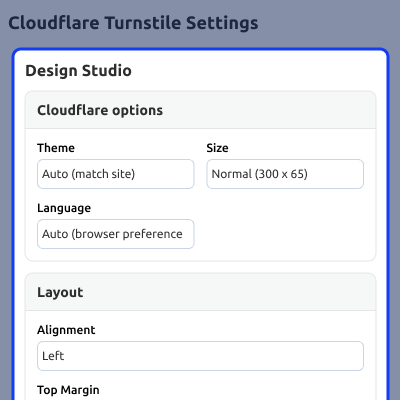
It also includes design controls for theme, size, alignment, labels, spacing, and language. Each form can use separate settings when needed.
Built in reports show pass rates, failed attempts, blocked traffic, and form activity, while alerts, logs, and flexible rules help admins manage store security from one dashboard.
You can check our Customer Verification for WooCommerce module to verify real customers, reduce fake signups, and secure your WooCommerce store.
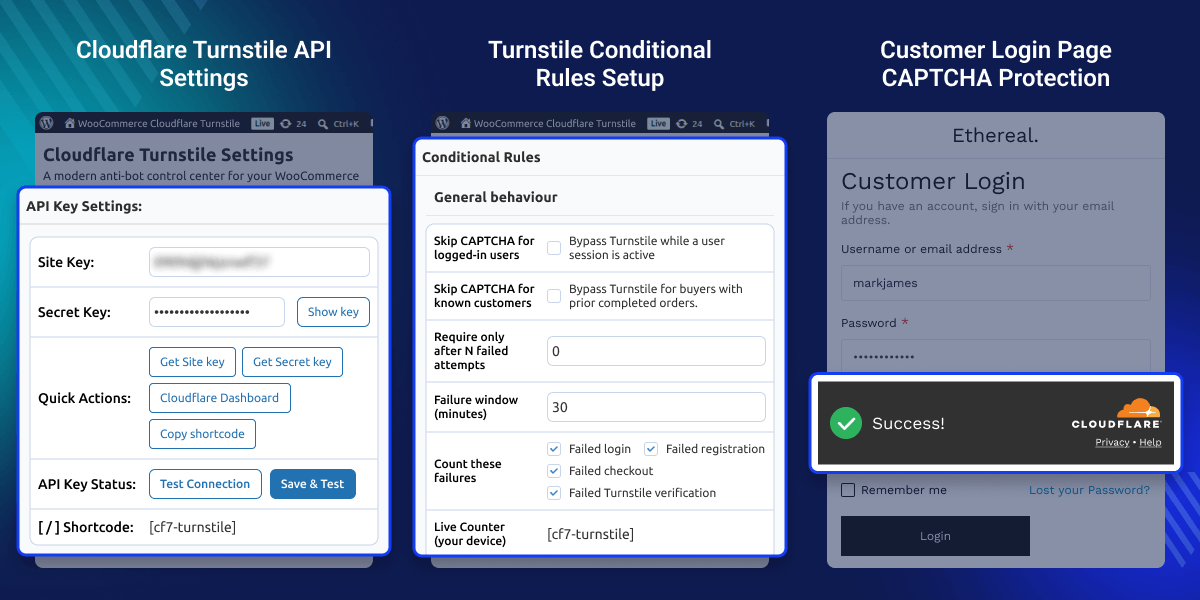
Secure login, registration, checkout, reviews, and payment forms from automated abuse.
Real users pass smoothly without puzzles or manual challenges.
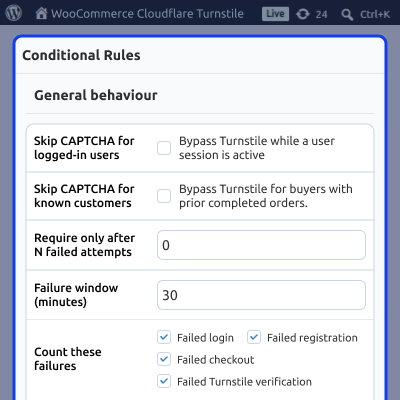
Show CAPTCHA only for risky visitors using IP, country, or behavior rules.
Apply different themes, labels, and settings for each form.
Track passes, failures, blocked traffic, and trends from one panel.
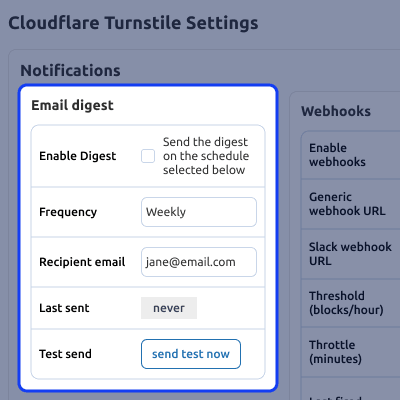
Receive alerts when suspicious activity increases.
WooCommerce stores often face fake registrations, spam reviews, bot logins, and checkout abuse. These issues create unwanted records and affect store performance.
Default protection tools may not cover all forms or offer advanced control. Store owners need better security for login, checkout, and customer actions.
This plugin adds automated verification without puzzles. It blocks fake activity while keeping the experience simple for real users.
Admins can control rules based on IP, country, failed attempts, and user behavior, with reports and alerts available from one dashboard.
This plugin helps protect WooCommerce stores from different types of spam and bot activity.
Prevent fake orders and automated checkout abuse.
Block bots creating spam customer accounts.
Avoid brute-force login attempts and credential abuse.
Keep blog comments and product reviews clean.
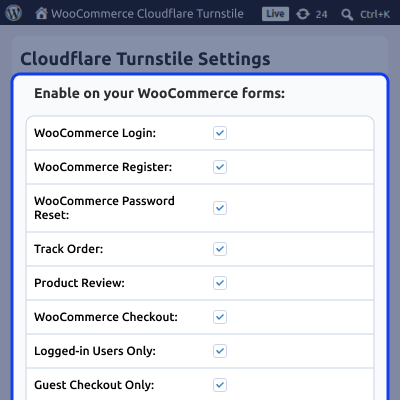
Control Turnstile CAPTCHA settings for each individual WooCommerce form separately.

This plugin protects all major forms across your store and site and blocks automated abuse effectively.
Control when CAPTCHA appears using smart conditions and avoid unnecessary checks for trusted users.
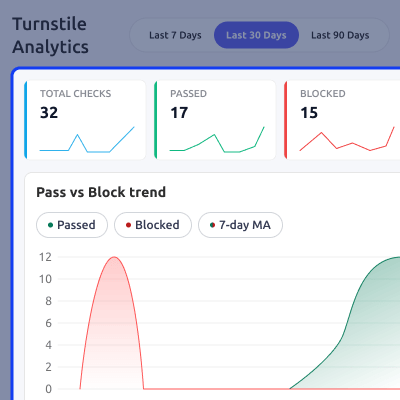
Track bot activity and performance with detailed reports and analytics.
Get alerts when suspicious activity increases and stay updated on security events.
Customize CAPTCHA appearance to match your store design without coding.
Manage access control using IP-based rules to allow or block specific users in WooCommerce store.

Protect WooCommerce forms from repeated abuse attempts using Turnstile verification and behavior based restrictions system.

Control form access by applying country based restrictions using Turnstile CAPTCHA for WooCommerce security settings.

Send CAPTCHA verification data to external systems using webhooks for real time integration with WooCommerce.

Monitor CAPTCHA verification activity with graphical insights for passed and blocked traffic across protected forms.

View hourly CAPTCHA verification activity for the last seven days to analyze user interaction patterns.

Analyze blocked requests with detailed reasons and identify the top blocked traffic sources easily.

Quickly configure Cloudflare Turnstile keys using a guided setup process inside WooCommerce admin panel.

Customize the Turnstile CAPTCHA appearance and preview widget changes directly from the WooCommerce admin panel.

Control Turnstile widget position and spacing inside forms using Design Studio layout settings.

Customize widget container appearance with border, background, corner, and shadow settings from Design Studio.

Add custom labels and helper text above or below the Turnstile widget using Design Studio settings.

For any query or issue, please create a support ticket here http://webkul.uvdesk.com/
You may also check our quality WooCommerce Plugins.
Detailed technical features and requirements to help you understand the module’s capabilities and ensure smooth integration with your system.
Detailed technical features and requirements to help you understand the module’s capabilities and ensure smooth integration with your system.
We’re partnered with top-tier, trusted providers!
Want to know more how exactly we are going to power up your eCommerce Website with Cloud to fasten up your store
* Server Configuration may vary as per application requirements.



