USD
  • EUR
  • INR
  • USD
Cart
Cart 0
  • You have no items in your shopping cart.
    Cart
    Cart 0
    • You have no items in your shopping cart.
    Hire a Developer
    ×
    Contact Us!
    Send Again
    Close
    Please Login to Write Your Review

    WooCommerce Virtual Try On

    WooCommerce Virtual Try On allows customers to try products virtually before buying. It offers an engaging and interactive shopping experience with realistic product visualization.


    • Admin can enable or disable the virtual try on feature for specific products or categories.

    • Customers can upload their own images to virtually try on products.

    • Customers can also use AI generated models for a more personalized try on experience.

    • Admin can add AI generated model images directly to the product gallery.

    • Admin can configure settings to allow or restrict guest users from using the virtual try on feature.

    Screenshots
    WooCommerce Virtual Try On WooCommerce Virtual Try On WooCommerce Virtual Try On WooCommerce Virtual Try On WooCommerce Virtual Try On WooCommerce Virtual Try On WooCommerce Virtual Try On
    Show More Hide All
    $299.00

    * Required Fields

    Add To Cart
    30 Days Refund*
    Lifetime Free Upgrade
    Only One Time Payment
    $299.00
    Configure and Buy
    • Description
    • Reviews
    • FAQ
    • Customers ()
    • Specifications
    • Cloud Hosting
    • Changelog

    WooCommerce Virtual Try On Plugin helps increase customer confidence, reduce product returns, and boost conversion rates. It lets shoppers make better purchase decisions with visual try ons.

    Admins can manage all Virtual Try On settings from the backend. They can turn the feature on or off for specific products, handle AI models, and choose if guest users can use the try on feature.

    Also, if you need a plugin that enables customers to search for products on the website using images and phrases, then checkout WooCommerce AI Image & Semantic Search .
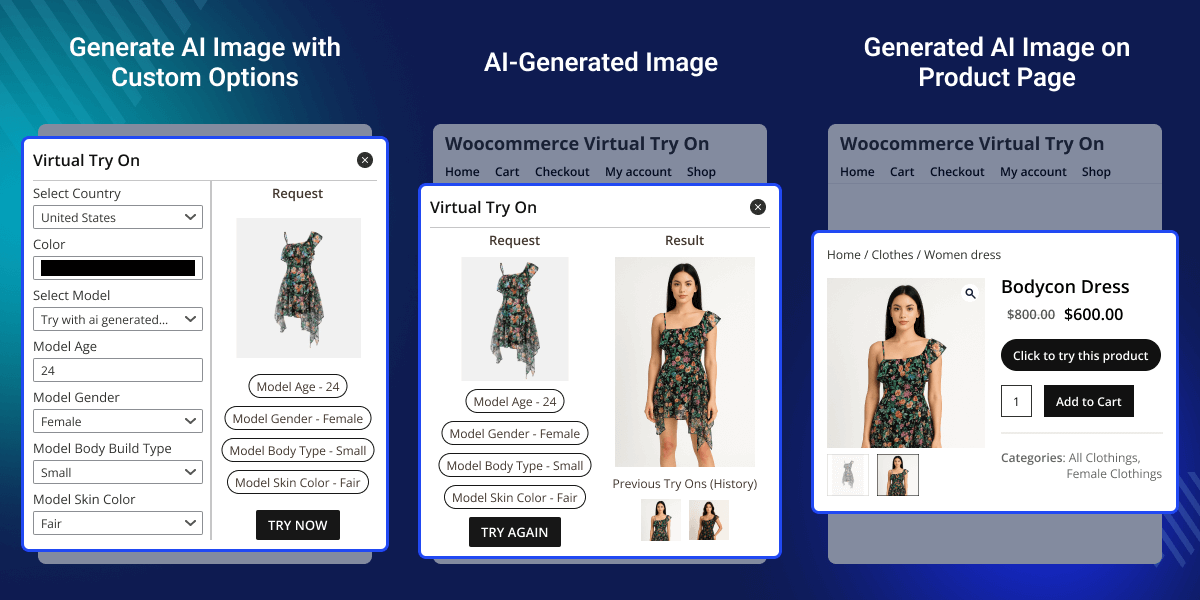
    WooCommerce Virtual Try-On

    Highlighted Features of WooCommerce Virtual Try-On

     AI Powered Try On

    Customers can try products virtually using AI-generated models for a more realistic and personalized shopping experience.

     Customer Image Upload

    Users can upload their own images to see how items will look on them directly from the store page.

     Model Management

    Admin can upload or add AI-generated model images to the product gallery for customer try-ons.

     Guest User Access

    Admin can choose whether guest users can use the virtual try-on feature or restrict it to logged-in customers.

     Product Control

    Enable or disable the virtual try-on feature for specific products as needed.

     Prompt Modification

    Admin can modify AI prompts to improve results if the model output does not meet expectations.

    Why Do We Need the WooCommerce Virtual Try On Plugin?

    WooCommerce Virtual Try On Plugin is a great addition for online stores. It helps improve the customer experience by letting shoppers interact with products virtually. With its smart AI features, it lowers return rates, boosts customer satisfaction, and helps buyers make confident choices.

    From fashion to accessories, this plugin changes the way people shop online. It makes the process more fun, interactive, and engaging. If you want to add a visual Try On option to your store, the WooCommerce Virtual Try On Plugin is the right solution. It brings the feel of shopping in a store to the convenience of online shopping.

    Apart from this, if you need a plugin that allows the admin to remove the background of the media image while updating the product, then checkout AI Image Background Remover for WordPress WooCommerce.

    Virtual Try On Configuration

    After installing the WooCommerce Virtual Try On plugin, the admin can set up the core module settings from the backend panel.
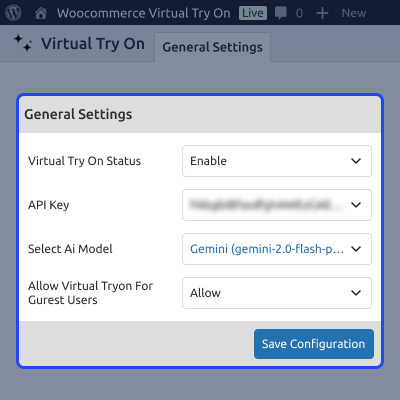
    • Enable or disable the Virtual Try On feature globally across the store.
    • Enter the API Key to connect with the AI service for generating Try On images.
    • Select the preferred AI model (e.g., Gemini, Gemini 2.0 Flash) for Try On processing.
    • Allow or restrict guest users from accessing the Virtual Try On feature.
    • Save all configuration changes from the settings panel.
    Virtual Try On Configuration

    AI Generated Model Settings

    The plugin lets the admin define details for creating AI-generated model images used during Virtual Try On.
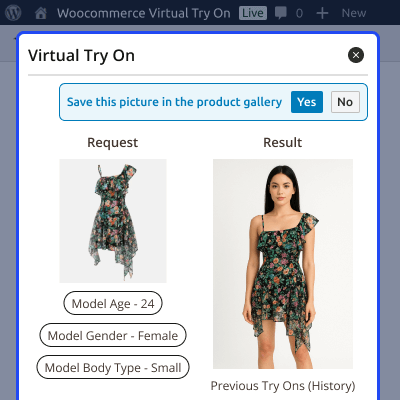
    • Choose the AI model type for generating Try On images.
    • Enter AI model attributes such as:
      • Model Age – specify the preferred age range.
      • Model Gender – select Male, Female, or Other.
      • Body Type – choose the desired body structure.
    • An AI-generated model image is created based on the given inputs.
    • The generated image can be added to the product gallery for customer Try On.
    AI Generated Model Settings

    AI Model on Product Page (Customer End)

    Customers can access the Virtual Try On feature directly from the product page once the admin adds the AI-generated model.
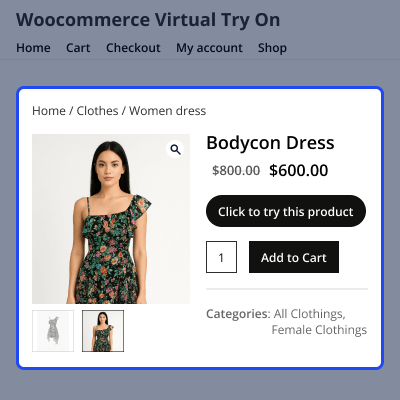
    • “Click to Try This Product” button launches the Try On window.
    • Customers can select:
      • Use AI Model – choose from configured AI-generated models.
      • Upload Your Image – upload their own picture for a personalized Try On.
    • The plugin generates a real-time preview of how the product looks on the selected model or image.
    • Customers can switch models, upload a new image, or adjust the preview as needed.
    AI Model on Product Page

    Support

    For any query or issue, please create a support ticket here http://webkul.uvdesk.com/

    You may also check our quality WooCommerce Plugins.

    Specifications

    Product Version1.0.0
    Released3 months ago
    Last UpdatedMarch 3, 2026 (14 days ago)
    Supported VersionsWordPress  6.x.x  WooCommerce  10.x.x  
    Write a review

    Frequently Asked Questions

     Do we need a separate app for customers to use the virtual Try On feature?
    No, customers can access the Virtual Try On feature directly from your WooCommerce store’s product page without any separate app or installation.
     
     Can customers upload their own images for trying products?
    Yes, customers can upload their own images from the product page to see how the product will look on them.
     
     Does the plugin support AI generated models?
    Yes, the plugin supports AI generated models that the admin can create and manage from the backend and display on the product gallery.
     
     Can guest users use the Virtual Try On feature?
    Yes, guest users can also use the Virtual Try On feature if the admin allows it in the configuration settings.
     
     Can the admin control which products support virtual Try On?
    Yes, the admin can enable or disable the Virtual Try On feature for specific products or categories from the backend.
     
     Can the admin modify AI prompt settings?
    Yes, the admin can edit and refine the AI prompts used to generate models or Try On previews for better accuracy.

    Move to Cloud Today

    AWS Free tier hosting for one year by amazon web services, for more details please visit AWS Free Tier.

    GCP Free tier hosting for one year with 300 credit points by google cloud platform, for more details please visit GCP Free Tier.

    Azure free tier hosting for one year with 25+ always free services, for more details please visit Azure Free Tier.

    In our default configuration we will provide tremendous configuration for your eCommerce Website which is fast to load and response.

    Default Configuration Details of Server

    • 1 GB RAM
    • 1 Core Processor
    • 30 GB Hard Disk
    • DB with 1 GB RAM and 1 Core Processor

    * Server Configuration may vary as per application requirements.

    Want to know more how exactly we are going to power up your eCommerce Website with Cloud to fasten up your store. Please visit the Cloudkul Services.

    Get Started with Cloud
    • + Features
    • - Bugs
    Version 1.0.0
    • Initial Release


