Working for OpenCart since 2010 and contributed to latest stable release v3.0.3.7
Opencart eBay Connector
OpenCart eBay Connector connects your eBay store with OpenCart. It syncs products, categories, and orders. The admin can manage multiple eBay accounts and add shipping, tax, return, and listing details.
- Add multiple eBay accounts and sync them with OpenCart.
- Get real-time updates for add, revise, sold, and delete events.
- Import and export products, categories, and orders.
- Create price and quantity rules for automatic updates.
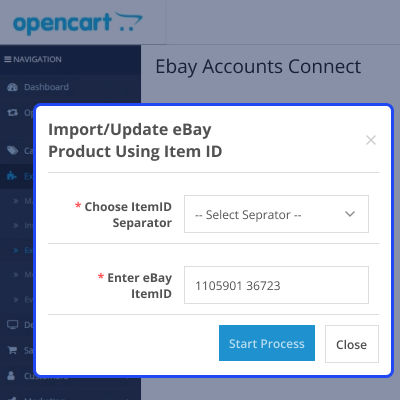
- Import or update items using eBay Item ID or Order ID.
- Import multiple images and map product variations.
- Create templates for eBay product listings.
- Schedule products for listing on a set date and time.
- Update price, stock, condition, and description in real time.
- Set shipping charges, tax, and return details.
- Map eBay categories, specs, and custom categories.
- View sync results and manage products from one panel.
Working for OpenCart since 2010 and contributed to latest stable release v3.0.3.7
- Description
- Reviews
- FAQ
- Customers ()
- Specifications
- Cloud Hosting
- Changelog
OpenCart eBay Connector connects your eBay store with OpenCart. It lets the admin import products, categories, and orders from eBay. The admin can also export products to eBay.
The admin can add and manage multiple eBay accounts. The module makes product and category mapping easy. The admin can add shipping, tax, return policy, dispatch time, and listing details. It supports products with options like size, color, and other variations.
When a product is updated in OpenCart, the changes sync to eBay. This includes name, price, stock, description, condition, and options. If a product is removed from eBay, the admin can relist it from OpenCart.
If you want an extension that allows you to take orders in physical stores and sync sales, inventory, and customer data with your online store, then check out the Opencart POS System.
Highlighted Features
Multiple eBay Accounts
This module allows to add multiple eBay accounts and do synchronization.
Export Products
Export products from the Opencart store to the eBay store.
Import Multiple Product Images
The admin can import the multiple images of the eBay imported product to the Opencart store.
Import Single Order
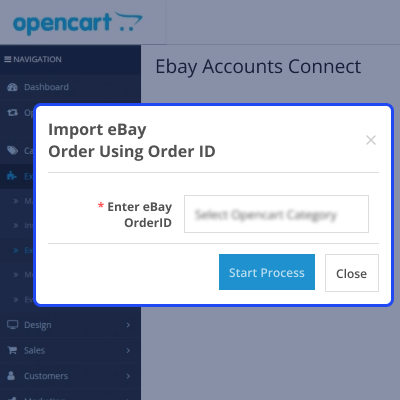
The admin can import a single order using the eBay Order Id.
Map Sub Category
This module allows admin to select sub-categories to map from eBay to Opencart.
Define Return Policy
Define return policy with return days, pay by, other info.
Product Delete Option
The products will auto-delete if the same product's stock is zero on the eBay store.
Real-Time and Sync
The activity of Adding, Updating, and Deletion from the eBay site will be updated on the Opencart store and vice versa.
Why Do You Need OpenCart eBay Connector?
OpenCart eBay Connector lets you manage your eBay and OpenCart stores from one place. You do not need to update data on both platforms. Products, stock, and orders sync automatically.
This saves time and reduces manual work. It also helps you sell on eBay with better control from OpenCart.
If you are looking for an extension that connects OpenCart with Odoo and keeps products, orders, customers, and inventory organized in one place, then check out Opencart Odoo Connector.
Integrate eBay Connector with OpenCart Store
The module lets you connect multiple eBay accounts with OpenCart and supports category mapping, product import and export, and order synchronization.
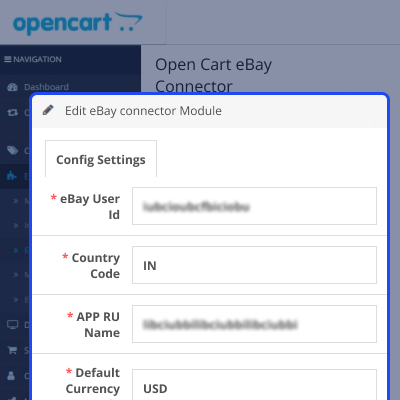
- Select the eBay store country.
- Choose Sandbox or Production mode.
- Enter the eBay User ID.
- Select the Country Code.
- Set the APP RU Name.
- Set the Default Currency Code.
- Enter the eBay Application ID.

eBay Template Listing
The admin can export the product’s additional information along with the product as per the choice. For this, the admin needs to create the eBay Template Listing. The admin can-
- Edit or delete the template.
- Add or create an unlimited number of Templates.
- Create two type of template – Product Description and Custom Description
- Configure the template for the product on the product edit page.

Product Price and Quantity Rule
The admin can easily update the price of the synced products automatically. For this, the admin needs to create the Price Rules and can:
- Edit the Price Rules Delete/remove the existing Price Rule from the list.
- Add an unlimited number of price rules.
- Set the operation of price rule as fixed or percentage.
- Set the price operation type as an increase or decrease in price rule.
Note: The admin can even bulk upload the price rules via a CSV file.

Map Categories
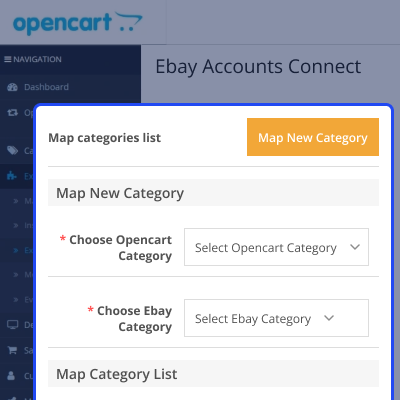
Before importing or exporting products, the admin needs to do the categories mapping. Associate the correct the eBay category with the Opencart category. Select the parent and sub-categories of the stores and do the mapping accordingly.
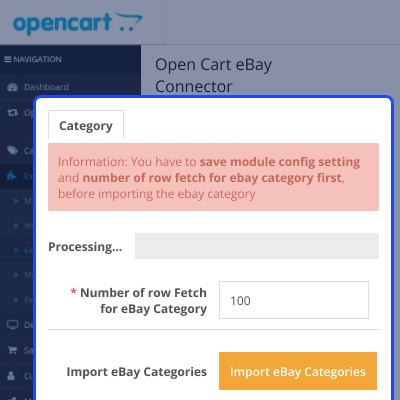
- Set the default no. of eBay categories to fetch
- Select the default import category for eBay items
- Choose sub-categories of Opencart and eBay
- View and delete entries from map categories list
- View result after the categories mapping process

Import Products
After mapping the Opencart categories with eBay, the admin can now import products. The admin can import products from multiple eBay accounts. All the basic information about the eBay products will be mapped.
- Import all the products from your eBay store
- Sync product's - name, price, description, quantity, images
- View and delete entries from import eBay products list
- View result after the eBay product mapping process

Map Orders
The admin can also do the mapping of eBay orders with the Opencart store. Please make sure that the ordered products are already mapped with Opencart. The mapped order list shows Opencart order ID, eBay order ID, order status, order total, and created date.
- Select the default eBay order status to import
- View and delete entries from the mapped order list
- View result after the eBay order mapping process

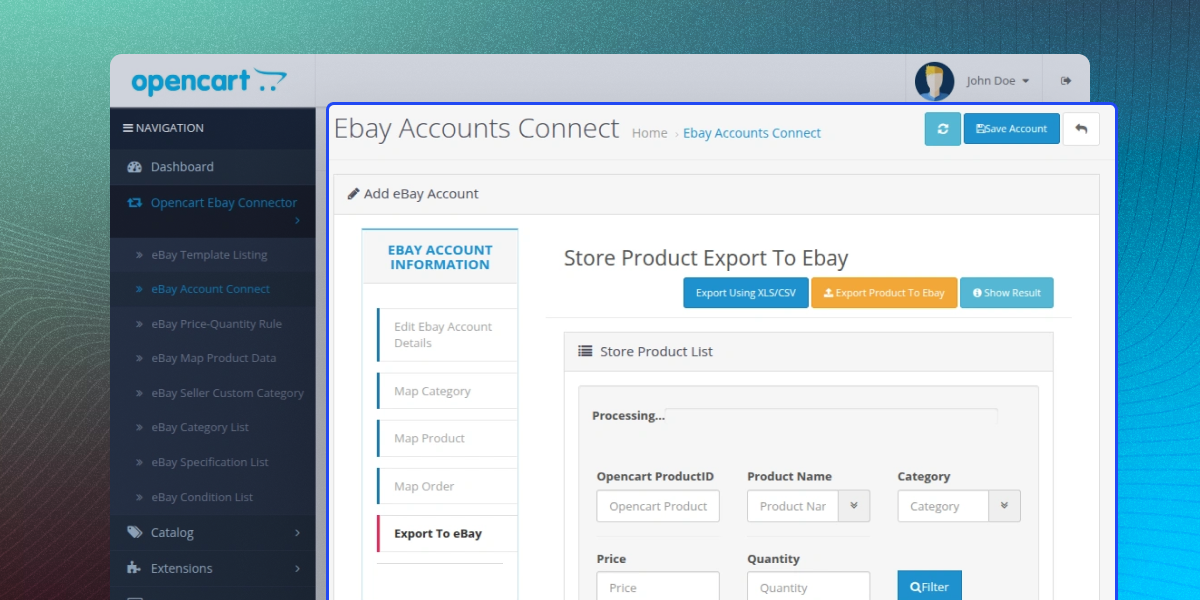
Export to eBay
The admin can export Opencart products to the eBay store. Real-time sync for exported product's name, description, price, quantity, condition, variation. Include the following information for the exported products:
- Define return policy with return days, pay by, other info
- Set the eBay listing duration of the exported product
- Enter the dispatch time for the exported product
- Set default quantity for exported products having zero quantity
- Include tax information with the exported products
- Set shipping service, cost, additional cost, minimum & maximum time, free shipping
- Add eBay product specification, condition, and variation for exported product
- View exported product list showing the price, quantity, product ID, name, category
- View result after the exporting process

Real Time and Sync
Through this feature, the admin can perform all the activities of Adding, Updating and Deletion from the eBay site will be updated on the Opencart store also.
- Any changes in products done on the eBay store will be real-time updated and sync on the Opencart store also.
- If a particular account has been deleted from the eBay store then Admin will receive the notification on the Opencart store.
- Products of the Opencart store can also be synchronized at multiple eBay stores.

eBay Motors Integration
The Opencart eBay Connector also works with eBay Motors. You can import or export products from eBay Motors to Opencart.
- Import all the eBay Motors categories and map them with the Opencart store categories.
- Do complete synchronization of products, categories, and orders.
- A warning message will appear if the category is not mapped correctly for both stores.
- A separate tab will show which product has been imported successfully or not.
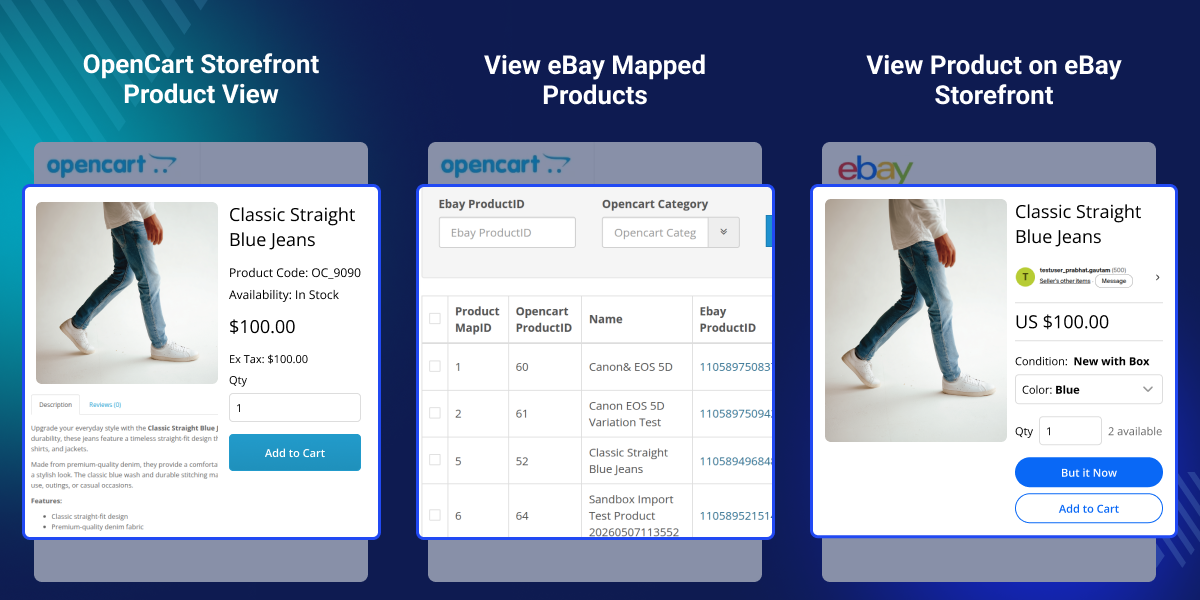
- The imported product will have Product Map ID, Opencart Product ID, Name, eBay Product ID, Opencart Category, and Sync Source.

Complete Features List
- Edit mapped products from the admin panel.
- Apply price and quantity rules during sync.
- Import products, orders, and categories from the link section.
- Relist exported products from OpenCart.
- View imported categories, specs, and conditions.
- Delete imported data when needed.
- Select sub-categories for mapping.
- Set the number of records to sync.
- Set category fetch limits.
- Enable or disable business policies.
- Enable or disable real-time events and notifications.
- Use sandbox mode for testing.
- Supports eBay Motors (US).
- Import custom categories from eBay.
- Use a separate section for product data mapping.
Opencart eBay Connector Support
For any query or issue please create a support ticket here http://webkul.uvdesk.com/
You may also check our quality Opencart Extensions.
Specifications
Recent Reviews
Write a reviewGreat service and support
Very good support.
Frequently Asked Questions
Move to Cloud Today
AWS Free tier hosting for one year by amazon web services, for more details please visit AWS Free Tier.
GCP Free tier hosting for one year with 300 credit points by google cloud platform, for more details please visit GCP Free Tier.
Azure free tier hosting for one year with 25+ always free services, for more details please visit Azure Free Tier.
In our default configuration we will provide tremendous configuration for your eCommerce Website which is fast to load and response.
Default Configuration Details of Server
- 1 GB RAM
- 1 Core Processor
- 30 GB Hard Disk
- DB with 1 GB RAM and 1 Core Processor
* Server Configuration may vary as per application requirements.
Want to know more how exactly we are going to power up your eCommerce Website with Cloud to fasten up your store. Please visit the Cloudkul Services.
Get Started with Cloud- + Features
- * Bugs
- + Added access token handler
- * Updated deprecated methods
- + Added dynamic value for country iso code for product export
- * Fixed add product issue in version 3.x.x.x
- * Fixed the git issues for Opencart version 3.x.x.x and version 2.3.x.x
- * Fixed Template Issue
- * Fixed the git issues for Opencart version 3.x.x.x
- * "FixedPriceTransaction" event added
- * Fixed the code compatibility issues with Opencart version 3.0.3.6
- * Fixed the compatibility in registering library with Opencart version 3.0.3.6
- * Resolve shipping method export issue during export of the product from OC to eBay.
- * Resolve Validation and configuration tab management on error issue for Opencart all version.
- * Resolve default sorting missing and sorting disappear on filter issues for Opencart all version.
- * Resolve server-side validation issue in the module configuration for Opencart all version.
- * Resolve the same eBay account are saved multiple time issues for Opencart all version.
- * Fixed the fatal error in Real-Time Sync.
- * Shipping array correction in the export section.
- * Correction in config email variable name in version 3.x
- * Coding issue(method was not close properly) resolved in version 3.x
- * Table closing issue resolved in version 3.x.
- * eBay to OC syncing issue resolved in version 3.x.x.x
- * Fixed template-icon status issue
- * Fixed the map product data scheduling issue
- * Fixed the issues applying price quantity rule while revising eBay item
- * Fixed the issues of exporting Auction Product
- * Some fixes regarding updates
- + Added Updates in OC 3.0.x.x
- * updated code at v3
- * fixed git issue
- * fixed git issue
- * git issue resolved #152
- * Git issues resolved #141 to #154
- + real-time sync and sync products price and quantity to multiple accounts products added
- * Ticket issue resolved
- + Added Category Management on the account level
- + Added option to import the CSV & Xls file for catalog product to export at eBay end
- + Added Shipping Management at the account level
- + Added feature for Auction product and Price (sales, base) management.
- + Added feature for importing and mapping merchant's shop categories to Opencart Store
- + Added separate panel for managing the variation, specification, etc.
- + Added Quantity Rules the same as Price Rule Feature.
- * Fixed the EAN issue in variation
- + Added functionality for mapping a single product (Opencart or from one of your eBay account) to other accounts product for having same price and quantity and if one changes then every other product price change in both end (Opencart and eBay)
- * Resolved the issue on the eBay account edit for big amount of products.
- * Resolved the issue product description deleted when product updated on eBay
- + Added feature when stock quantity reduced to 0 then product deleted from Opencart or not.
- * Issue fixed for removing price rule mapping on the failed export products
- * Template data issue resolved
- * SKU and EAN check added
- * Duplicate entry issue resolved in all versions.
- * Removed the code of the "product real-time sync event" in version 2.3
- * Changed email id to default email id in events for OC 2.3
- * Removed unwanted codes
- * Added events functionality in v3
- + End listing of eBay item, when Opencart product quantity is zero.
- * Fixed issue for Unnecessary code on the git commit
- * Fixed issue for the MPN, UPC and separator error on the Product Map Page
- + Added Real-Time Events Update feature for adding/updating/removing the eBay products on both sides when action performs on the eBay site.
- * OC product can be saved when all the product sold at eBay site
- * eBay product sync delete when deleting from OC with eBay from the admin product page
- + Added feature delete eBay product(exported from OC) when deleting from the default catalog product page.
- * GalleryType changed to Featured
- * Fix ebay_condition_list list delete issue
- + Added feature to import weight class id the Products.
- + Added feature to import MPN code, UPC code, and Manufacturer of the Products.
- + Added Feature to the Importing Product height, width, and length
- * Fixed issue for the Importing Product's stock status with quantity 0 (zero).
- * Fixed issue for the Imported Product Main Image
- + Add feature to import multiple images for all the Opencart Versions from eBay.
- * Fixed issue for price rules feature
- + Add feature to applying the price rules on the Import / Export products.
- * Fix the issue of eBay specification and eBay condition will now display only fields that are for selected category
- * Fix the issue of displaying invalid request in an email to userID
- * Fix the issue for Display of Email Id at orders.
- + Add feature to use a custom template for the eBay product description.
- * Fix the issue for already exported OC product to eBay, will not show to another account to export again.
- * Fix the issue for Opencart Sub Category Mapped with eBay least category.
- * Fix the issue for Opencart Export Product Currency issue.
- + Added warning message if composer not installed
- + File added /catalog/model/catalog/ebay_product_map.php
- + Add functionality to update the stock on the eBay store, at the time order will place on Opencart store for the mapped product.
- + Add feature to import single eBay's product and order from eBay Store to Opencart Store.
- + Add filtering for Mapped entries ( Mapped Categories, Products, and Orders).
- + Add a separate listing of eBay imported categories according to eBay sites.
- + Add a separate listing of eBay specifications based on eBay categories according to eBay sites.
- + Add a separate listing of eBay conditions based on Opencart and eBay mapped categories.
- +Updated for Opencart version 3.x.x.x
- Initial Release