USD
  • EUR
  • INR
  • USD
Cart
Cart 0
  • You have no items in your shopping cart.
    PrestaShop Extensions
    Cart
    Cart 0
    • You have no items in your shopping cart.
    Hire a Developer
    ×
    Contact Us!
    Send Again
    Close
    Please Login to Write Your Review
    POB Extension Multi Warehouse Extension

    POB Extension Multi Warehouse Extension

    x
    Free

    * Required Fields

    $99.00
    Add To Cart

    PrestaShop Odoo Bridge Multi-Warehouse Extension controls which Odoo warehouse stock reaches PrestaShop: one specific warehouse or the sum of all.


    • Choose which Odoo stock source is sent to the PrestaShop store.

    • Select ALL to send the stock sum of every Odoo warehouse to PrestaShop.

    • Select SPECIFIC to send stock from one chosen Odoo warehouse only.

    • Pick the warehouse in the Select Warehouse field of the connection.

    • Keep a separate Odoo warehouse just for your PrestaShop products.

    • Show stock moves of the chosen warehouse on PrestaShop in real time.

    • Set it all from the POB Multi WareHouse tab on the Odoo connection.

    • Works on top of an existing PrestaShop Odoo Bridge (POB) setup.

    POB Extension Multi Warehouse Extension
    POB Extension Multi Warehouse Extension
    $99.00
    Check How It Works

    Need Help Deciding?

    Support answers within one business day.

    Open a ticket
    $99.00
    Configure and Buy
    X
    • Description
    • Reviews
    • FAQ
    • Customers ()
    • Specifications
    • Cloud Hosting
    • Changelog

    PrestaShop Odoo Bridge Multi-Warehouse Extension is an Odoo add-on that decides which warehouse stock flows to PrestaShop. It suits stores that run more than one stock location in Odoo.

    Stores that already link PrestaShop with Odoo through the bridge can add it to the same setup. The admin opens the connection in Odoo and picks a warehouse rule on a new tab.

    With the ALL rule, PrestaShop shows the total stock of every Odoo warehouse. With the SPECIFIC rule, it shows only the stock held in the one warehouse you select.

    A store can also keep a separate warehouse in Odoo just for PrestaShop products. Any stock move in that warehouse then reflects on the PrestaShop store in real time.

    The add-on ships as the pob_multi_warehouse module and is installed on the Odoo side. It supports PrestaShop 1.5.x.x, 1.6.x.x, and 1.7.x.x.

    Additionally, if you want to sync products, customers, and orders between the two platforms, then check Odoo PrestaShop Connector.
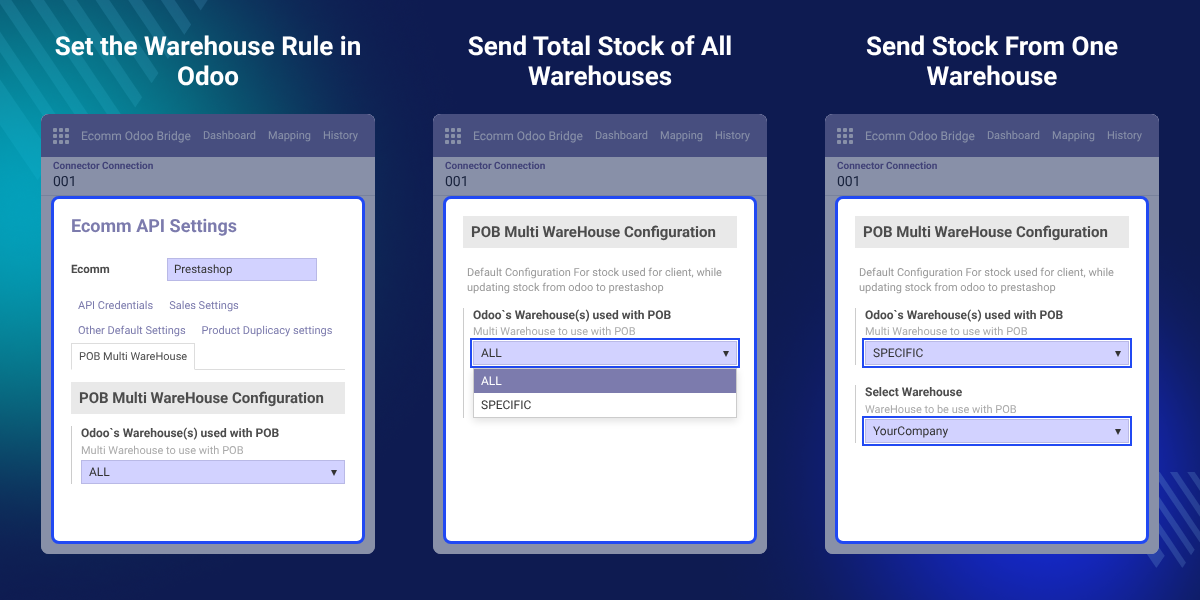
    PrestaShop Odoo Bridge Multi-Warehouse Extension

    Highlighted Features of PrestaShop Odoo Bridge Multi-Warehouse Extension

     Total Stock of All Warehouses

    Send the summed stock of every Odoo location to PrestaShop with the ALL option.

     Stock From One Warehouse

    Send stock from a single chosen Odoo warehouse to PrestaShop with the SPECIFIC option.

     Real-Time Stock Updates

    Stock moves in the selected Odoo warehouse show on the PrestaShop store in real time.

     Settings on the Connection

    Set the warehouse rule from the POB Multi WareHouse tab of the Odoo connection instance.

    Why Do We Need a Multi-Warehouse Extension for PrestaShop Odoo Bridge?

    Many stores keep stock in more than one place. More locations cut shipping time and spread the risk if one warehouse slows down.

    When PrestaShop is linked to Odoo, the store still needs to know which warehouse stock to show buyers. Without a rule, the store cannot say whether one warehouse or all of them counts.

    This extension adds that rule to the bridge. The admin picks ALL for the stock sum of every warehouse, or SPECIFIC for a single one.

    Setup takes one field on the connection: Odoo`s Warehouse(s) used with POB. If you choose SPECIFIC, a second field called Select Warehouse appears for the warehouse name.

    Also, if you want to compare stock between PrestaShop and Odoo, you can check our extension POB Extension : Stock Comparison.

    Multi-Warehouse Stock Sync Use Cases for PrestaShop Stores

    • Sell From Every Warehouse

      Stores that ship from all their locations show the full stock count to buyers by using ALL.

    • Dedicated Online Store Warehouse

      Stores that keep one Odoo location for online orders show only that stock on PrestaShop.

    • Faster Order Fulfillment

      Stores spread stock across sites to ship orders sooner, while PrestaShop keeps the right count.

    • Backup Stock Location

      If one site becomes slow, the store can manage stock from another and switch the rule.

    POB Multi WareHouse Configuration Tab in Odoo

    The POB Multi WareHouse tab is added to the connection instance in Odoo. It holds the default setting Odoo uses for stock while updating stock from Odoo to PrestaShop.
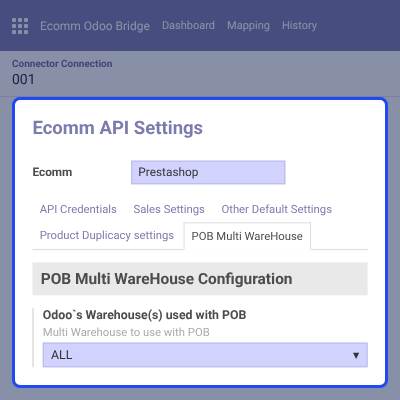
    • Open Ecomm Odoo Bridge and then Connection Instance in Odoo.
    • Find the new POB Multi WareHouse tab beside the other connection tabs.
    • Set the Odoo`s Warehouse(s) used with POB field to ALL or SPECIFIC.
    • Save the connection so the warehouse rule applies to stock updates.
    POB Multi WareHouse Configuration Tab in Odoo

    Sync Total Stock From All Odoo Warehouses

    The ALL option sends the sum of stock from every Odoo warehouse to PrestaShop. Buyers see one count that covers all locations.
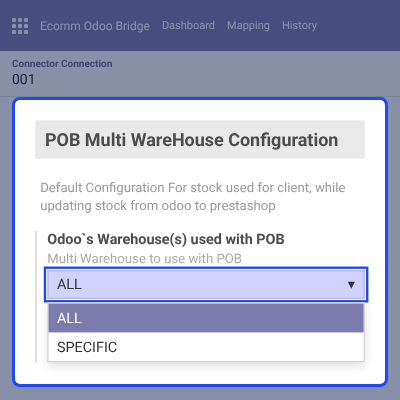
    • Choose ALL in the Odoo`s Warehouse(s) used with POB field.
    • Odoo adds the quantity of each location into one total per product.
    • PrestaShop receives that total on each stock update from Odoo.
    • Suits stores that can ship an order from any of their locations.
    Sync Total Stock From All Odoo Warehouses

    Sync Stock From a Specific Odoo Warehouse

    The SPECIFIC option sends stock from one chosen Odoo warehouse to PrestaShop. Stock held at other locations stays out of the PrestaShop count.

    Also, if you want more control over how stock moves between the two systems, you can check POB Extension Stock Handling.
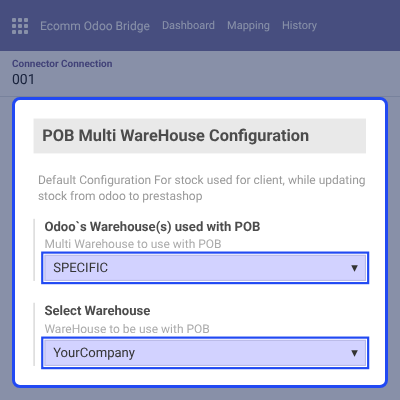
    • Choose SPECIFIC in the Odoo`s Warehouse(s) used with POB field.
    • Pick the warehouse to use in the Select Warehouse field.
    • Keep a separate Odoo location just for PrestaShop products if needed.
    • Stock moves in that warehouse reflect on PrestaShop in real time.
    Sync Stock From a Specific Odoo Warehouse

    Complete PrestaShop Odoo Bridge Multi-Warehouse Extension Feature List

    Warehouse Stock Rules

    • Send the stock sum of all Odoo warehouses to PrestaShop with the ALL option
    • Send stock from one selected Odoo warehouse to PrestaShop with the SPECIFIC option
    • Choose the warehouse for the SPECIFIC rule in the Select Warehouse field
    • Use a separate Odoo warehouse just for PrestaShop products

    Stock Updates

    • Update PrestaShop stock from Odoo based on the chosen warehouse rule
    • Reflect stock moves in the selected Odoo warehouse on PrestaShop in real time
    • Keep the rule as the default stock setting for the connection

    Setup and Compatibility

    • Install the pob_multi_warehouse module on the Odoo side
    • Find it in Odoo Apps after Update Apps List, with developer mode on
    • Configure it from the POB Multi WareHouse tab under Ecomm Odoo Bridge
    • Needs PrestaShop Odoo Bridge (POB) already linking the store to Odoo
    • Supports the PrestaShop versions listed in the module specifications

    POB Extension Multi Warehouse Extension Support -

    For any query or issue please create a support ticket here http://webkul.uvdesk.com

    You may also check our other top-quality PrestaShop Add-ons.

    Specifications

    Product Version1.0
    Released11 years ago
    Last UpdatedOctober 14, 2026 (21 days ago)
    Supported VersionsPrestaShop  1.5.x.x​  1.6.x.x​  1.7.x.x​  Odoo  7.x  8.x  10.x  11.x  12.x  13.x  14.x  

    Ratings

    We'd love to hear your thoughts! Share your feedback and help us craft an even better experience tailored just for you.

    Write a review

    Specification

    Detailed technical features and requirements to help you understand the module’s capabilities and ensure smooth integration with your system.

    Cloud Hosting

    Detailed technical features and requirements to help you understand the module’s capabilities and ensure smooth integration with your system.

    Default Configuration Details of Server

    1 GB
    RAM
    1 Core
    Processor
    30 GB
    Hard Disk
    1 GB RAM & 1 Core Processor
    Database

    Want to know more how exactly we are going to power up your eCommerce Website with Cloud to fasten up your store

    * Server Configuration may vary as per application requirements.

    Change Logs

    Not Available