Laravel Marketplace Delivery Time Slot
Laravel Marketplace Delivery Time Slot lets users pick a delivery date and time at checkout, where sellers can control slots, order limits, and delivery schedules.
- Let users choose delivery dates and time slots at checkout.
- Show selected delivery details in the user's order history.
- Set the greatest order limits for each delivery time slot.
- Create delivery schedules for specific days and time ranges.
- Configure default delivery dates and time slots from the admin panel.
- Define allowed delivery days for marketplace orders.
- Set the total number of days available for delivery booking.
- Define the minimum order processing time before delivery.
- Display custom messages when delivery slots are unavailable.
- Description
- Reviews
- FAQ
- Customers ()
- Specifications
- Cloud Hosting
- Changelog
Laravel Marketplace Delivery Time Slot allows the user to select a delivery date and time slot during checkout. This module is useful for marketplaces that need organized delivery planning.
It helps sellers avoid accepting more orders than they can handle within a specific delivery window. Sellers can create delivery slots for specific days and define the greatest number of orders allowed in each slot.
Admins can set how many days users can book in advance. If a seller does not create delivery slots, the default delivery schedule set by the admin is used. This ensures delivery booking remains available across the marketplace.
The module displays custom messages when delivery options are unavailable. Also, if you want to add different shipping rates for each product, then check Laravel eCommerce Marketplace Per Product Shipping extension.
Please Note - To use this extension, you must purchase and install Laravel Multi Vendor Marketplace, first.
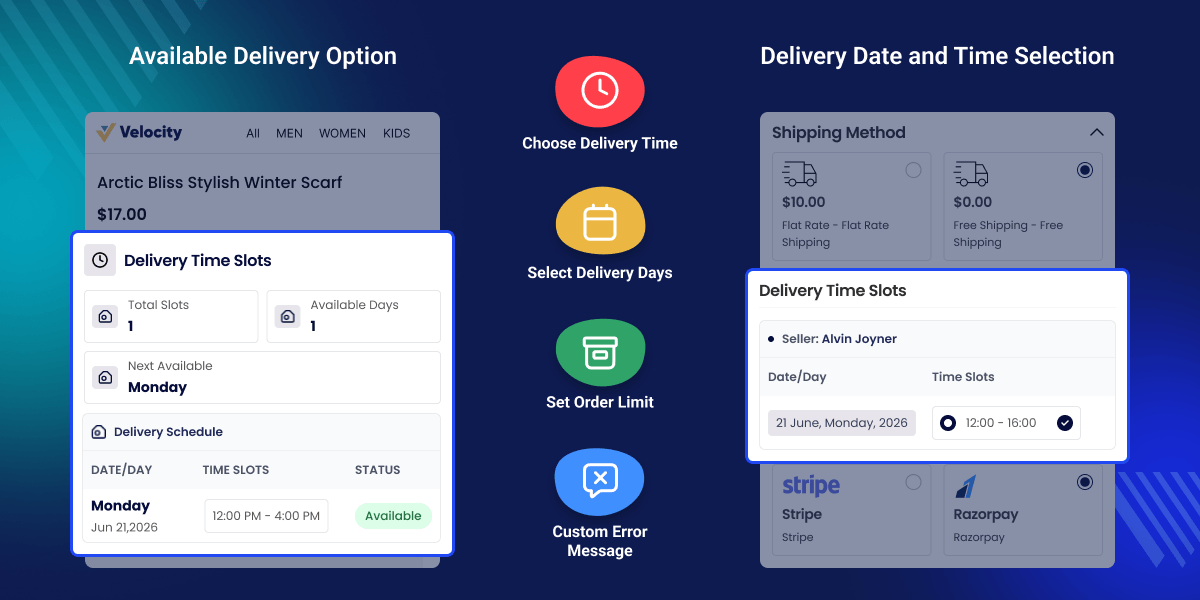
Highlighted Features of Laravel Marketplace Delivery Time Slot
Select Prefered Day and Time
Customers can choose their preferred day and time for delivery at the time of checkout.
Default Allowed Days
The admin can select the default allowed days.
Set Number of Days
Admin and Sellers can also set the total number of days to display.
Minimum Required Time
The admin can set the minimum required time for order processing in days.
Error Message
The admin can set the error message that will be visible at the time of checkout if no slot is available.
Delivery Order History
Admin and Sellers can check the delivery order history in their dashboards.
Why do we need the Laravel Marketplace Delivery Time Slot?
Laravel Marketplace Delivery Time Slot helps marketplaces manage deliveries by allowing customers to choose a preferred delivery date and time during checkout.
Default marketplace systems may lack delivery scheduling, making delivery planning difficult and increasing the risk of delays. This module allows sellers to create delivery slots, set order limits, and define minimum processing times.
It helps reduce delivery conflicts, improve scheduling, and provide a smoother checkout experience. Also, if you want to upload products in bulk using a CSV/XLS file can also check Laravel eCommerce Marketplace Bulk Upload module.
Use Cases
Daily Essentials Delivery
Allow customers to choose convenient delivery dates and time slots.
Food and Meal Delivery
Manage delivery capacity with order limits for each time slot.
Gift Delivery Services
Enable scheduled deliveries for special occasions and events.
Healthcare Deliveries
Provide flexible delivery scheduling for medicines and healthcare products.
Seller Delivery Time Slot Management
Sellers can create delivery schedules by defining delivery dates, time ranges, and order limits. This helps organize deliveries and avoid overbooking.
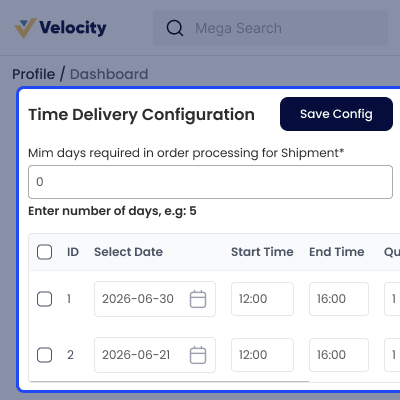
- Set minimum order processing days.
- Create delivery slots for specific dates.
- Configure delivery start and end times.
- Define order quotas for each slot.

Delivery Time Slot at Checkout
Customers can choose their preferred delivery date and available time slot during checkout for a more convenient delivery experience.
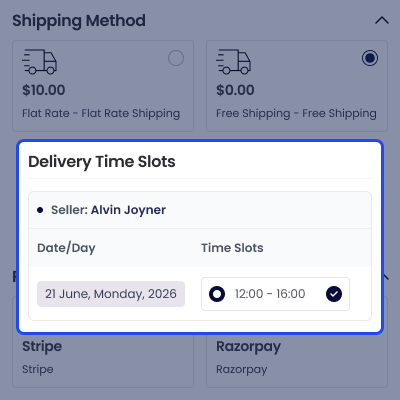
- Display available delivery dates at checkout.
- Show seller-specific delivery slots.
- Select preferred delivery windows.
- Display selected slots in order details.

Delivery Time Configuration
Admins can configure delivery schedules, available days, and checkout settings to provide accurate delivery options.
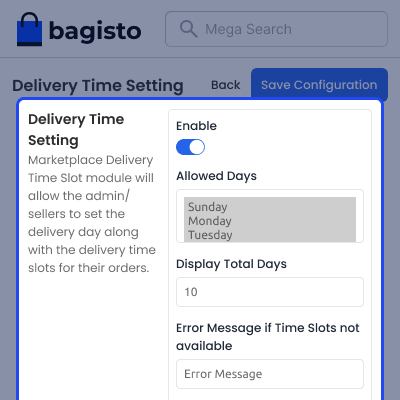
- Enable or disable the module.
- Select available delivery days.
- Set visible delivery dates at checkout.
- Add custom messages for unavailable slots.

Support
For any issue related to this module, please create a support ticket here at - https://webkul.uvdesk.com/en/customer/create-ticket/ or send an email to [email protected]
You may also check our quality Bagisto Extensions.
Specifications
Frequently Asked Questions
Move to Cloud Today
AWS Free tier hosting for one year by amazon web services, for more details please visit AWS Free Tier.
GCP Free tier hosting for one year with 300 credit points by google cloud platform, for more details please visit GCP Free Tier.
Azure free tier hosting for one year with 25+ always free services, for more details please visit Azure Free Tier.
In our default configuration we will provide tremendous configuration for your eCommerce Website which is fast to load and response.
Default Configuration Details of Server
- 1 GB RAM
- 1 Core Processor
- 30 GB Hard Disk
- DB with 1 GB RAM and 1 Core Processor
* Server Configuration may vary as per application requirements.
Want to know more how exactly we are going to power up your eCommerce Website with Cloud to fasten up your store. Please visit the Cloudkul Services.
Get Started with Cloud- + Feature Add (+)
- - Feature Remove (-)
- ! Bug Fixed (!)
- * Modification (*)
- + Compatible with Bagisto version v2.4.4
- + Compatible with Bagisto version v2.2.2 and Marketplace v2.2.2
- + Compatible with Bagisto version v2.1.2 and Marketplace v2.1.2
- + Compatible with Bagisto version 1.4.5
- + Compatible with Marketplace version 1.4.5
- ! Fixed issue when deleting Minimum Required Time in Order Process field from inspect showed an exception
- ! Fixed random number issue when adding more than 10 digits in Quotas
- ! Fixed missing asterisk in required day field in admin panel
- ! Fixed non-working back button in delivery time slot place
- ! Fixed day not showing in admin panel while visible on seller page in delivery order
- ! Fixed required field saving without value for seller
- ! Fixed slot time details not visible in order history after placing order
- ! Start time slot should appear before end time
- ! Added missing space while adding Minimum Required Time in Order Process
- ! Fixed 24-hour standard time slot conflict issue
- ! Fixed checkout issue when Delivery Time Slot feature is disabled
- ! Added functionality to disable added time slot
- + Compatible with Bagisto version 1.4.4
- + Compatible with Bagisto version 1.4.3
- + Compatible with Bagisto version 1.3.3
- + Compatible with Bagisto version 1.3.2
- + Compatible with Bagisto version 1.3.1
- + Compatible with Bagisto version 1.2.0
- ! Delivery slots should not be visible for non-shipping products (downloadable, virtual, booking)
- ! Fixed layout issue when adding multiple arrays of delivery time slots
- ! Fixed layout when warning message displays at seller end
- ! Negative values are no longer accepted in input fields
- ! Fixed exception when placing order for virtual products without shipping address
- ! Fixed exception on onepage checkout when time slot exists
- ! Fixed slot design in onepage checkout
- ! Updated order grid column in seller delivery order history


