USD
  • EUR
  • INR
  • USD
Cart
Cart 0
  • You have no items in your shopping cart.
    Odoo Apps Extensions
    Cart
    Cart 0
    • You have no items in your shopping cart.
    Hire a Developer
    ×
    Contact Us!
    Send Again
    Close
    Please Login to Write Your Review
    Odoo POS Kitchen Network Printer

    Odoo POS Kitchen Network Printer

    x
    Free

    * Required Fields

    $100.00
    Add To Cart

    Direct order printing with Odoo POS Kitchen Network Printer!


    • It allows connecting a network printer to Odoo POS Kitchen.

    • The Odoo app provides a menu to create a network printer.

    • Simplified network printer configuration in the Odoo backend.

    • It permits direct receipt printing in the POS Kitchen.

    • Change the status of the network printer based on connection.

    Odoo POS Kitchen Network Printer
    Odoo POS Kitchen Network Printer
    $100.00
    Check How It Works

    Need Help Deciding?

    Support answers within one business day.

    Open a ticket
    $100.00
    Configure and Buy
    X
    • Description
    • Reviews
    • FAQ
    • Specifications
    • Cloud Hosting
    • Changelog

    Convenient order processing with Odoo POS Kitchen Network Printer!

    Network printer not only simplifies printing but also offer various benefits. Firstly, it reduces the cost of equipment, is highly scalable, allows printing from anywhere, is easy to install, etc.

    Odoo POS Kitchen Network Printer permits printing kitchen receipts via a network printer. The Odoo app allows printing POS Kitchen Receipts directly without a POSBox. But before printing any receipt, you need to configure the module in the Odoo backend. Also, you can print the Kitchen receipts before validating the order from the POS session for the defined categories. Further, there is no need to be dependent on the non-network/traditional printer.
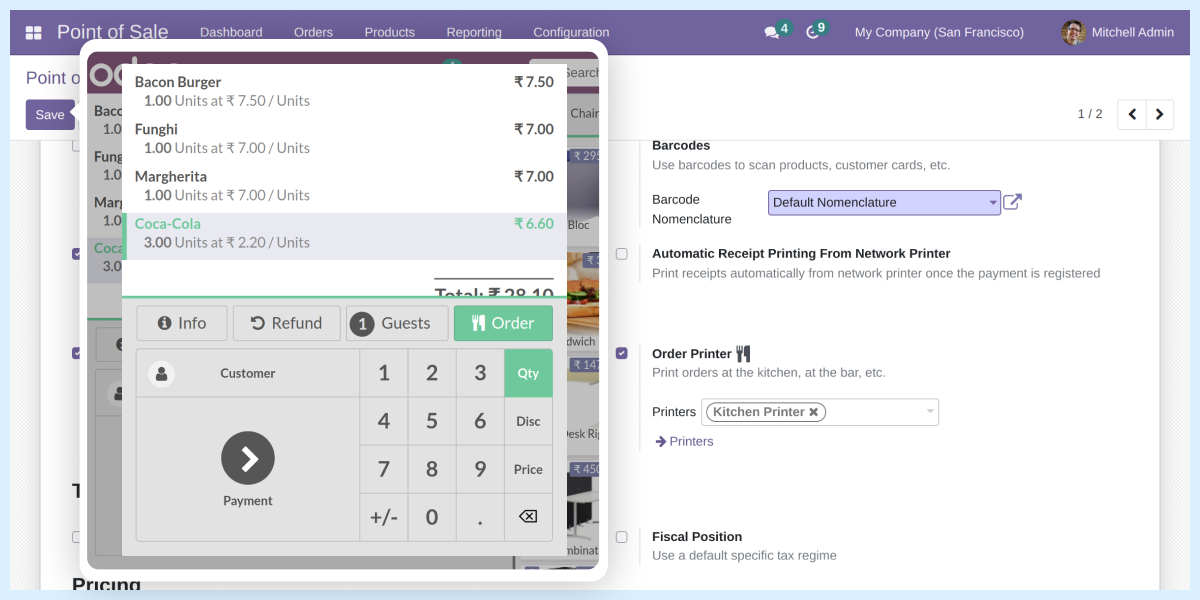
    Odoo POS Kitchen Network Printer

     Prerequisites For Using Odoo POS Kitchen Network Printer Module

    Odoo POS Kitchen Network Printer works in conjunction with the following module:

    Odoo POS Network Printer

    Firstly, you must install this module for Odoo POS Kitchen Network Printer to work perfectly.

     Odoo POS Kitchen Network Printer Features

    Printing POS Kitchen Receipts in Odoo

    • Odoo POS Kitchen Network Printer authorizes you to configure ECS/POS network printer with POS Kitchen.
    • The Odoo POS automatically sends the printing command to the specified network printer via the QZ Tray client.
    • The module eradicates the need for POSBox to connect a printer.

     Print POS Kitchen Receipts Directly in Odoo

    • The Odoo app permits the POS user to print kitchen receipts without POSBox.
    • It allows POS users to directly access the printer with the print button on the form view.
    • The module makes receipt printing convenient with ECS/POS Network Printer.

    Network Printer Configuration for Odoo POS Kitchen

    • The module allows you to add a network printer for the kitchen.
    • You can add the printed product categories from the Odoo backend.

     Enable or Disable the Module from the Odoo Backend

    • You can change the status of the POS Kitchen Network Printer.
    • The module provides three network printer statuses: Connected (Green), Waiting for a Connection (Yellow), and Disconnected (Red).

    Connecting a Network Printer with Odoo POS Kitchen

    • The module allows you to configure a network with your Odoo POS Kitchen.
    • Enable or disable the network printer setting from the Odoo backend.
    • Enter the network printer name while configuring.
    • Enable the setting for the kitchen network printer.
    • You have to enable the setting for order printer from the setting menu.
    • You can also enable/disable the setting for automatic receipt printing from the network printer.
    • Allow Kitchen receipt printing before order validation from the Odoo backend.
    Configuring Kitchen Network Printer

     Printing Kitchen Order Receipt from the Odoo POS

    Uisng Kitchen Network Printer
    • The POS user can change the status of the network printer.
    • POS users can add products to the cart and print the Kitchen receipt before order validation.
    • The Kitchen Receipt can be printed automatically without manual input.
    • You can manually send the receipt to the kitchen for order printing.
    • You can also control the network printer status from the Odoo POS.
    • Change the status of the network printer as per your need or let it update automatically.
    • You can also see the order button highlighted on adding configured product POS categories.

    Odoo POS Kitchen Network Printer

    Webkul's dedicated support provides you with the customizations and troubleshooting solutions for Odoo POS Kitchen Network Printer.

    For any query or issue, please CREATE A TICKET HERE

    Specifications

    Product Version1.0.0
    Released3 years ago
    Last UpdatedOctober 8, 2025 (1 year ago)
    Supported Versions14.x  17.x  18.x  19.x  20.x  8.x  9.x  10.x  11.x  12.x  13.x  15.x  16.x  

    Ratings

    We'd love to hear your thoughts! Share your feedback and help us craft an even better experience tailored just for you.

    5.0
    3 Reviews
    based on verified customer feedback
    Write a review
    Wenceslao Muñoz

    Excellent Module and service

    Posted On - July 14, 2023

    We have been working with Webkul for 3 years and the result is always as expected. They adapt to your needs.

    Marketing CDC

    Great Support and service

    Posted On - June 9, 2023

    Great service, quick turn around on customisations for Odoo used them multiple times.

    Young Adventures Australia
    🇦🇺 Australia

    Excellent product and service

    Posted On - May 16, 2023

    I have been using Webkul for the last few months. It takes a fair bit of time to get used to and understand (Im still learning)
    Starting price is really affordable but as you add different features it adds up quickly, however, I find it extremely useful, and moving forward it is allowing my business to automate a lot of work so that I can continue to expand.

    Specification

    Detailed technical features and requirements to help you understand the module’s capabilities and ensure smooth integration with your system.

    Cloud Hosting for Websites & Applications

    Power your website or application with flexible, scalable cloud infrastructure designed for performance and growth.

    Move Your Website or Application to the Cloud

    Get started with Cloudkul hosting tailored to your needs.

    Flexible Cloud Plans Start small. Scale as you grow.
    Starting at US$25*
    ✓ Hosting for websites and applications
    ✓ Resources matched to your needs
    ✓ Scalable infrastructure for growth

    Configure Your Cloud Server

    RAM Flexible
    CPU Scalable
    Storage Flexible
    Built Around Your Project's Needs

    Choose server resources based on your workload, expected traffic, and performance requirements.

    Grow at Your Own Pace

    Start with the cloud resources your project needs today and adjust your server configuration as your business grows.

    Ready to Move to the Cloud?

    Explore flexible cloud hosting plans and choose your ideal configuration.

    Explore Cloud Hosting Plans

    * Starting price is indicative. Final pricing and available server resources depend on the selected hosting configuration and requirements.

    Change Logs

    Not Available