USD
  • EUR
  • INR
  • USD
Cart
Cart 0
  • You have no items in your shopping cart.
    Odoo Apps Extensions
    Cart
    Cart 0
    • You have no items in your shopping cart.
    Hire a Developer
    ×
    Contact Us!
    Send Again
    Close
    Please Login to Write Your Review
    Odoo Stavio | Real Estate and Property Theme

    Odoo Stavio | Real Estate and Property Theme

    x
    Free

    * Required Fields

    $99.00
    Add To Cart

    Odoo Stavio | Real Estate & Property Theme turns Odoo Website into a property site for estate agents, brokers, letting agents and property developers.


    • Install seven ready pages, from Home and Properties to Sell With Us and Our Team.

    • Add ten real estate blocks from the Stavio group in the Website Builder.

    • Let visitors search listings by area, street or reference from the hero block.

    • Show sale, let and new homes in Featured Listings cards with beds and baths.

    • Publish unit prices and status in an Availability Table for a new development.

    • Present local areas with the Neighbourhood Guide block and district cards.

    • Switch between two estate headers, two footers and three mega menu templates.

    • Capture seller leads with a Valuation CTA block placed on every page.

    • Restyle the shop, listing page, client area and contact page in three styles.

    • Change the layout of each block from the Website Builder without code.

    Odoo Stavio | Real Estate and Property Theme
    Odoo Stavio | Real Estate and Property Theme
    $99.00
    Check How It Works

    Need Help Deciding?

    Support answers within one business day.

    Open a ticket
    $99.00
    Configure and Buy
    X
    • Description
    • Reviews
    • FAQ
    • Customers ()
    • Specifications
    • Cloud Hosting
    • Changelog

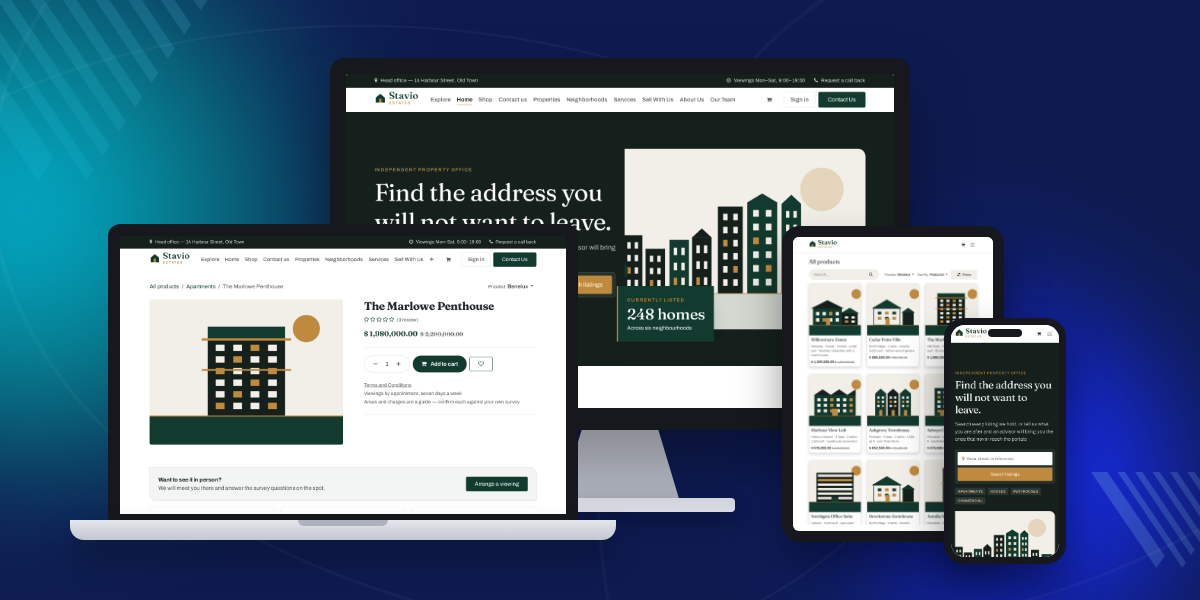
    Odoo Stavio | Real Estate & Property Theme is an Odoo website theme for estate agencies, brokerages and property developers. It installs a complete property website on Odoo Website and eCommerce.

    Admins activate Stavio from the website theme selector. Seven pages arrive with their blocks already placed: Home, Properties, Neighborhoods, Services, Sell With Us, About Us and Our Team.

    Listings stay as Odoo products. Your shop becomes a property catalogue with category filters, and each product page reads as a listing with a viewing prompt and a trust strip.

    Design choices live in the Website Builder, where the Theme tab holds the evergreen and brass palette, Fraunces headings and Archivo body text. Each block has its own Layout option.

    Stavio runs on both Odoo Community and Odoo Enterprise. It needs the Website, eCommerce and Wishlist apps, which Odoo installs with it. Ten demo listings load on demo databases only.

    Additionally, if you want saved property lists with more options for your visitors, then check Odoo Website Advanced Wishlist.
    Odoo Stavio | Real Estate & Property Theme

    Highlighted Features of Odoo Stavio | Real Estate & Property Theme

     Property Search Hero

    A dark hero block with a search field for area, street or reference, quick category tags and a live listing counter.

     Ten Estate Blocks

    Listings, availability, neighbourhoods, advisors, client stories, track record, journey and valuation blocks in one Stavio group.

     Unit Availability Table

    Show unit, type, beds, baths, area, aspect, guide price and an Available, Reserved or Sold status for each unit.

     Estate Header and Mega Menus

    A header with an office bar and viewing button, a centred header, and three mega menus for property, districts and services.

     Seller Valuation Leads

    Valuation CTA and the footer valuation card send homeowners to book a written valuation with an advisor.

     Three-Way Theme Style

    Pick Soft, Outline or Bold for the shop, the listing page, the client area and the contact page from the Website Builder.

    Why Do We Need Odoo Stavio | Real Estate & Property Theme?

    An estate agency website must answer three buyer questions fast: what is for sale, where it is, and who to call. Home sellers also need a clear way to ask for a valuation.

    A real estate website built on stock Odoo Website starts from general blocks for any business. Odoo has no property search hero, no unit availability table and no district guide, so agencies build these pages by hand.

    Odoo Stavio adds those pieces as Website Builder blocks with real estate wording. Pages, menus, header and footer are placed when the theme is activated, so the site is ready to edit.

    A practical detail: the theme replaces the eCommerce shipping note under the price with viewing and survey text, because a house is not a parcel that ships in 2 to 3 days.

    Also, if your advisors book viewings and valuations by time slot, you can check our module Odoo Website Appointment Management System.

    Use Cases

    •  Independent Estate Agency

      A local agency lists homes for sale and to let, shows its advisors and takes valuation requests from one site.

    •  New Development Launch

      A developer publishes each phase with an availability table and marks units as Reserved or Sold as they go.

    •  Letting and Property Management

      A letting agent sends landlords to the Services and Sell With Us pages, with a guide for tenants in the mega menu.

    •  Commercial Property Broker

      A broker lists offices and retail units under a Commercial category and shows a dedicated advisor for each patch.

    •  Luxury Homes Realtor

      A realtor presents villas and penthouses with large listing cards, client stories and a calm editorial look.

    Property Search Hero Block

    Property Search Hero is the first block on the Stavio homepage. Visitors type an area, street or reference and press Search listings to open the property catalogue.

    A counter card beside the search shows how many homes are listed, so buyers see the stock size at a glance.
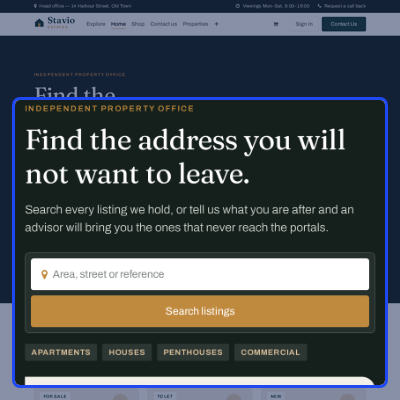
    • Search field with the placeholder Area, street or reference.
    • Quick tags for Apartments, Houses, Penthouses and Commercial.
    • Currently Listed counter card over the hero illustration.
    • Layout option with Default, Compact and Wide arrangements.
    • Hide listing counter and Text reveal checkboxes in the block options.
    Property Search Hero Block

    Featured Property Listings

    Featured Listings shows three property cards with a status tag, price line, address, beds, baths and floor area. It sits on the Home and Properties pages.
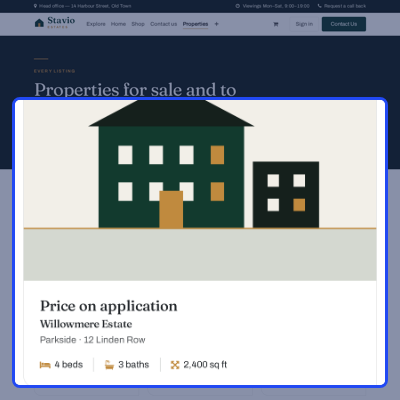
    • Status tags such as For Sale, To Let and New on each card.
    • Bed, bath and square foot icons under each listing title.
    • See all listings button that opens the property catalogue.
    • Layout option with Default, Compact and Wide (4 across).
    • Corner cut slider from 0 to 40 px and a Hide status tags checkbox.
    Featured Property Listings

    Development Unit Availability Table

    Availability Table lists every unit in a development release. Buyers compare units side by side before they ask for the full schedule.

    Developers update one row when a unit changes hands, and the status badge shows the change. For show-flat slots and site visits, see Odoo Booking & Reservation Management.
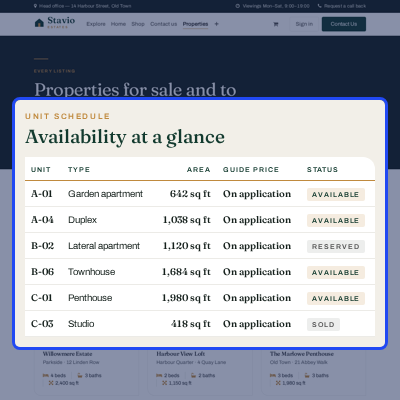
    • Columns for Unit, Type, Beds, Baths, Area, Aspect, Guide price and Status.
    • Status badges for Available, Reserved and Sold units.
    • Request the full schedule button above the table.
    • Layout option with Default, Striped and Compact rows.
    • Disable row highlight checkbox for a still table.
    Development Unit Availability Table

    Neighbourhood Guide for Local Areas

    Neighbourhood Guide presents the areas an agency covers as image cards. Each card names the district and gives one line on its homes and lifestyle.

    Agencies with a separate site per branch can run them from one database with Odoo Multi Website.
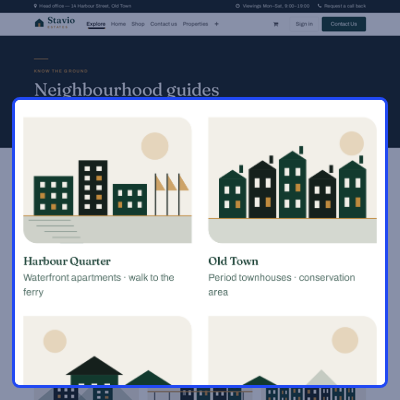
    • Six district cards: Harbour Quarter, Old Town, Parkside, North Ridge, Riverside and Uptown.
    • Read the guides button that leads to the Neighborhoods page.
    • Layout option with Default, Rows and Dense (4 across).
    • Captions over the image checkbox for a darker card style.
    Neighbourhood Guide for Local Areas

    Estate Headers, Footers and Mega Menus

    Stavio ships two headers and two footers, switchable from the Website Builder. Its estate header carries an office bar with viewing hours and a call back link.
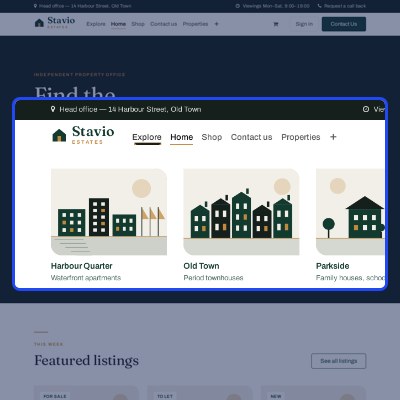
    • Estate header with logo left and a Contact Us button, or a Centered Brand header.
    • Estate footer with four link columns and a Book a valuation card.
    • Compact footer with one statement line, one row of links and a phone number.
    • Mega menu templates: Property Menu, Districts and Services.
    • Property Menu splits Buy, Rent and Commercial into separate columns.
    Estate Headers, Footers and Mega Menus

    Advisor Cards and Client Stories

    Advisor Cards put a named person on every file. Each card shows a portrait, name, patch and a contact link, which builds trust before the first call.
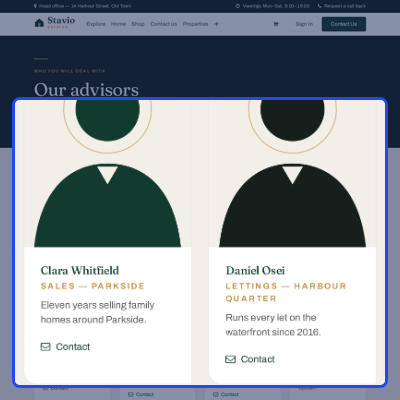
    • Advisor Cards with Default, Portrait and Roster layouts.
    • Hide contact link checkbox for a cleaner team page.
    • Client Stories block with Default, Feature one and Plain layouts.
    • Track Record block for homes sold, days to offer and years on the patch.
    • Boxed figures option with Ruled and Stacked layouts.
    Advisor Cards and Client Stories

    Buying Journey and Valuation Leads

    Buying Journey explains the agency process in four numbered steps, and Valuation CTA closes every page with a call to book a written valuation.
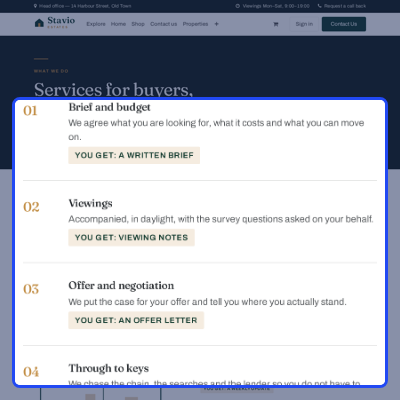
    • Four steps: Brief and budget, Viewings, Offer and negotiation, Through to keys.
    • A You get tag under each step, such as a written brief or viewing notes.
    • Journey layouts: Default, Timeline and Grid, plus Hide deliverable tags.
    • Valuation CTA layouts: Default, Centered and Slim band.
    • Outline button checkbox for a lighter valuation call to action.
    Buying Journey and Valuation Leads

    Property Catalogue and Listing Page

    Stavio restyles the Odoo eCommerce shop as a property catalogue. Listings show as cards, three per row, with categories and price filters on the left.

    On the listing page, a strip under the details invites the visitor to arrange a viewing and lists three trust points. Buyer questions per listing can be answered with Odoo Website Product FAQ.
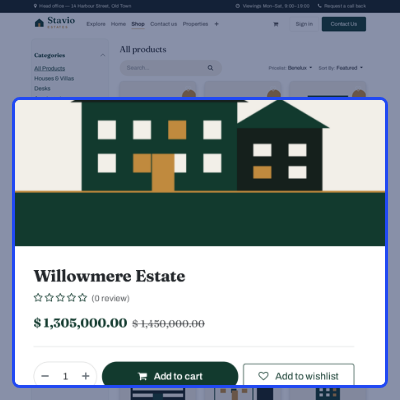
    • Shop cards with a wishlist heart, short description and price.
    • Left category list with Houses & Villas, Apartments, New Developments and Commercial.
    • Listing page images in a 4:3 carousel with customer reviews on.
    • Arrange a viewing button with Accompanied viewings and One named advisor points.
    • Price note that reads Viewings by appointment, seven days a week.
    Property Catalogue and Listing Page

    Website Builder Blocks and Theme Styles

    All ten Stavio blocks sit in their own Stavio group in the Website Builder block panel. Admins drag a block onto any page and change it from the options panel.

    Want visitors to compare two homes side by side? Pair the theme with Odoo Website Product Compare.
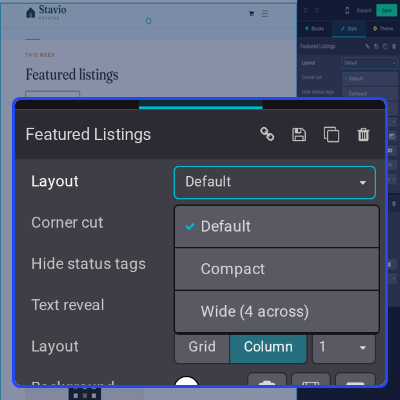
    • Each block has a Layout select with three arrangements.
    • Each block has one block-specific toggle and a Text reveal checkbox.
    • Theme style select with Soft, Outline and Bold on four page types.
    • Palette, fonts and button radius change from the Theme tab.
    Website Builder Blocks and Theme Styles

    Support

    For any query or issue, please create a support ticket here CREATE A TICKET HERE

    You may also check our top-quality Odoo Apps.

    Specifications

    Product Version1.0.0
    Released6 days ago
    Last UpdatedOctober 21, 2026 (6 days ago)
    Supported Versions19.x  20.x  

    Ratings

    We'd love to hear your thoughts! Share your feedback and help us craft an even better experience tailored just for you.

    Write a review

    Frequently Asked Questions

     What is Odoo Stavio | Real Estate & Property Theme?
    Stavio is an Odoo website theme for estate agents, brokers and property developers. It adds seven pages, ten real estate blocks and a restyled property shop.
     
     Which Odoo editions does the Stavio theme support?
    The Stavio theme works on both Odoo Community and Odoo Enterprise. The same theme files install on either edition.
     
     Which Odoo apps does the Stavio theme need?
    The Stavio theme needs the Website, eCommerce and Wishlist apps. Odoo installs them with the theme if they are missing.
     
     How do I add property listings to the website?
    Each listing is an Odoo eCommerce product with a price, images and a website category. Publish the product and it appears in the property catalogue.
     
     Can I change the block layouts without code?
    Yes, Click a Stavio block in the Website Builder and pick a Layout, such as Compact or Wide. Each block also has its own toggle and a Text reveal checkbox.
     
     Can I switch the header, footer or mega menu?
    Yes, The Website Builder offers the Stavio and Stavio Centered Brand headers, two footers, and three mega menu templates named Property Menu, Districts and Services.
     
     Does the theme load demo listings on a live database?
    No, The ten demo listings and four categories load only on a database created with demo data. A production install stays clean.
     
     Is the Stavio theme mobile friendly?
    Yes, Every page and block uses responsive layouts, so search, listings and tables adapt to tablet and phone screens.

    Specification

    Detailed technical features and requirements to help you understand the module’s capabilities and ensure smooth integration with your system.

    Cloud Hosting

    Detailed technical features and requirements to help you understand the module’s capabilities and ensure smooth integration with your system.

    Default Configuration Details of Server

    1 GB
    RAM
    1 Core
    Processor
    30 GB
    Hard Disk
    1 GB RAM & 1 Core Processor
    Database

    Want to know more how exactly we are going to power up your eCommerce Website with Cloud to fasten up your store

    * Server Configuration may vary as per application requirements.

    Change Logs

    Not Available


