WooCommerce Bagisto Connector
WooCommerce Bagisto Connector sends products, categories, customers, and orders from WooCommerce into Bagisto, from WordPress admin.
- Connect WooCommerce to Bagisto using a Bagisto API token.
- Sync simple, variable, grouped, and downloadable products.
- Map WooCommerce categories to matching Bagisto categories.
- Push WooCommerce orders with line items, taxes, and addresses.
- Sync customers and map WordPress roles to Bagisto groups.
- Map WooCommerce tax classes to Bagisto tax categories.
- Run bulk sync jobs in the background without page timeouts.
- Select rows in WordPress list tables and sync only those.
- Track every API request and error inside the sync log viewer.
- Turn on auto sync so new products reach Bagisto right away.
- Description
- Reviews
- FAQ
- Customers ()
- Specifications
- Cloud Hosting
- Changelog
WooCommerce Bagisto Connector is a WordPress plugin that moves catalog, customer, and order data from WooCommerce into a Bagisto store.
Admins add the Bagisto site URL and an API token, then test the connection before the first sync runs.
Each entity has its own settings tab. An admin turns on products, categories, taxes, users, and orders one at a time.
Sync jobs go through a background queue. A progress bar refreshes every five seconds while the queue works.
The plugin saves the Bagisto record ID against each WooCommerce record, so a second sync updates instead of duplicating.
Additionally, if you also sell on Shopify from the same WooCommerce catalog, then check Shopify Connector for WooCommerce.
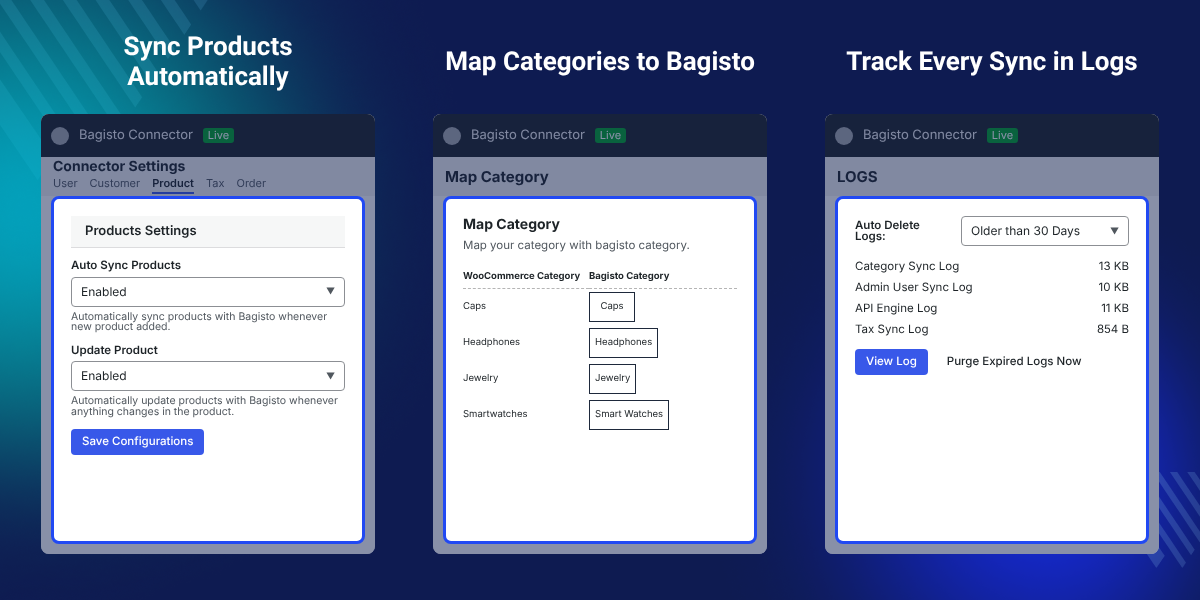
Highlighted Features of WooCommerce Bagisto Connector
Secure API Connection
Link both stores with a Bagisto personal access token and check it with the Test Connection button.
Real Time Auto Sync
New and edited WooCommerce products reach Bagisto as soon as an admin saves them.
Category Mapping Table
Match each WooCommerce category to a Bagisto category from one table inside WordPress admin.
Background Queue Engine
Large catalogs move in batches, so a bulk sync never hits a PHP execution timeout.
Selective Bulk Actions
Pick rows in the WordPress products, users, categories, or orders table and sync only those.
Detailed Sync Logs
Read API headers, payloads, and HTTP status codes for every request from the Logs tab.
Why Do We Need WooCommerce Bagisto Connector?
WooCommerce and Bagisto hold product data in different shapes. Neither platform reads the other one out of the box.
A manual WooCommerce Bagisto integration means CSV exports fixed by hand. Category trees, variations, and tax classes break along the way.
WooCommerce Bagisto Connector moves the same records over the Bagisto REST API instead. Mapping survives between runs.
A variable product goes across in two steps. The parent carries the super attributes, then the plugin creates each variation against it.
Also, if you want to list the same catalog on a marketplace, you can check our plugin WooCommerce eBay Connector.
WooCommerce Bagisto Connector Use Cases
-
Move a Store to Bagisto
Store owners leaving WordPress push the whole catalog, the customer list, and past orders into a new Bagisto store.
-
Run Both Storefronts
Keep WooCommerce as the main selling site and Bagisto as a second one, with product and order data in step.
-
Test a Bagisto Build
Developers copy a live WooCommerce catalog into a Bagisto staging site and try the theme against real products.
-
Share Orders With Bagisto
Send WooCommerce orders into Bagisto so a fulfilment team picks and packs from one order list.
Bagisto Connection Setup and API Token
The Connection tab holds the Bagisto site URL and the API token. An admin checks the link before any data moves.
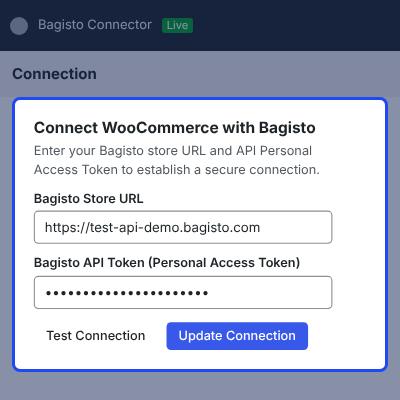
- Enter the Bagisto site URL with http or https and no trailing slash.
- Paste the Bagisto personal access token into the masked token field.
- Use the show and hide toggle to read the token while typing it.
- Click Test Connection to ping the Bagisto API in real time.
- Open the update modal to re-authenticate without losing mapped IDs.

Product Sync Settings and Auto Sync
Product settings decide which WooCommerce products go to Bagisto and whether later edits follow them across.
Also, if you run a Magento store beside WooCommerce, you can check Magento 2 WooCommerce Connector.
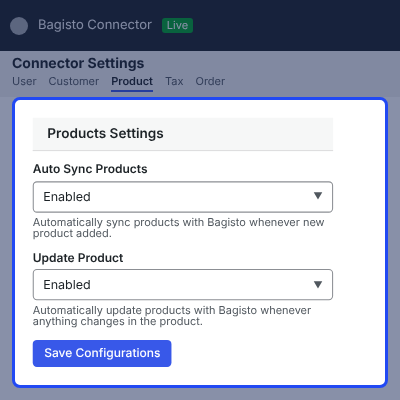
- Sync simple, variable, grouped, and downloadable WooCommerce products.
- Turn auto sync on for new products, and again for later updates.
- Send SKUs, prices, stock quantity, descriptions, and image galleries.
- Map variable attributes to Bagisto super attributes for each variant.
- Fall back to a quantity of 1 when WooCommerce does not manage stock.

Category Mapping and Attribute Sync
Category settings sit inside the Product tab. They send the WooCommerce category tree across and map each category to a Bagisto one.
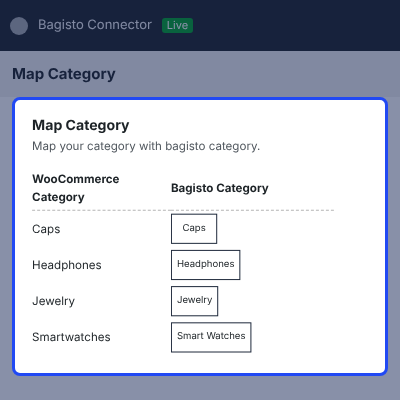
- Keep multi level category trees in the same parent and child order.
- Map every WooCommerce category to a Bagisto category from one table.
- Sync global and local product attributes together with their terms.
- Cache the Bagisto category list so the mapping table loads quickly.
- Turn category auto sync on or off from the same settings tab.

Tax Mapping for WooCommerce Tax Classes
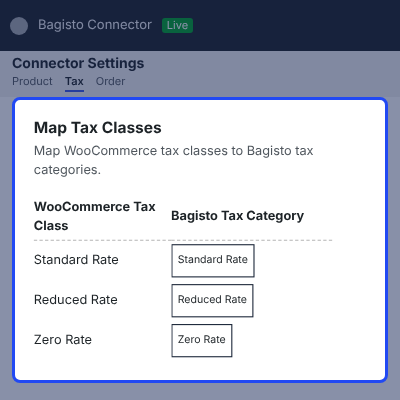
Tax settings match WooCommerce tax classes with Bagisto tax categories, so a synced product carries the right rate.
- Turn tax sync on before the first product batch leaves WordPress.
- Map every WooCommerce tax class to a Bagisto tax category.
- Cover standard rate, reduced rate, and zero rate classes.
- Revisit the mapping table after adding a new WooCommerce tax class.
- Leave tax sync off when Bagisto already holds the tax setup.

Order Sync and Status Mapping
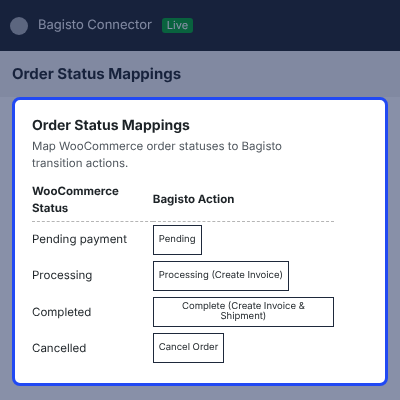
Order settings send WooCommerce orders into Bagisto with their line items, addresses, and payment method.
Also, if you want the same order data inside an ERP, you can check Odoo WooCommerce Connector.
- Push billing and shipping addresses along with every line item.
- Map each WooCommerce order status onto a Bagisto transition action.
- Map payment gateways, such as COD onto cashondelivery in Bagisto.
- Sync WooCommerce coupons as Bagisto cart rules for the same discount.
- Work with the WooCommerce High Performance Order Storage tables.

Customer and User Sync Settings
User settings move WordPress users and WooCommerce customers into Bagisto along with their saved addresses.
Also, if you plan to open the Bagisto store to other sellers, you can check Laravel Multi Vendor Marketplace.
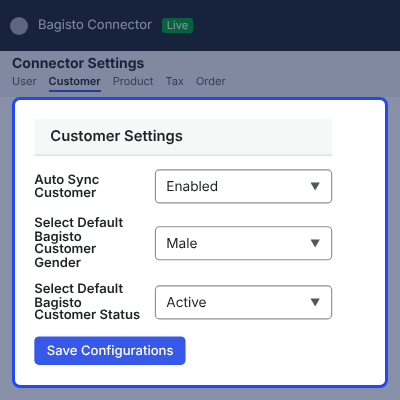
- Map each WordPress role onto a Bagisto customer group.
- Pick a default status, channel, and gender for new customer records.
- Send saved billing and shipping addresses with the account.
- Turn on auto sync so a new registration reaches Bagisto at once.
- Refresh the Bagisto record when a customer edits the profile.

Bulk Sync with Background Queues
Bulk sync pushes an existing catalog in batches. The queue runs behind the page, so nothing waits on one long request.
Also, if you want to add more features on the Bagisto side, you can check our Bagisto Laravel range.
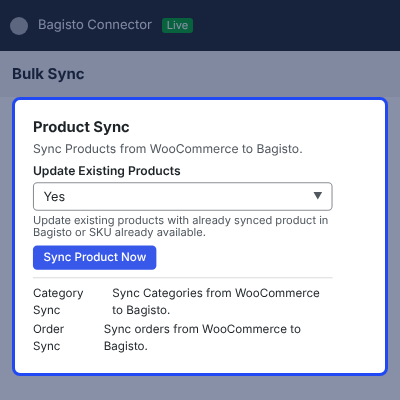
- Run product, category, user, customer, tax, and order queues together.
- Watch a progress bar that polls the queue every five seconds.
- Keep the sync buttons locked while a queue is still running.
- Read toast alerts as each task finishes in the background.
- Fall back to WP Cron when a loopback request does not fire.

Sync Logs and Error Tracking
The Logs tab records what the connector sent to Bagisto and what came back, so a failed record is easy to trace.
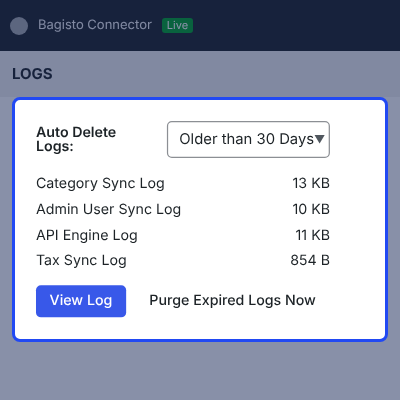
- Open any log card from the Logs tab and read the file in the browser.
- Check the request headers, JSON payload, and HTTP status code.
- Download a raw log file for a support ticket in one click.
- Auto delete logs older than 1, 15, or 30 days, or keep them for good.
- Match a failed record to the API error that caused it.

Complete WooCommerce Bagisto Connector Feature List
Connection and Setup
- Connect WooCommerce to Bagisto with a personal access token and a bearer header
- Verify the link from the Connection tab with an AJAX Test Connection call
- Mask the stored token and reveal it with a show and hide toggle
- Re-authenticate through the update modal without breaking mapped entity IDs
- Split the settings into General, User, Product, Tax, and Order tabs
Product and Catalog Sync
- Sync simple, variable, grouped, and downloadable products with SKUs, prices, and stock
- Build Bagisto configurable products from super attributes and per variant payloads
- Save the Bagisto product ID in post meta so a repeat sync updates the same record
- Recover a lost mapping through an SKU lookup that saves the ID again
- Upload product images through a shared media downloader with MIME and EXIF checks
- Set a quantity of 1 for in stock products that WooCommerce does not manage
Category, Attribute and Tax Mapping
- Sync multi level category trees and keep the parent and child order
- Map WooCommerce categories to Bagisto categories from an interactive table
- Sync global and local product attributes with their attribute terms
- Cache the Bagisto category list in a transient for a faster mapping screen
- Map WooCommerce tax classes onto Bagisto tax categories before a product run
Order and Customer Sync
- Import orders with line items, billing and shipping addresses, and payment gateways
- Map order statuses to Bagisto actions and payment methods, such as COD to cashondelivery
- Sync WooCommerce coupons as Bagisto cart rules, without fee and shipping discounts
- Sync WordPress users and WooCommerce customers with roles, groups, and addresses
- Apply a default status, channel, and gender to every new Bagisto customer
Bulk Sync and Background Processing
- Queue products, categories, users, customers, attributes, taxes, and orders in parallel
- Run the queue over loopback HTTP requests with a WP Cron fallback every five minutes
- Poll the queue every five seconds and update progress bars without a page reload
- Lock the sync buttons while a queue runs and keep that state across a refresh
- Select rows in the users, categories, products, and orders tables for a targeted sync
- Show a Bagisto mapping status column beside products, categories, and orders
Logs, Compatibility and Developer Tools
- Log API headers, JSON payloads, HTTP status codes, and error traces for each request
- Open a log card in the Logs tab or download the raw file in one click
- Rotate and purge old log files through a daily WP Cron cleanup event
- Support WordPress 6.0 and above, WooCommerce 9.0 and above, and PHP 7.4 to 8.2
- Work with WooCommerce High Performance Order Storage and custom order tables
- Extend the settings tabs and bulk actions through action and filter hooks
- Keep saved settings, mapping meta, and log history after a deactivation
Support
For any query or issue, please create a support ticket here http://webkul.uvdesk.com/.
You may also check our top-quality WooCommerce Plugins.
Specifications
Frequently Asked Questions
Specification
Detailed technical features and requirements to help you understand the module’s capabilities and ensure smooth integration with your system.
Cloud Hosting
Detailed technical features and requirements to help you understand the module’s capabilities and ensure smooth integration with your system.
Move to Cloud Today
We’re partnered with top-tier, trusted providers!
Default Configuration Details of Server
RAM 1 Core
Processor 30 GB
Hard Disk
Database
Want to know more how exactly we are going to power up your eCommerce Website with Cloud to fasten up your store
* Server Configuration may vary as per application requirements.
Change Logs
- - Feature Add (+)
- - Feature remove (-)
- - Bug Fixed (!)
- - Modification (*)
- + Intial Release.
- Secure token authentication: connect to Bagisto using a Personal Access Token with live connection verification.
- Dedicated settings tabs for Users, Customers, Products, Categories, Attributes, Taxes and Orders.
- Selective bulk sync directly from the native Users, Categories, Products and Orders list tables.
- Auto-sync and auto-update toggles per entity for creation and update events.
- One-to-one mapping tables for WooCommerce categories and tax classes.
- Background queue processing with a five-minute health check and automated retry for failed tasks.
- Real-time polling progress bar and floating toast notifications.
- Embedded log viewer with request/response detail, raw log download, log rotation, a configurable retention policy and a daily cleanup cron.
- WooCommerce High-Performance Order Storage (HPOS) compatibility.


