USD
  • EUR
  • INR
  • USD
Cart
Cart 1
    Hire a Developer
    ×
    Contact Us!
    Send Again
    Close
    Please Login to Write Your Review

    WooCommerce Marketplace Shiprocket Shipping

    WooCommerce Marketplace Shiprocket Shipping lets vendor's ship orders from their own pickup locations. They use admin's Shiprocket account with live rates and automatic shipment creation.


    • Multi Vendor shipping with separate vendor control.

    • Multiple pickup locations with default warehouse.

    • Live courier rates at checkout per vendor.

    • Automatic shipment creation after order placement.

    • Download shipping labels from order page.

    • Download invoices for vendor's and admin.

    • Admin can also add their pickup location for shipping their own products.

    Screenshots
    WooCommerce Marketplace Shiprocket Shipping WooCommerce Marketplace Shiprocket Shipping WooCommerce Marketplace Shiprocket Shipping WooCommerce Marketplace Shiprocket Shipping WooCommerce Marketplace Shiprocket Shipping WooCommerce Marketplace Shiprocket Shipping WooCommerce Marketplace Shiprocket Shipping WooCommerce Marketplace Shiprocket Shipping WooCommerce Marketplace Shiprocket Shipping
    Show More Hide All
    $99.00

    * Required Fields

    Add To Cart
    30 Days Refund*
    Lifetime Free Upgrade
    Only One Time Payment
    $99.00
    Configure and Buy
    • Description
    • Reviews
    • FAQ
    • Customers ()
    • Specifications
    • Cloud Hosting
    • Changelog

    WooCommerce Marketplace Shiprocket Shipping connects your store with Shiprocket. It lets vendors manage their own shipping. It supports multi-vendor shipping. Each vendor handles order pickup and fulfillment separately.

    Vendors can add pickup locations. They can also set a default warehouse. Orders can be shipped from the dashboard. At checkout, buyers see live courier rates. These rates depend on each vendor’s location. Shipping is calculated separately for each vendor in the cart.

    After an order is placed, the system creates shipments through Shiprocket. Vendors do not need to enter order details. Shipping labels and invoices are available in the order view. Vendors and admin can download them.

    This module supports courier services and cash on delivery (COD). It helps manage shipping tasks for marketplace stores. It also supports shipment tracking and logistics through Shiprocket.

    Additionally, you can go through Marketplace USPS Shipping for WooCommerce to add USPS Shipping to your marketplace.
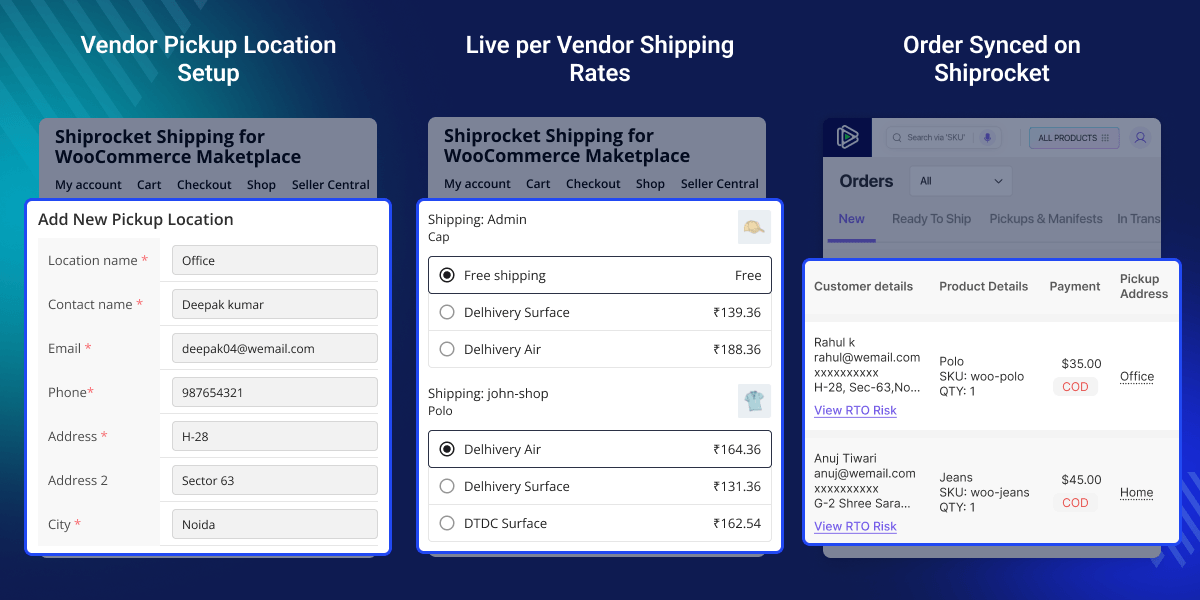
    WooCommerce Marketplace Shiprocket Shipping

    Highlighted Features

     Per Vendor Shipping Setup

    Each vendor can add their pickup addresses and choose a default one.

     Multiple Pickup Locations

    Vendor's can add warehouses and set a default pickup location.

     Live Shipping Rates

    Customers see real time courier rates based on vendor location.

     Auto Shipment Creation

    Shipments are created automatically after order placement.

     Label & Invoice Download

    Shipping labels and invoices are available in order view.

     Admin Shipping Control

    Admin can also set pickup locations for their own products.

    Why do we need Shiprocket Shipping for WooCommerce Marketplace

    In a multi vendor marketplace, vendors ship from different places. Default WooCommerce shipping treats the store as one source. This can give wrong shipping rates.

    Vendors often rely on the admin to create shipments. This slows down orders. It also adds extra manual work. WooCommerce Multi Vendor Shiprocket Shipping fixes this. It gives vendors control of their shipping. It also creates shipments through Shiprocket.

    This module follows real marketplace needs. It gives correct shipping rates and faster order processing.

    Apart from this, if you would like to set shipping prices for each product, then you can check WooCommerce Per Product Shipping Extension.

    Use Cases

    Explore how this module supports different marketplace business models.

     Multi Vendor Marketplace

    Each vendor ships from their own location with separate courier rates and shipment handling.

     Dropshipping Stores

    Vendors can manage shipping independently without admin involvement.

     Regional Rates

    Shipping rates are calculated based on vendor and customer location.

     COD Based Stores

    Cash on Delivery charges are included in courier rates automatically.

    Vendor Pickup Location Management

    Vendor's can manage their warehouses directly from their dashboard. They can add location details like address, contact info, and GSTIN. A default pickup location can be selected for shipping.
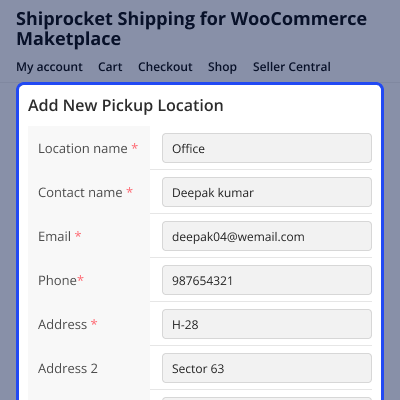
    • Add and manage multiple pickup locations
    • Set default warehouse for shipping
    • Import locations from Shiprocket account
    • Validate address and contact details
    • Vendor specific data isolation
    Vendor Pickup Location Management

    Live Per Vendor Shipping Rates

    Shipping rates are calculated separately in the cart. Buyers can choose from available courier options based on serviceability. WooCommerce Marketplace Shiprocket Shipping provides accurate shipping costs and improves checkout transparency for customers.
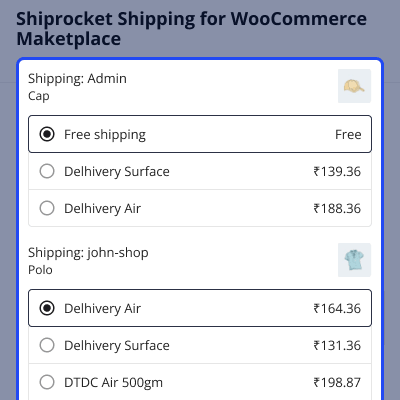
    • Real time courier rate calculation
    • Separate shipping packages per vendor
    • COD charges included automatically
    • Weight and dimension based pricing
    • Courier details stored in order
    Live Per Vendor Shipping Rates

    Automatic Shipment Creation

    Shipments are created as soon as order is placed. Each vendor gets a separate shipment for their items. This reduces manual work and speeds up order processing.
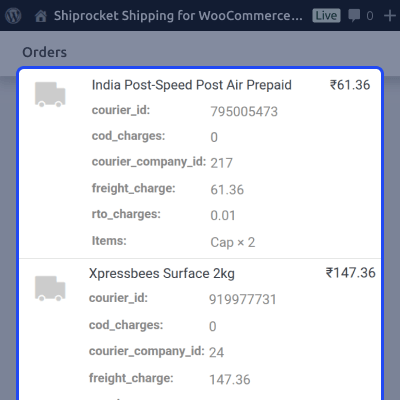
    • Auto order sync with Shiprocket
    • AWB generated using selected courier
    • Supports classic and block checkout
    • Separate shipments for each vendor
    • Order notes updated with shipment details
    Automatic Shipment Creation

    Shipping Label Printing

    Labels can be generated and downloaded from the order page. Both vendor's and admin have access to label printing. This allows quick access to shipping documents without leaving the order page.
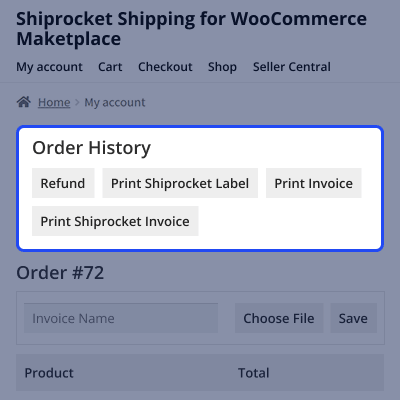
    • One click label generation
    • Available in vendor and admin panels
    • Secure request validation
    • Cached label URLs for faster access
    • Admin control to enable or disable
    Shipping Label Printing

    Admin Shiprocket Account

    Vendors do not require a Shiprocket Account, they can add their pickup locations from their WooCommerce store frontend dashboard. Pickup address will be added to the Admin's Shiprocket account. Admin can verify the Pickup address by SMS verification to the vendor's contact no.
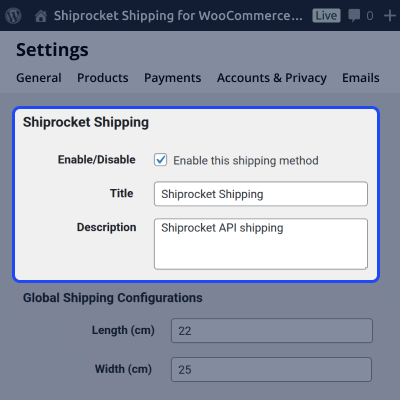
    • Only the admin needs to configure the API credentials from Shiprocket settings.
    • Default pickup and product settings
    • Manual and auto token refresh
    • Independent shipment creation
    • Central control from WooCommerce settings
    Admin Shiprocket Account

    Automatic Token Management

    This Shiprocket WooCommerce plugin handles Shiprocket authentication in the background. There is no need to log in again when tokens expire. This ensures uninterrupted communication with Shiprocket without manual login.
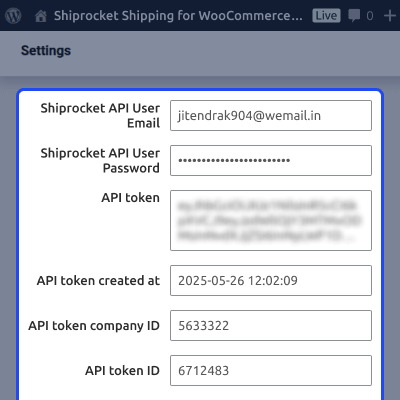
    • Auto login using API credentials
    • Token refresh on expiry
    • Retry failed API requests
    • Secure server side authentication
    Automatic Token Management

    Support

    For any query or issue, please create a support ticket here http://webkul.uvdesk.com/

    You may also check our quality WooCommerce Plugins.

    Specifications

    Product Version1.0.0
    Released4 days ago
    Last UpdatedMay 1, 2026 (Today)
    Supported VersionsWordPress  6.x.x  WooCommerce  10.x.x  
    Write a review

    Frequently Asked Questions

     Does it support multiple vendors in one order?
    Yes, it supports multiple vendors in one order, with shipping split vendor-wise and separate rates based on location.
     
     Are shipping rates shown in real time?
    Yes, shipping rates are fetched live from Shiprocket API and displayed in real time during checkout.
     
     How are shipments created?
    Shipments are auto-created by the Multi Vendor Shiprocket module right after a customer places an order.
     
     Can vendors print shipping labels?
    Yes, vendors can print shipping labels directly from their dashboard for all confirmed and processed orders.
     
     What happens if the token expires?
    If the token expires, the system refreshes it automatically in the background without affecting operations.
     
     Does it support COD orders?
    Yes, COD orders are supported, and applicable Cash on Delivery charges are included in shipping costs.
     
     Are product dimensions required?
    If product dimensions are missing, default values set by the admin are used automatically by the system.

    Move to Cloud Today

    AWS Free tier hosting for one year by amazon web services, for more details please visit AWS Free Tier.

    GCP Free tier hosting for one year with 300 credit points by google cloud platform, for more details please visit GCP Free Tier.

    Azure free tier hosting for one year with 25+ always free services, for more details please visit Azure Free Tier.

    In our default configuration we will provide tremendous configuration for your eCommerce Website which is fast to load and response.

    Default Configuration Details of Server

    • 1 GB RAM
    • 1 Core Processor
    • 30 GB Hard Disk
    • DB with 1 GB RAM and 1 Core Processor

    * Server Configuration may vary as per application requirements.

    Want to know more how exactly we are going to power up your eCommerce Website with Cloud to fasten up your store. Please visit the Cloudkul Services.

    Get Started with Cloud
    • + Features
    • - Bugs
    Version 1.0.0
    • Initial Release


