USD
  • EUR
  • INR
  • USD
Cart
Cart 0
  • You have no items in your shopping cart.
    WooCommerce Extensions
    Cart
    Cart 0
    • You have no items in your shopping cart.
    Hire a Developer
    ×
    Contact Us!
    Send Again
    Close
    Please Login to Write Your Review
    WooCommerce POS Tranzila Terminal Payment

    WooCommerce POS Tranzila Terminal Payment

    x

    * Required Fields

    $299.00
    Add To Cart
    30 Days Money Back Guarantee*
    Only One Time Payment

    WooCommerce POS Tranzila Terminal Payment Module connects Tranzila payment terminals with WooCommerce POS for secure, real time in store card payments.


    • Connect Tranzila payment terminals to WooCommerce POS.

    • Accept secure debit and credit card payments at checkout.

    • Take card payments in real time through Tranzila terminals.

    • Add a Tranzila Terminal as a payment method in WooCommerce POS.

    • Set up terminal settings for each outlet.

    • Update WooCommerce orders automatically after each payment.

    • Save the transaction ID and payment details with every order.

    • Accept split payments for more payment options.

    • Show live payment status in a simple payment window.

    • Works with WooCommerce HPOS and legacy order storage.

    WooCommerce POS Tranzila Terminal Payment
    WooCommerce POS Tranzila Terminal Payment
    $299.00
    Check How It Works
    $299.00
    Configure and Buy
    30 Days Money Back Guarantee*
    Only One Time Payment
    X
    • Description
    • Reviews
    • FAQ
    • Customers ()
    • Specifications
    • Cloud Hosting
    • Changelog

    WooCommerce POS Tranzila Terminal Payment connects Tranzila payment terminals with WooCommerce POS. It helps you accept secure card payments during checkout.

    This plugin sends payment requests from Point of Sale to the Tranzila terminal, and the terminal processes the payment. When the payment is approved, WooCommerce updates the order.

    You can use a different Tranzila terminal for each outlet. This makes it easy to manage payments in multiple stores. The plugin saves payment details with every WooCommerce order. You can view payments, check transaction records, and track orders from one place.

    It is a good fit for retail stores, restaurants, pharmacies, and many other businesses. Also, To Integrate WooCommerce with Salesforce to sync eCommerce and CRM data, improving sales and customer management with WordPress WooCommerce Salesforce Connector.
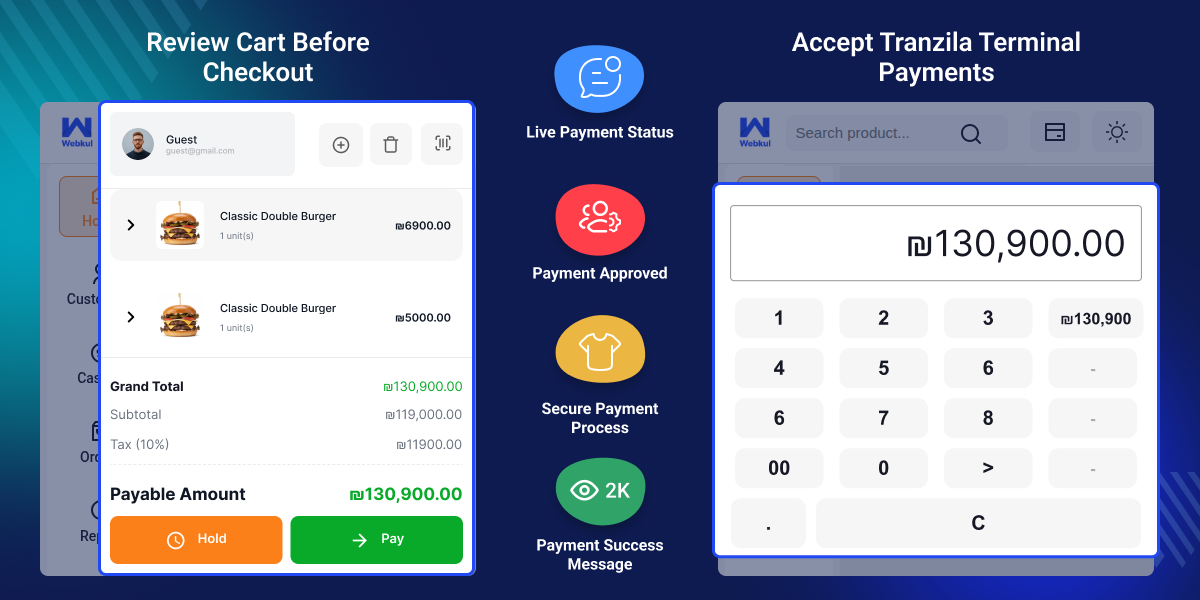
    WooCommerce POS Tranzila Terminal Payment

    Highlighted Features of WooCommerce POS Tranzila Terminal Payment

     Real-Time Card Payments

    Take card payments with Tranzila terminals from checkout.

     Terminal Integration

    Connect Tranzila terminals to Point of Sale for quick in-store payments.

     Per Outlet Setup

    Assign a different payment terminal to each outlet.

     Automatic Order Updates

    Update WooCommerce orders automatically after every successful or failed payment.

     Payment Record Storage

    Save the transaction ID, payment details, and terminal details with each WooCommerce order.

     Split Payment Support

    Accept full or split payments to give users more ways to pay.

     Live Payment Screen

    Show payment steps and live payment status during checkout.

     WooCommerce HPOS Support

    Works with WooCommerce High Performance Order Storage and legacy order storage.

    Why Do We Need WooCommerce AI Product Recommendations?

    WooCommerce POS Tranzila Terminal Payment connects Tranzila payment terminals to WooCommerce POS. It helps businesses take secure card payments and speed up checkout.

    Many businesses use separate systems for payments and orders. Cashiers have to switch between them during checkout. This takes more time and can lead to mistakes.

    This plugin brings both systems together by sending payment requests from the Point of Sale to the Tranzila terminal. Orders update automatically after each successful payment.

    Payment details are stored with every order, and you can assign a different terminal to each outlet. As a result, in-store payments become simple, fast, and secure.

    Apart from this, To Manage retail sales, inventory, orders, users, and payments across multiple stores with real-time sync checkout, you can check WooCommerce POS.

    Use Cases

    • Retail Stores

      Take debit and credit card payments through Tranzila terminals during checkout.

    • Pharmacies

      Take card payments in your store and keep payment records and WooCommerce orders up to date after every sale.

    • Electronics Stores

      Take card payments for expensive products and save payment details with every WooCommerce order.

    • Multi Outlet Businesses

      Use a different Tranzila terminal for each outlet to manage payments across all your store locations.

    Drawer Account Summary

    Tranzila Payment Plugin includes a Drawer Account Summary that shows drawer balance, payments, refunds, expected cash, and total amount before you close the drawer.
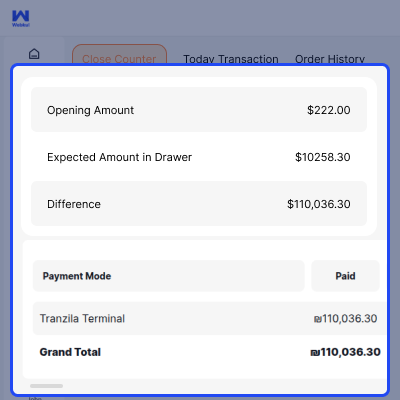
    • View the opening balance and expected cash
    • See payment, refund, and change totals
    • View Tranzila Terminal payment totals
    • Check the total cash in the drawer
    • Print the drawer summary before closing
    • Review all transactions at a glance
    Drawer Account Summary

    Order History

    WooCommerce Tranzila Integration lets cashiers find completed orders; they can view payment details, check the transaction status, and print invoices from the Order History screen.
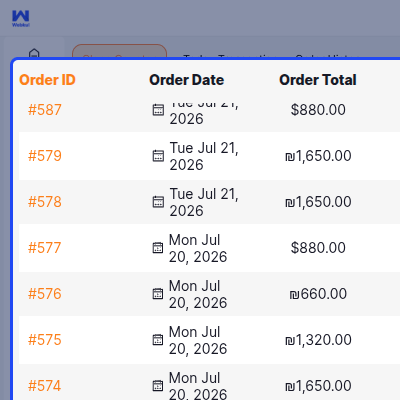
    • Search orders by order ID or user name
    • View the order date, total, sales channel, and status
    • See products, taxes, discounts, and payment details
    • View the Tranzila payment method and transaction amount
    • Print invoices from the order details
    • Send order confirmation emails from the screen
    Order History

    Real-Time Payment Processing

    WooCommerce Tranzila Payment Gateway shows the payment status as the payment is processed. Cashiers can see each step before they finish the checkout.
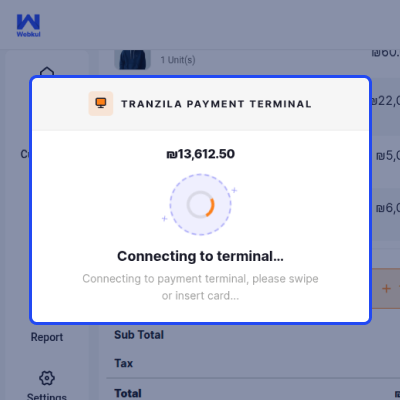
    • Connect to the Tranzila terminal
    • Show the payment status during card payment
    • Show the payment amount before approval
    • Tell users to tap, insert, or swipe their card
    • Wait for the payment result before finishing the order
    • Show clear payment messages during checkout
    Real-Time Payment Processing

    Payment Approval Confirmation

    Payment Approval Confirmation screen shows after a card payment is approved. It lets cashiers see the payment before they finish the WooCommerce order.
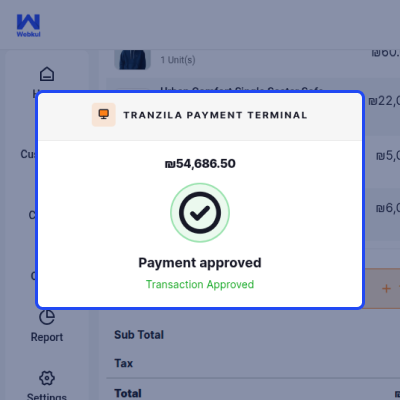
    • Show the payment approval screen after a successful payment
    • Show the approved payment amount
    • Let cashiers check payment before they finish the order
    • Show a clear payment message during checkout
    • Help reduce payment mistakes
    • Continue checkout after payment approval
    Payment Approval Confirmation

     Product Catalogue and Checkout

    Tranzila Terminal provides a Product Catalogue where cashiers can search, filter, and browse products in a grid for faster item selection and checkout.
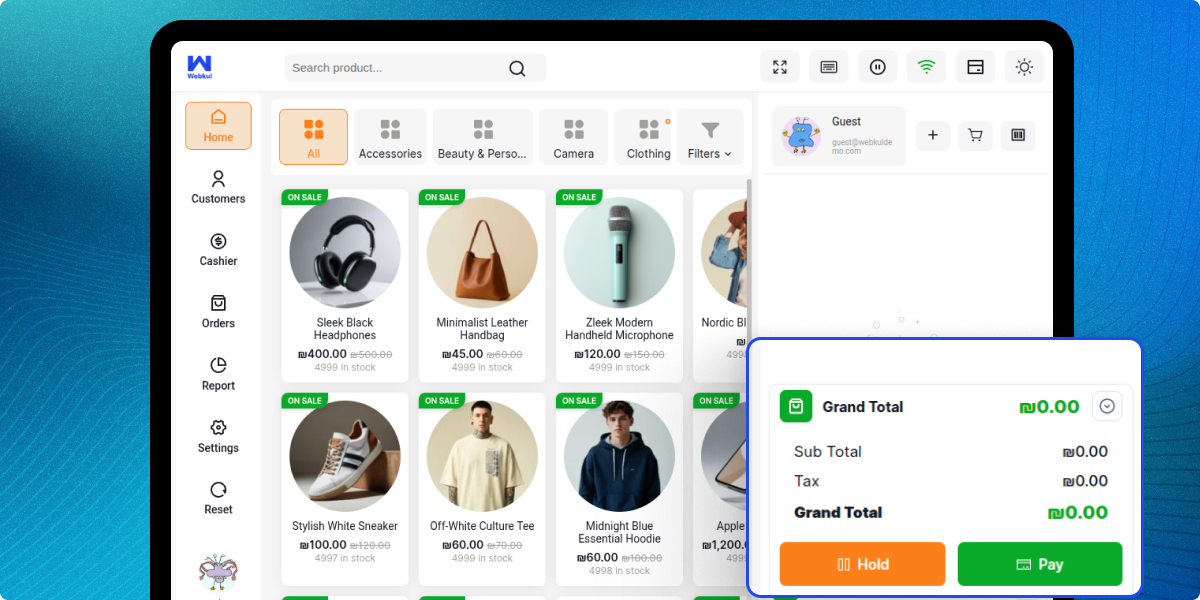
    • Search products by name for faster checkout
    • Browse products by category with quick filters
    • Add products to the cart with a single click
    • View product prices, stock, and sale labels
    • Display the running cart total with taxes
    • Hold or complete orders directly from the checkout screen
    Product Catalogue and Checkout

     Tranzila Terminal Payment

    WooCommerce Payment Integration lets cashiers accept secure card payments with the Tranzila Terminal. They can complete payments quickly from the payment screen.
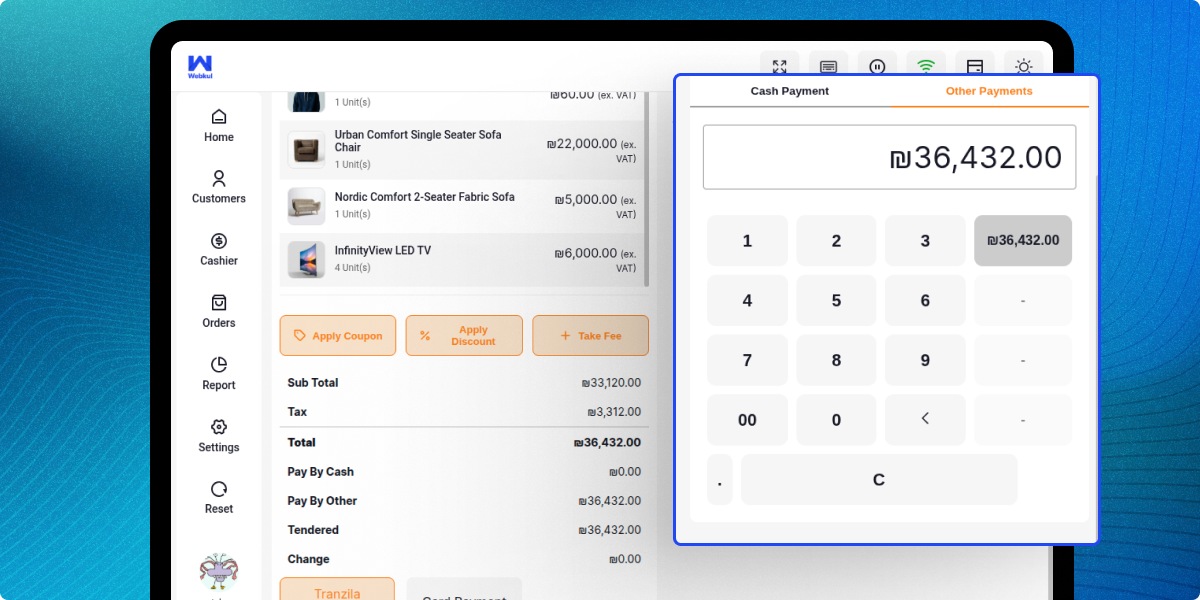
    • Choose Tranzila Terminal as the payment method
    • Accept card payments in real time
    • Support cash, card, and other payment methods
    • Apply coupons, discounts, and extra fees before payment
    • View payment totals, taxes, and change automatically
    • Confirm the payment and print the invoice from the same screen
    Tranzila Terminal Payment

     Support

    For any query or issue please create a support ticket here http://webkul.uvdesk.comYou may also check our other top-quality WooCommerce Plugins.

    Specifications

    Product Version1.0.0
    Released25 days ago
    Last UpdatedAugust 5, 2026 (25 days ago)
    Supported VersionsWordPress  6.x.x  7.x.x  WooCommerce  9.x.x  10.x.x  

    Ratings

    We'd love to hear your thoughts! Share your feedback and help us craft an even better experience tailored just for you.

    Write a review

    Frequently Asked Questions

     Does this plugin affect the standard WooCommerce checkout?
    No, this plugin only adds Tranzila payment support to Point of Sale and does not change the standard WooCommerce checkout or online payment process.
     
     Can I configure different terminals for different outlets?
    Yes, you can set up separate Tranzila terminal settings for each outlet, allowing every store to use its own payment terminal and account details.
     
     Can I set Tranzila as the default Point of Sale payment method?
    Yes, you can set Tranzila Terminal as the default payment method for supported outlets, so cashiers can use it automatically during checkout.
     
     What happens if a payment fails?
    If a payment fails, the order is marked as failed, and the cashier can retry the payment or cancel the transaction from the error message.
     
     Does it support split payments?
    Yes, this plugin supports split payments; users can pay with more than one payment method during Point of Sale checkout where this feature is available.
     
     Is the payment communication secure?
    Yes, this plugin uses secure communication with Tranzila to send payment requests and receive payment responses during checkout.
     
     Can I continue using other Point of Sale payment methods?
    Yes, this plugin works with other supported Point of Sale payment methods, so stores can continue offering multiple payment options.

    Specification

    Detailed technical features and requirements to help you understand the module’s capabilities and ensure smooth integration with your system.

    Cloud Hosting

    Detailed technical features and requirements to help you understand the module’s capabilities and ensure smooth integration with your system.

    Default Configuration Details of Server

    1 GB
    RAM
    1 Core
    Processor
    30 GB
    Hard Disk
    1 GB RAM & 1 Core Processor
    Database

    Want to know more how exactly we are going to power up your eCommerce Website with Cloud to fasten up your store

    * Server Configuration may vary as per application requirements.

    Change Logs

    • - Feature Add (+)
    • - Feature remove (-)
    • - Bug Fixed (!)
    • - Modification (*)
    Version 1.0.0
    • + Intial Release


