USD
  • EUR
  • INR
  • USD
Cart
Cart 0
  • You have no items in your shopping cart.
    Cart
    Cart 0
    • You have no items in your shopping cart.
    Hire a Developer
    ×
    Contact Us!
    Send Again
    Close
    Please Login to Write Your Review

    WooCommerce WCFM Marketplace Point of Sale

    WooCommerce WCFM Marketplace Point of Sale System lets WCFM Marketplace vendors sell their products in retail outlets, with orders being automatically generated in WooCommerce store.


    • Both admin and WCFM vendors can create multiple retail outlets connected to the online stores.

    • Multiple agents can be created by admins and WCFM vendors for outlets to manage sales and customers.

    • Barcode reader functionality for seamlessly adding products to the cart.

    • Admin can create payment options such as cash, card, or split method for checkout at WCFM POS.

    • WCFM POS agents can place the product cart on hold for future processing.

    • Admin can set the WCFM POS theme color configuration.

    • WCFM POS Invoice template creation option for the store admin.

    • Admin can view the WCFM POS sales report for all outlets.

    • Order details view option for the admin with outlet wise filtration.

    Additional Info

    Screenshots
    WooCommerce WCFM Marketplace Point of Sale WooCommerce WCFM Marketplace Point of Sale WooCommerce WCFM Marketplace Point of Sale WooCommerce WCFM Marketplace Point of Sale WooCommerce WCFM Marketplace Point of Sale WooCommerce WCFM Marketplace Point of Sale WooCommerce WCFM Marketplace Point of Sale WooCommerce WCFM Marketplace Point of Sale WooCommerce WCFM Marketplace Point of Sale WooCommerce WCFM Marketplace Point of Sale WooCommerce WCFM Marketplace Point of Sale WooCommerce WCFM Marketplace Point of Sale
    Show More Hide All
    $199.00

    * Required Fields

    Add To Cart
    Only One Time Payment
    $199.00
    Configure and Buy
    • Description
    • Reviews
    • FAQ
    • Customers ()
    • Specifications
    • Cloud Hosting
    • Changelog

    WooCommerce WCFM Marketplace Point of Sale (POS) System allows WCFM marketplace vendors to sell their WooCommerce products in physical stores, with orders directly recorded in their WCFM store. Vendors can also create multiple cashiers or agents for their outlets.

    This WooCommerce WCFM POS system seamlessly integrates physical and online store management. With its intuitive and fast front end, it boosts efficiency and enhances WCFM POS performance.

    Also, check out the WooCommerce Mobile App Builder that converts your WooCommerce store into a native mobile app (Android & iOS).

    Note-
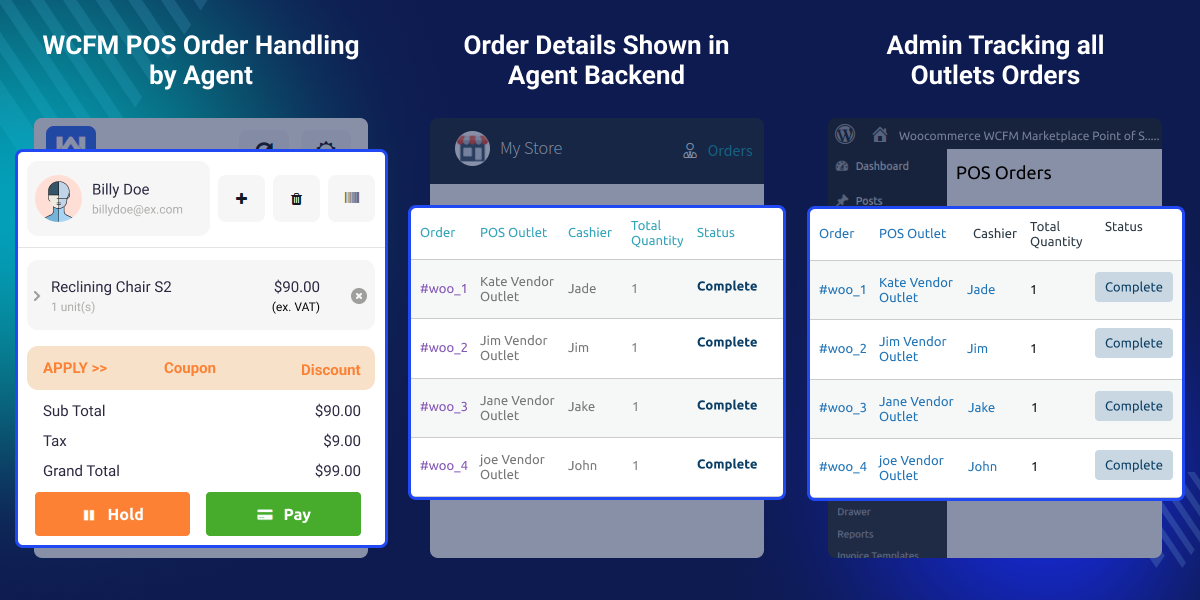
    • The WCFM POS system is compatible with devices that have a screen resolution of 1280px or higher. We are currently working on making it compatible with devices that have a screen resolution of 768px or higher.
    • WCFM POS will not work in the Mozilla Firefox private window.
    • To use WooCommerce WCFM Marketplace POS System you must have WooCommerce WCFM Marketplace, as well as WooCommerce POS module installed.
    WooCommerce WCFM Marketplace Point of Sale

    Highlighted Features of WooCommerce WCFM Marketplace POS

     Retail Outlet Management

    Admin and WCFM vendors can create multiple retail outlets and connect them with their online store for streamlined operations.

     Multi Agent Support

    Admin and WCFM vendors can add multiple agents or cashiers for their outlets to handle sales and customer interactions efficiently.

     Barcode Integration

    The WCFM POS system supports barcode readers, enabling quick and easy addition of products to the cart.

     Flexible Payment Options

    Admin can define checkout methods like cash, card, or split payments for the WCFM POS system

     Advanced Sales Reporting

    Admin can view outlet wise sales reports to track orders, customers, and stock for the WCFM POS system.

     Hold Cart Feature

    The WCFM POS agents can hold product carts for future checkout processing.

     Invoice Template Creation

    Admin can easily design and configure custom WCFM POS system invoice templates.

     POS Theme Configuration

    Admins can personalize the WCFM POS system interface with configurable theme colors.

    Why do we need WooCommerce WCFM Marketplace Point of Sale System module?

    WooCommerce WCFM Marketplace POS System bridges the gap between physical and online stores, enabling seamless operations for retail businesses.

    Store owners can efficiently oversee physical store operations on their WooCommerce platform, including creating outlets, managing orders, and adding users. The system supports barcode printing for products, streamlining inventory tracking and order processing.

    By integrating POS features with the online store, businesses gain centralized control over customers, payments, and essential functions, simplifying operations and enhancing efficiency for marketplace sellers.

    You may also like our Purchase Order for WooCommerce extension which helps the WooCommerce store admin to manage the inventory of the products.

    Advanced Store Management

    WooCommerce WCFM Marketplace Point of Sale add on streamlines both online and physical retail operations.
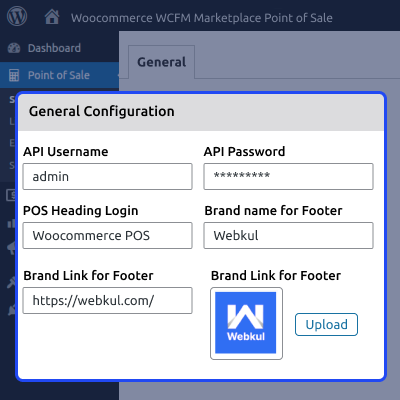
    • Connect physical stores with your WooCommerce website.
    • Set up and manage multiple retail outlets.
    • Add agents or cashiers for each physical store.
    • Track product inventories in one place.
    • Create and process orders directly through the WCFM POS.
    Advanced Store Management

    Flexible Payment Options

    Define multiple payment methods for a smooth checkout process in WCFM POS system.
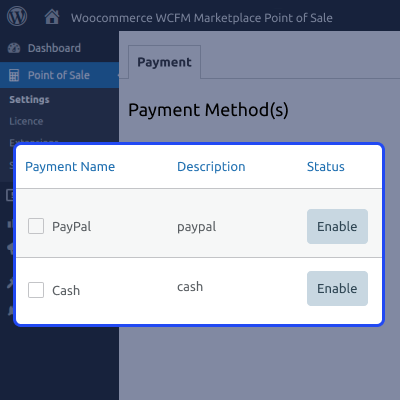
    • Set up payment options like cash, card, or split payments.
    • Process transactions quickly and securely.
    • Track and manage payments for each store.
    • Sync payments with online orders effortlessly.
    • Offer flexibility at checkout for customers.
    Flexible Payment Options

    Barcode Integration

    Simplify product management and order creation using barcode functionality within the WCFM POS system.
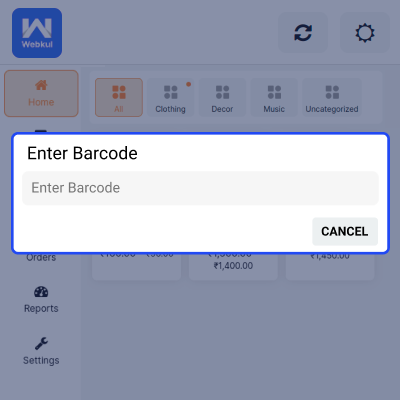
    • Print product barcodes through the system.
    • Scan barcodes to quickly add items to the cart.
    • Avoid errors in inventory and order management.
    • Save time by reducing manual data entry.
    • Improve efficiency with quick product handling.
    Barcode Integration

    Manage WCFM Outlets and Agents

    Easily manage multiple retail outlets and agents using the centralized WCFM POS system.
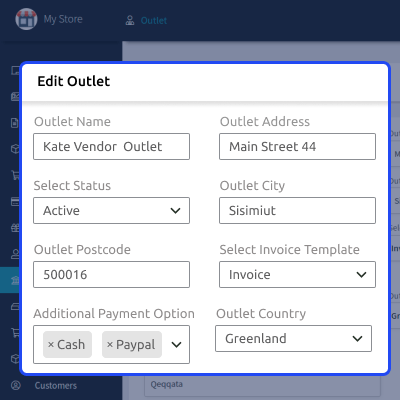
    • Create and manage multiple store locations.
    • Add cashiers or agents for specific outlets.
    • Monitor sales activities for each store.
    • Assign roles to simplify store operations.
    • Keep physical store management organized.
    Manage WCFM Outlets and Agents

    Manage WCFM POS Orders

    WCFM point of sale system allows easy tracking of POS orders by WCFM marketplace vendors.
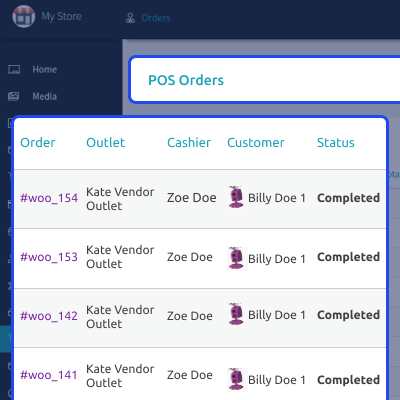
    • Manage orders from multiple outlets in one dashboard.
    • View order history and status updates in real time.
    • View receipts and print directly from the POS system.
    • Apply discounts or promotions at checkout seamlessly.
    • Track payments and generate detailed sales reports.
    Manage WCFM POS Orders

    Sales Reporting

    WCFM POS allows to track and analyze retail stores' performance with advanced sales data.
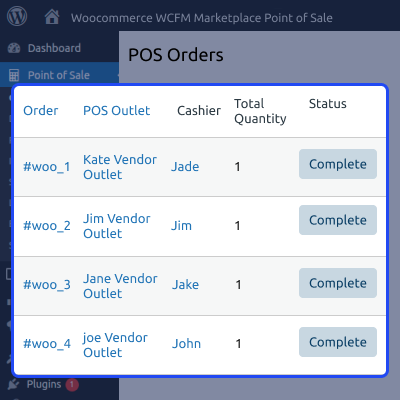
    • Get detailed sales reports for all outlets.
    • Filter POS orders based on outlets.
    • Monitor agent performance with outlet specific metrics.
    • Keep track of order and payment history.
    • Use reports to make informed decisions.
    Sales Reporting

    Hold Cart Feature

    WCFM POS agents can manage orders using the hold cart option.
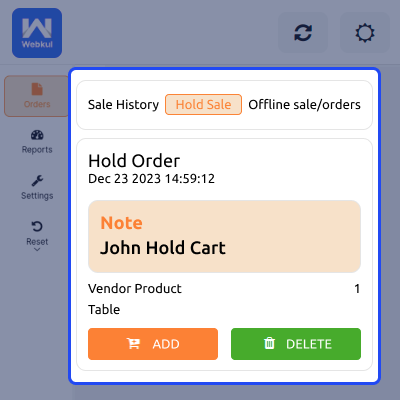
    • Pause the cart and keep it for checkout at a later time.
    • Handle interruptions without losing order data.
    • Resume held carts anytime.
    • Manage long queues efficiently.
    • Offer better convenience for customers.
    Hold Cart Feature

    Support

    For any query or issue, please create a support ticket here http://webkul.uvdesk.com/

    You may also check our quality WooCommerce Plugins.

    Specifications

    Product Version1.0.0
    Released1 year ago
    Last UpdatedMarch 13, 2026 (1 day ago)
    Supported VersionsWordPress  6.x.x  WooCommerce  9.x.x  
    Write a review

    Frequently Asked Questions

     How does the admin use WooCommerce WCFM Marketplace POS Extension?
    Admin can manage outlets, assign cashiers, set payment methods, customize themes, design invoices, and track sales reports using the WCFM POS system.
     
     How can WooCommerce WCFM POS system be used by Agents?
    Using the WCFM POS system, agents can manage sales, assist customers, process payments, and hold carts for future checkouts.
     
     What customization options are available in WooCommerce WCFM POS?
    Admins can customize POS themes, create tailored invoice templates, and adjust settings to suit their store's branding.
     
     How does WooCommerce WCFM POS streamline store operations?
    The WCFM POS system integrates barcodes, manages orders, tracks sales, and enables seamless syncing with online stores for smooth operations.
     
     What reporting features does WooCommerce WCFM POS offer?
    Admin can view sales reports, filter orders by outlet, and analyze store performance for better decision making.

    Move to Cloud Today

    AWS Free tier hosting for one year by amazon web services, for more details please visit AWS Free Tier.

    GCP Free tier hosting for one year with 300 credit points by google cloud platform, for more details please visit GCP Free Tier.

    Azure free tier hosting for one year with 25+ always free services, for more details please visit Azure Free Tier.

    In our default configuration we will provide tremendous configuration for your eCommerce Website which is fast to load and response.

    Default Configuration Details of Server

    • 1 GB RAM
    • 1 Core Processor
    • 30 GB Hard Disk
    • DB with 1 GB RAM and 1 Core Processor

    * Server Configuration may vary as per application requirements.

    Want to know more how exactly we are going to power up your eCommerce Website with Cloud to fasten up your store. Please visit the Cloudkul Services.

    Get Started with Cloud
    • + Features
    • - Bugs
    Version 1.0.0
    • Initial release


