USD
  • EUR
  • INR
  • USD
Cart
Cart 0
  • You have no items in your shopping cart.
    CS-Cart Extensions
    Cart
    Cart 0
    • You have no items in your shopping cart.
    Hire a Developer
    ×
    Contact Us!
    Send Again
    Close
    Please Login to Write Your Review
    Microsoft Clarity Integration for CS-Cart

    Microsoft Clarity Integration for CS-Cart

    x

    * Required Fields

    $99.00
    Add To Cart
    30 Days Money Back Guarantee*
    Only One Time Payment

    Microsoft Clarity Integration for CS-Cart links a CS-Cart storefront to a Microsoft Clarity project. Store owners get session replays, heatmaps, and event tracking.


    • Turn on CS-Cart session recording and heatmaps through a Microsoft Clarity project.

    • Hold recording in cookie-less mode until the shopper accepts the cookie banner.

    • Tag every session with customer group, currency, language, and device type.

    • Log product views, cart changes, checkout steps, and orders as Clarity events.

    • Force priority recording on cart, checkout, and order confirmation pages.

    • Apply PII masking to name, email, phone, address, and payment inputs in replays.

    • Track any button or block by entering its CSS selector in the settings.

    • Filter storefront JavaScript errors raised by adblockers and browser extensions.

    • Send the Clarity session replay link to Google Analytics 4 as an event value.

    • Read sessions, rage clicks, dead clicks, and scroll depth in the CS-Cart admin.

    Microsoft Clarity Integration for CS-Cart
    Microsoft Clarity Integration for CS-Cart
    $99.00
    30-Day Refund Policy.
    Check How It Works
    $99.00
    Configure and Buy
    30 Days Money Back Guarantee*
    Only One Time Payment
    X
    • Description
    • Reviews
    • FAQ
    • Customers ()
    • Specifications
    • Cloud Hosting
    • Changelog

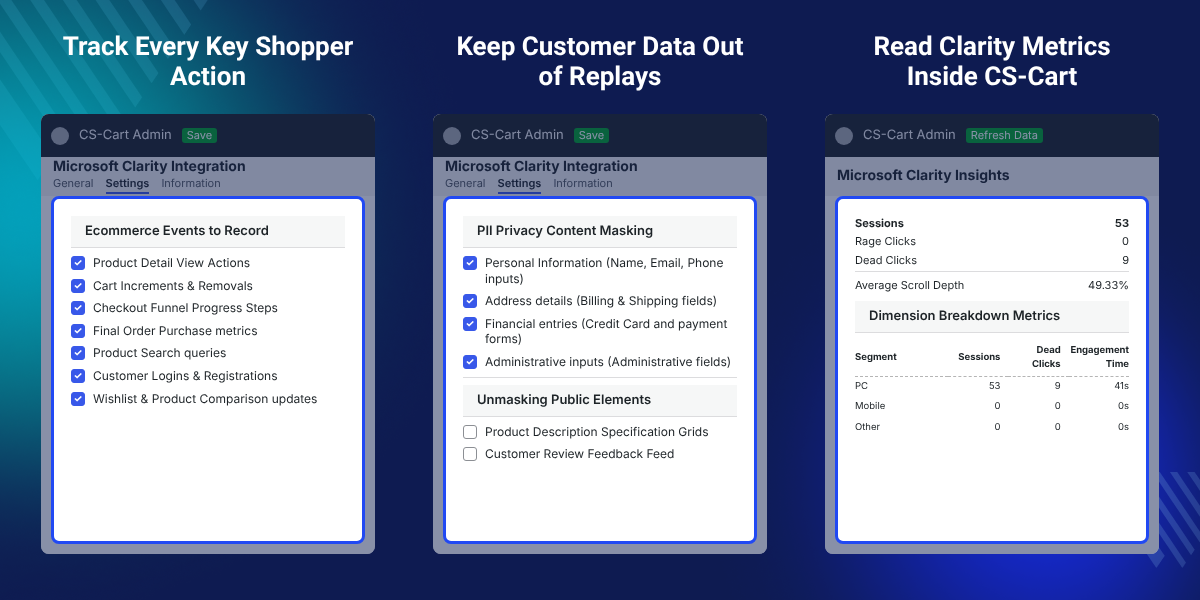
    Microsoft Clarity Integration for CS-Cart is a CS-Cart module that links a storefront to a Microsoft Clarity project. It records session replays and click heatmaps for every visit the shopper allows.

    Setup stays inside the admin panel. Admins paste the Clarity Project ID, switch storefront tracking on, and decide whether recording waits for the native CS-Cart GDPR cookie banner.

    Every recorded session carries store context. Clarity receives tags for customer group, currency, language, device category, storefront ID, vendor details, and UTM campaign values.

    Shopper actions become named markers in the replay timeline. Product views, cart changes, checkout steps, searches, logins, and completed orders each fire their own Clarity event.

    Customer data stays out of the recordings. Masking covers name, email, phone, address, and payment inputs, while product specification grids and review feeds stay readable.

    Additionally, if you want to push CS-Cart store events into Google Analytics through tag containers, then check CS-Cart GTM Manager Plugin.
    Microsoft Clarity Integration for CS-Cart

    Highlighted Features of Microsoft Clarity Integration for CS-Cart

     CS-Cart Session Recording

    CS-Cart session recording shows how shoppers move through category, product, cart, and checkout pages.

     Cookie Consent Control

    Run Clarity in cookie-less mode until a visitor accepts the native CS-Cart GDPR cookie banner.

     Custom Session Tags

    Tag each visit with customer group, currency, language, device category, storefront ID, and vendor name.

     Ecommerce Event Tracking

    Log product views, cart changes, checkout steps, searches, and orders as named events in the timeline.

     Priority Recording Upgrades

    Skip Clarity sampling on cart, checkout, and order pages so high-value visits are always recorded.

     Rage Click and Scroll Depth Insights

    Read sessions, rage clicks, dead clicks, and average scroll depth without leaving the CS-Cart admin.

    Why Do We Need Microsoft Clarity Integration for CS-Cart?

    A default CS-Cart store reports what was ordered, not what went wrong before the order. Order reports show totals, while the reason a shopper left the checkout page stays unknown.

    Adding a recording script by hand creates its own problems. Someone has to edit the snippet into the theme, it keeps running for visitors who refused cookies, and it records admin sessions too.

    Microsoft Clarity Integration for CS-Cart moves that work into the add-on settings. The script loads on storefront pages only, respects the cookie banner, and stays off in the administration and vendor panels.

    The masking defaults follow real CS-Cart markup: checkout inputs carry data-clarity-mask, while public blocks such as the specification list carry data-clarity-unmask so replays stay readable.

    Also, if you want to give customers a richer account area alongside this tracking, you can check our add-on CS-Cart Customer Profile Page.

    Microsoft Clarity Use Cases for CS-Cart Stores

    • Fix Checkout Funnel Drop-Offs

      Replay the sessions that reached the checkout form and stopped, then find the step where shoppers gave up.

    • Compare Customer Groups

      Filter recordings by customer group to see how wholesale buyers shop differently from guests.

    • Review Vendor Storefronts

      Vendor ID and vendor name tags separate marketplace traffic, which pairs well with CS-Cart Multi Vendor Mobile App.

    • Measure Ad Landing Pages

      UTM source, medium, and campaign tags show how paid and referred visitors behave, which also reads well beside CS-Cart Affiliate Extension.

    Microsoft Clarity General Settings in CS-Cart

    The General tab holds the connection between CS-Cart and the Microsoft Clarity project. Admins enter the Project ID copied from the Clarity Overview page and switch recording on.
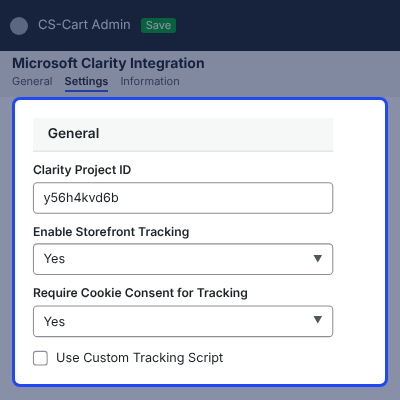
    • Enter the Clarity Project ID taken from the Clarity project Overview page.
    • Set Enable Storefront Tracking to Yes or No to control recording.
    • Set Require Cookie Consent for Tracking to Yes for cookie-less anonymous mode.
    • Tick Use Custom Tracking Script to paste a script instead of the generated one.
    • Keep tracking off in the administration and vendor panels, which the module enforces.
    Microsoft Clarity General Settings in CS-Cart

    Telemetry and Custom Session Tags

    Telemetry and Custom Session Tags attach CS-Cart context to each Clarity session. The tags become filters inside Clarity, so recordings can be grouped instead of watched at random.
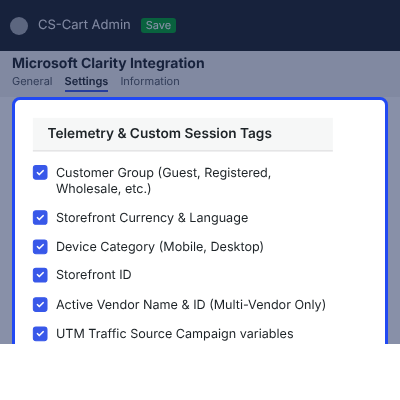
    • Customer Group tags the session as Guest, Registered, Wholesale, or a custom group.
    • Storefront Currency & Language records the active currency and browser locale.
    • Device Category sorts the session as Desktop, Tablet, or Mobile.
    • Storefront ID names the storefront a shopper browsed in a multi-storefront setup.
    • Active Vendor Name & ID marks the vendor for Multi-Vendor installations.
    • UTM Traffic Source Campaign variables capture utm_source, utm_medium, and utm_campaign.
    Telemetry and Custom Session Tags

    Ecommerce Events to Record

    Ecommerce Events to Record decides which shopper actions are sent to Clarity as named events. Each event shows up as a clickable marker on the session playback timeline.

    Merchants pick the events they care about, so a busy catalog does not fill every recording with noise. Stores that also alert shoppers on those actions can pair it with CS-Cart Advanced Notification.
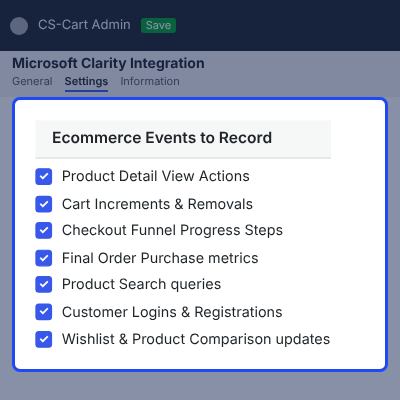
    • Product Detail View Actions fire when a shopper opens a product page.
    • Cart Increments & Removals fire when items are added to or removed from the cart.
    • Checkout Funnel Progress Steps fire as the shopper moves through checkout.
    • Final Order Purchase metrics fire when checkout is completed.
    • Product Search queries log the keywords a shopper typed into catalog search.
    • Customer Logins & Registrations and Wishlist & Product Comparison updates log account and list activity.
    Ecommerce Events to Record

    Priority Recording Upgrades

    Microsoft Clarity samples sessions when traffic is heavy, so a purchase can go unrecorded. Priority Recording Upgrades call the Clarity upgrade API and keep the visits that matter.

    Stores that run campaigns or flash sales use this to guarantee a replay for every completed order, including orders placed through CS-Cart Razorpay Magic Checkout.
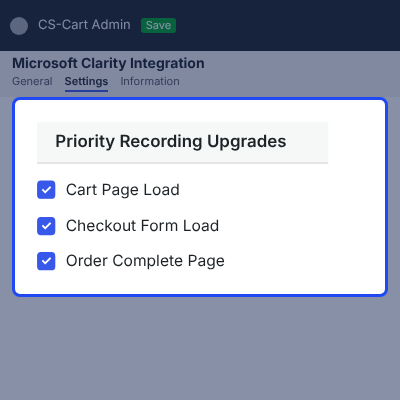
    • Cart Page Load raises recording priority when a shopper opens the cart.
    • Checkout Form Load raises priority as soon as checkout begins.
    • Order Complete Page raises priority when the shopper reaches the order confirmation.
    • Each upgrade works on its own, so a store can keep only the checkout trigger.
    Priority Recording Upgrades

    PII Privacy Content Masking

    PII Privacy Content Masking keeps customer data out of the replays. A masked field shows stars in the recording, while unmasking rules keep public content readable.
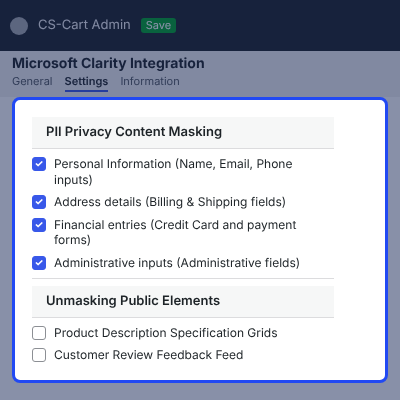
    • Personal Information hides name, email, and phone inputs.
    • Address details hide billing and shipping fields.
    • Financial entries hide credit card numbers, CVV, and payment forms.
    • Custom Masking Selectors accept CSS selectors for any extra block to hide.
    • Unmasking Public Elements keep specification grids and the review feed readable.
    • Custom Unmasking Selectors accept CSS selectors for blocks that must stay visible.
    PII Privacy Content Masking

    Admin Dashboard Analytics Settings

    Admin Dashboard Analytics Settings connect the CS-Cart backend to the Clarity Data Export API. Generate the token on the Data Export page of the Clarity project, then paste it here.
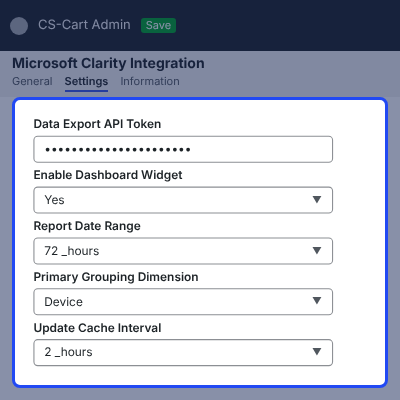
    • Data Export API Token stores the Clarity REST Data Export token.
    • Enable Dashboard Widget turns the backend insights screen on or off.
    • Report Date Range sets the window the metrics are pulled for.
    • Primary Grouping Dimension groups metrics by Device, Browser, OS, or Country.
    • Update Cache Interval sets how long the dashboard reuses stored metrics.
    Admin Dashboard Analytics Settings

    Microsoft Clarity Insights Dashboard

    The Microsoft Clarity Insights screen sits under Website > Microsoft Clarity in the admin sidebar. It shows project metrics inside CS-Cart, so a merchant does not have to open the Clarity portal.

    Clarity allows 10 Data Export calls per project per day, and the module respects that limit.
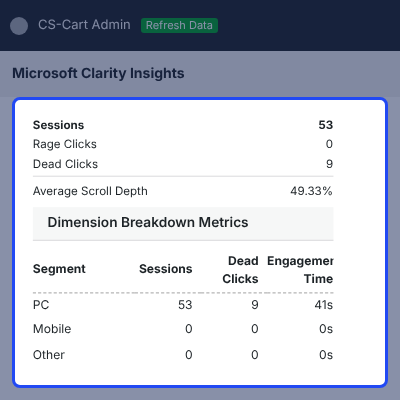
    • Metric cards report Sessions, Rage Clicks, Dead Clicks, and Average Scroll Depth.
    • Dimension Breakdown Metrics list the same figures per segment with engagement time.
    • Last Updated shows the time the stored metrics were pulled from Clarity.
    • Refresh Data pulls new figures, capped at 10 requests per day.
    • Saved setting changes read the cache and spend no API request.
    • Go to Microsoft Clarity opens the full project in the Clarity portal.
    Microsoft Clarity Insights Dashboard

    Complete Microsoft Clarity Integration for CS-Cart Feature List

    Storefront Tracking & Setup

    • Connect a CS-Cart store to a Microsoft Clarity project with the Project ID alone
    • Switch storefront recording on or off from a single Yes or No setting
    • Load the tracking code on every storefront page through a dynamic script loader
    • Paste a custom tracking script in the settings instead of the generated snippet
    • Keep the script out of the administration area and vendor panels so admin visits never skew the data

    Cookie Consent & PII Masking

    • Run Clarity in cookie-less anonymous mode until the CS-Cart GDPR banner is accepted
    • Skip tracking entirely for visitors who reject the cookie banner
    • Mask names, emails, phone numbers, addresses, card numbers, CVV, and payment forms
    • Add comma-separated CSS selectors to mask any further block in the replay
    • Unmask specification grids, review feeds, and any custom selector that must stay readable

    Session Tags & Segmentation

    • Tag sessions with customer group, storefront currency, and browser locale
    • Classify each session as Desktop, Tablet, or Mobile automatically
    • Record storefront ID and storefront name for multi-storefront installations
    • Record vendor ID and vendor name on CS-Cart Multi-Vendor stores
    • Capture utm_source, utm_medium, and utm_campaign from the landing URL

    Ecommerce Event Tracking

    • Fire named events for product views, cart additions, and cart removals
    • Fire events for each checkout funnel step and for completed purchases
    • Log catalog search keywords, customer signups, and customer logins
    • Log wishlist additions and product comparison updates
    • Add no-code custom events by entering a CSS selector and a Clarity event name

    Recording Priority & Error Screening

    • Call the Clarity upgrade API on cart load, checkout start, and order completion
    • Keep a replay for every completed order even while Clarity sampling runs
    • Send storefront JavaScript errors to Clarity for review
    • Ignore errors from adblockers, browser extensions, reCAPTCHA widgets, and CORS blocks
    • Add custom keyword patterns so the module drops any error containing those words

    Reporting, Integrations & Architecture

    • Send the Clarity session replay link to Google Analytics 4 as a custom event parameter
    • Show sessions, rage clicks, dead clicks, and average scroll depth in the CS-Cart admin
    • Group backend metrics by Device, Browser, Operating System, or Country
    • Serve cached figures with a warning banner once the store hits 10 requests per day
    • Follow CS-Cart add-on schema 4.0 autoloading, avoid raw SQL in controllers, and ship 27 language packs

     Support

    For any query or issue please create a support ticket here http://webkul.uvdesk.comYou may also check our other top-quality CS-Cart Add-ons.

    Specifications

    Product Version1.0
    ReleasedToday
    CategoryCS-Cart
    Last UpdatedSeptember 4, 2026 (Today)
    Supported VersionsCS-Cart  CS-Cart Multivendor  4.16.x  4.17.x  4.18.x  4.19.x  4.20.x  

    Ratings

    We'd love to hear your thoughts! Share your feedback and help us craft an even better experience tailored just for you.

    Write a review

    Frequently Asked Questions

     How does Microsoft Clarity Integration for CS-Cart work?
    Microsoft Clarity Integration for CS-Cart injects the Clarity tracking script on storefront pages using the Project ID from the module settings. Clarity then records session replays, heatmaps, and the ecommerce events selected in the settings.
     
     Do I need a Microsoft Clarity account?
    Yes. A Clarity project supplies the Project ID for tracking and the Data Export API token for the backend dashboard. Copy both values from the Clarity portal into the module settings.
     
     What happens if a visitor rejects cookies?
    When Require Cookie Consent for Tracking is set to Yes, Clarity runs in cookie-less anonymous mode until the CS-Cart GDPR banner is accepted. If the visitor rejects the banner, the module loads no tracking at all.
     
     Are admin and vendor sessions recorded?
    No. The module disables the tracking script inside the administration area and the vendor panels, so backend work never appears in the recordings or in the metrics.
     
     Is customer payment data visible in a replay?
    No. Credit card numbers, CVV values, and payment form inputs appear as stars. Names, emails, phone numbers, and address fields follow the same masking rule.
     
     Can I track a button that has no built-in event?
    Yes. Enter the CSS selector of the element and a Clarity event name under Dynamic Custom Event Trackers. Clarity then logs a custom event every time a shopper clicks that element.
     
     Why are some recordings missing after a busy day?
    Clarity samples sessions under heavy traffic. Turn on Priority Recording Upgrades for cart load, checkout start, and order completion so those visits are recorded instead of sampled out.
     
     How often can the backend dashboard be refreshed?
    The Clarity Data Export API allows 10 calls per project per day. After the store hits that limit, the dashboard serves cached figures from the database and shows a warning banner instead of calling the API.
     
     Does it work with CS-Cart Multi-Vendor?
    Yes. Session tags carry the active vendor ID, vendor name, and storefront ID, so a merchant can filter marketplace traffic per vendor and per storefront.
     
     Which languages are supported?
    The module ships 27 language packs, including Arabic, German, French, Spanish, Norwegian, and Chinese. Each pack follows the CS-Cart structure, so no language mismatch error appears during installation.

    Specification

    Detailed technical features and requirements to help you understand the module’s capabilities and ensure smooth integration with your system.

    Cloud Hosting

    Detailed technical features and requirements to help you understand the module’s capabilities and ensure smooth integration with your system.

    Default Configuration Details of Server

    1 GB
    RAM
    1 Core
    Processor
    30 GB
    Hard Disk
    1 GB RAM & 1 Core Processor
    Database

    Want to know more how exactly we are going to power up your eCommerce Website with Cloud to fasten up your store

    * Server Configuration may vary as per application requirements.

    Change Logs

    • - Feature Add (+)
    • - Feature remove (-)
    • - Bug Fixed (!)
    • - Modification (*)
    Version 1.0
    • + Seamless integration of Microsoft Clarity tracking script (including GDPR consent, PII masking, custom event listeners, and GA4 bridge) into the CS-Cart storefront.
    • + Integrated marketing insights dashboard in the administration panel displaying live metrics (Sessions, Rage/Dead clicks, Scroll Depth, Breakdown) with rate-limited data refresh.


