USD
  • EUR
  • INR
  • USD
Cart
Cart 0
  • You have no items in your shopping cart.
    Cart
    Cart 0
    • You have no items in your shopping cart.
    Hire a Developer
    ×
    Contact Us!
    Send Again
    Close
    Please Login to Write Your Review

    Odoo Marketplace Buyer Seller Live Chat

    Odoo Marketplace Buyer Seller Live Chat enables real-time chat between buyers and sellers. Customers chat from the product page, sellers reply via the backend, and chats stay tracked.


    • Real-time live chat between buyers and sellers.

    • Initiate chat directly from product pages or seller profiles.

    • Chat with multiple sellers at the same time.

    • Edit, reply to, or delete sent messages.

    • Live typing indicators for buyers and sellers.

    • Searchable emoji picker for expressive communication.

    • React to messages with emoji reactions.

    • In-tab notifications for every new message.

    • All conversations stored and tracked in Odoo backend.

    • Admin can monitor all buyer-seller chats from backend.

    • Set a default welcome message for the live chat.

    • Create and manage live chat rules and channels.


    Screenshots
    Odoo Marketplace Buyer Seller Live Chat Odoo Marketplace Buyer Seller Live Chat Odoo Marketplace Buyer Seller Live Chat Odoo Marketplace Buyer Seller Live Chat Odoo Marketplace Buyer Seller Live Chat Odoo Marketplace Buyer Seller Live Chat Odoo Marketplace Buyer Seller Live Chat Odoo Marketplace Buyer Seller Live Chat Odoo Marketplace Buyer Seller Live Chat
    Show More Hide All
    $99.00

    * Required Fields

    Add To Cart
    $99.00
    Configure and Buy
    • Description
    • Reviews
    • FAQ
    • Customers ()
    • Specifications
    • Cloud Hosting
    • Changelog

    Odoo Marketplace Buyer Seller Live Chat brings instant messaging right into your Odoo Marketplace. Buyers can open a chat from any product page or seller profile without leaving the store.

    The module removes the need for slow email threads. Buyers get quick answers, and sellers close more sales through real-time conversation. Customers can chat with multiple sellers at the same time. Each conversation runs in its own widget, so there is no confusion or switching between tabs.

    Sellers can now see when a buyer is typing, and buyers can see when the seller is about to reply. This keeps the chat smooth and reduces wait-time frustration. Buyers have full control over their messages. They can edit, reply to, or delete any message in the thread at any point during the conversation.

    The emoji picker comes with a built-in search bar. Users can find and send the right emoji fast, making conversations feel more natural and human. All chat threads are saved in the Odoo backend. Admins can view, track, and review every conversation across all sellers on the marketplace.

    Odoo Marketplace Buyer Seller Live Chat also supports emoji reactions on messages, default welcome messages, and live chat rules, giving both admins and sellers more control over the chat experience.
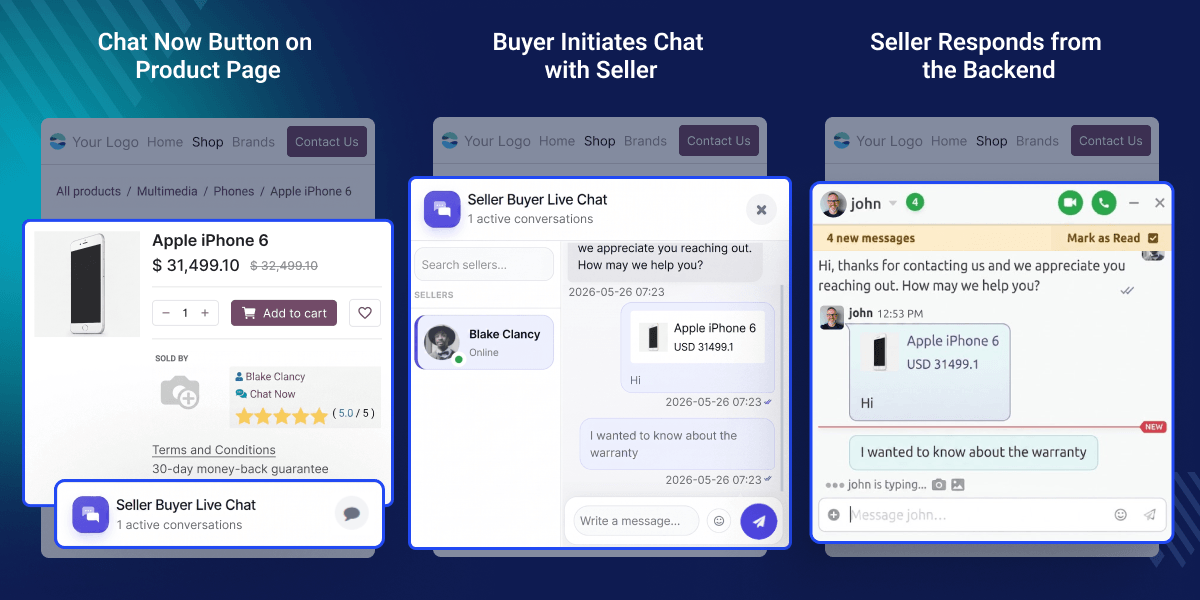
    Odoo Marketplace Buyer Seller Live Chat

    Highlighted Features of Odoo Marketplace Buyer Seller Live Chat

      Edit, Reply & Delete Messages

    Buyers and sellers can edit, reply to, or delete messages for better conversation control.

      Live Typing Indicators

    Buyers and sellers see a real-time typing indicator while the other person composes a message.

      Searchable Emoji Picker

    A built-in emoji picker with a search bar lets users find and send emojis quickly.

      Multi-Seller Chat Support

    Customers can chat with multiple sellers at the same time without switching between sessions.

      Admin Chat Oversight

    Admins can track and review all buyer-seller conversations anytime from the Odoo backend.

      Instant Message Notifications

    Buyers get notified right in the tab for each new message, ensuring no response slips by.

      Emoji Reactions on Messages

    Users can react to any message with an emoji for faster, more expressive replies.

      Default Welcome Message

    Admins can set a default message that greets buyers the moment they open a chat.

     Prerequisites For Using Odoo Marketplace Buyer Seller Live Chat Module

    Odoo  Marketplace Buyer Seller Live Chat Module works in conjunction with the following module:

    You would need to install this module first for Odoo Marketplace Buyer Seller Live Chat to work properly.

    Why Do We Need This Module?

    Buyers often have questions before they purchase, about product quality, shipping, or return policies. Without a fast way to get answers, they leave the store without buying.

    Default Odoo does not offer direct buyer-seller chat on the marketplace. Sellers and buyers are forced to rely on emails, which are slow and easy to miss.

    Live chat changes that. Buyers get answers in seconds, and sellers get a real chance to build trust and close the sale on the spot.

    The default live chat in Odoo also lacks features like typing indicators, message editing, or emoji search. Odoo Marketplace Buyer Seller Live Chat fills those gaps and gives both sides a smoother, more complete chat experience.

    Built by Webkul, a trusted Odoo development partner with years of experience building marketplace solutions for businesses worldwide.

    Use Cases

      Fashion & Apparel Marketplace

    A buyer wants to know the fabric or size of a product before ordering. They open a chat from the product page and get an instant reply from the seller.

      Electronics Marketplace

    A customer asks a seller about warranty, compatibility, or stock availability in real time, reducing the chance of a return or a bad review.

      Multi-Vendor Food or Grocery Store

    Buyers check with sellers about ingredients, freshness, or delivery time before placing an order, improving order accuracy and satisfaction.

      Service-Based Marketplace

    A buyer looking for a freelancer or service provider can chat with multiple sellers at once, compare offerings, and make a faster decision.

    Edit, Reply & Delete Messages

    With Odoo Marketplace Buyer Seller Live Chat, Buyers and sellers can take full control of their messages, edit, reply to, or delete any sent message to keep conversations clean, relevant, and easy to follow.
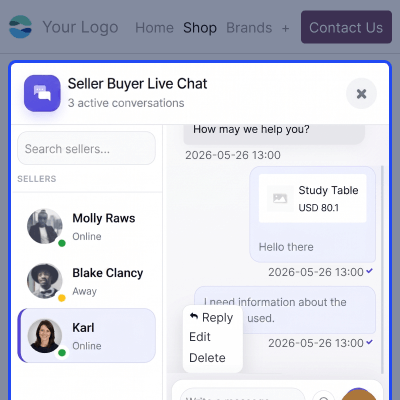
    • Edit any previously sent message at any time
    • Reply to a specific message within the thread
    • Delete messages that are no longer relevant
    • Works for both buyers on the frontend and sellers on the backend
    Edit, Reply & Delete Messages

    Real-Time Typing Indicators

    Both buyers and sellers see a live typing indicator when the other person is composing a message, reducing wait-time frustration and keeping the conversation active.
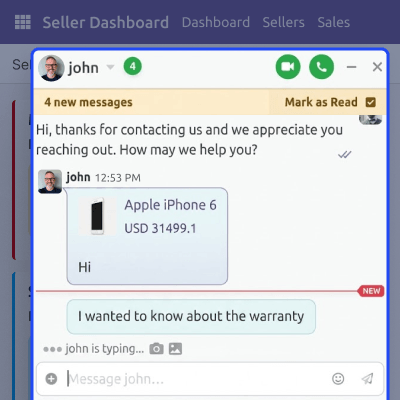
    • Buyer sees a typing indicator when the seller is composing a reply.
    • Seller sees when the buyer is typing from the backend.
    • Works on both frontend (buyer) and backend (seller/admin) views
    • Reduces back-and-forth delays and keeps the conversation active.
    Real-Time Typing Indicators

    Searchable Emoji Picker

    The emoji picker includes a built-in search bar so users can find and send the right emoji fast, making chats feel more personal and expressive.
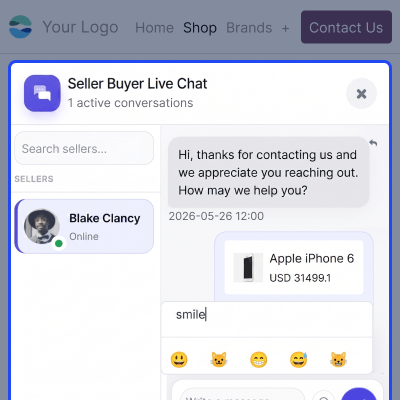
    • Accessible directly from the chat window toolbar.
    • Search for any emoji by name or keyword.
    • Selected emoji is instantly added to the message field
    • Available for both buyers (frontend) and sellers (backend)
    Searchable Emoji Picker

    Multi-Seller Chat Support

    Customers can open and manage chats with multiple sellers at the same time, with each conversation running in its own dedicated widget, ideal for comparing products before buying.
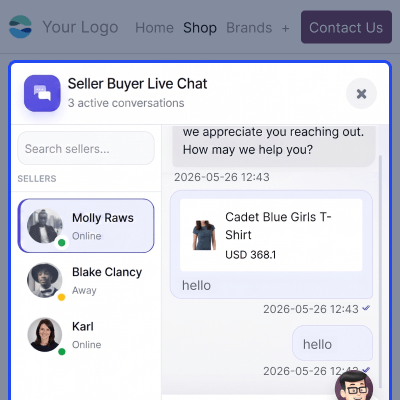
    • Chat with multiple sellers simultaneously from one screen.
    • Each seller gets a separate, dedicated chat window.
    • Sellers can also handle multiple buyer chats at the same time.
    • No need to switch tabs or sessions to manage conversations.
    Multi-Seller Chat Support

    Support

    For any query or issue, please create a support ticket here CREATE A TICKET HERE

    You may also check our other top-quality Odoo Modules.

    Specifications

    Product Version1.1.0
    Released5 years ago
    Last UpdatedJuly 2, 2026 (7 days ago)
    Supported VersionsOdoo  13.x  14.x  15.x  16.x  17.x  18.x  19.x  
    Write a review

    FAQ’s

     Can a buyer chat with multiple sellers at the same time?
    Yes, buyers can open and manage live chats with multiple sellers at once from the frontend, without switching tabs or losing context.
     Can buyers edit or delete messages after sending them?
    Yes, buyers can edit, reply to, or delete any sent message in the chat at any time to keep their conversations clean and in control.
     Is there a typing indicator in the chat?
    Yes, both buyers and sellers can see a live typing indicator when the other person is composing a message, which reduces wait time.
     Does Odoo Marketplace Buyer Seller Live Chat support emojis?
    Yes, a full emoji picker with a built-in search bar is available for both buyers and sellers to find and send the right emoji fast.
     Can users react to messages with emojis?
    Yes, users can react to any message with emoji reactions directly in the chat window, making responses faster and more expressive.
     Where are all chat conversations stored?
    All chats are saved in the Odoo backend, where admins can easily view, track, and review every single buyer-seller message anytime.
     Can the admin monitor all chats on the marketplace?
    Yes, the super admin can access all buyer-seller conversations and full message details directly from the Odoo backend at any time.
     From where can a buyer start a chat with a seller?
    Buyers can start a chat directly from any product page or the seller's profile page on the marketplace with just one single click.
      Can a default welcome message be set for the chat?
    Yes, admins can set a default welcome message that appears automatically every time a buyer opens a new chat on the marketplace.

    Move to Cloud Today

    AWS Free tier hosting for one year by amazon web services, for more details please visit AWS Free Tier.

    GCP Free tier hosting for one year with 300 credit points by google cloud platform, for more details please visit GCP Free Tier.

    Azure free tier hosting for one year with 25+ always free services, for more details please visit Azure Free Tier.

    In our default configuration we will provide tremendous configuration for your eCommerce Website which is fast to load and response.

    Default Configuration Details of Server

    • 1 GB RAM
    • 1 Core Processor
    • 30 GB Hard Disk
    • DB with 1 GB RAM and 1 Core Processor

    * Server Configuration may vary as per application requirements.

    Want to know more how exactly we are going to power up your eCommerce Website with Cloud to fasten up your store. Please visit the Cloudkul Services.

    Get Started with Cloud

    Change logs--------------------------------

    • [ADD] sticky popover messages for seller products on both product and seller profile page
    • [ADD] new design for the chatter message box


