WooCommerce Pre Order Plugin
WooCommerce Pre Order Plugin lets customers buy out of stock or upcoming items. It helps you capture sales through full or partial payments before stock arrives.
- Accept preorders for out of stock and upcoming WooCommerce products.
- Allow full or partial preorder payments with custom advance amounts.
- Set preorder status and availability dates from product settings.
- Launch upcoming products and collect orders before release.
- Automatically notify customers when preorder items return in stock.
- Limit preorder quantity to control demand and inventory.
- Send preorder reminders using automatic or manual email notifications.
- Supports Simple, Variable, Virtual, and Downloadable product types.
- Allow preorder and regular products in a single checkout.
- View preorder orders to estimate demand before launch.
WooCommerce Pre Order is now compatible with Cart and Checkout blocks and High-Performance Order Storage (HPOS).
- Description
- Reviews
- FAQ
- Customers ()
- Specifications
- Cloud Hosting
- Changelog
WooCommerce Pre Order Plugin lets customers order products that are out of stock or not yet released. This helps buyers secure popular or limited items in advance, without waiting for restocks.
Buyers can place preorders with full or partial payments. Store owners can also list products as prelaunch items to capture early demand and get a clearer picture of required inventory.
This preorder system helps store owners collect revenue before shipping. It also lowers the risk of unsold stock, as demand can be measured before committing to bulk inventory.
Important Note -
- If you have a Marketplace website, then you can check our Marketplace Pre Order for WooCommerce.
- The shipping will not be generated at the time of pre-order, else it will be generated once the product will come back in the stock and the buyer places the order again.

Highlighted Features for WooCommerce Pre Order Plugin
Pre-Order
The customer can purchase products in its pre-launch state.
Offer Advance Booking
Pre-Order for WooCommerce Extension allows the customer to pre-book a product and guarantees assured delivery.
Partial Payment
The module offers advance payment which can be either complete or partial.
Arrival Date
The admin can specify the product delivery date on the product page.
Email Notification
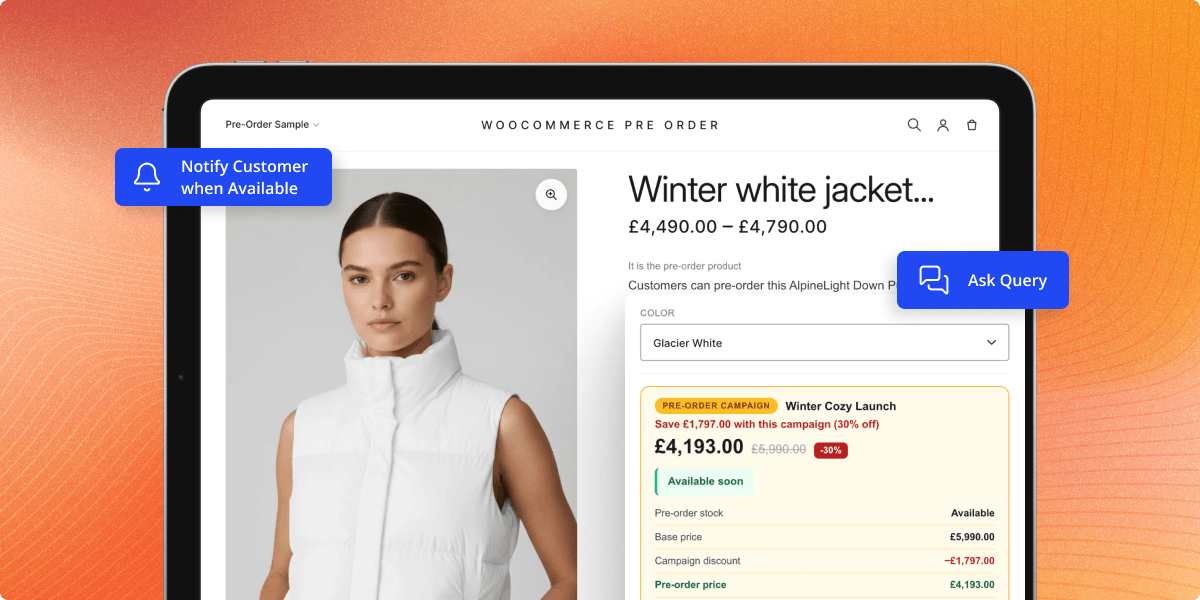
The customer will be notified through email when the product comes back in stock.
Easy Analyses
The admin can easily analyze customer demand and initial sales of the products
Notification Mode
The admin can set the mail notification type of mail as automatic, manual, or both. Accordingly, the customer will get the mail.
Add Product mode
The admin can set the product mode for pre-order product addition as automatic, manual, or both.
Order Flexibility
Customers can place pre-orders and regular products together in a single order.
Pre-order Bundling
Customers can add multiple pre-order products in a single order.
Why do we need WooCommerce Pre Order Plugin?
Pre Order for WooCommerce Extension plugin allows the store owner to test the market demand before investing in the product completely. It gives them a rough idea about how hit the product will be post-launch. In an eCommerce environment where there is tough competition between a variety of products.
Pre-Order for WooCommerce Plugin is a remarkable solution for it. It is the registered customer to places the order for the upcoming products. It can act as a boon to them to grab the product even before it is realized in the market.
Also, it will help the customers to not miss out on their favorite products on the website. Even if the product is out of stock they can book it and confirm it for delivery. So in this way, it is never a worry for the website customer's to miss out on their favorite products.
For products customers cannot physically check before release, you can use WooCommerce WebAR Product Plugin to let buyers view products in AR before placing a preorder.
Use Cases for WooCommerce Pre Order Plugin
WooCommerce Pre Order Plugin helps you keep selling when items are out of stock or have not launched yet. It fits different business models like product drops, early order capture, and testing market demand.
-
Product Prelaunch Sales
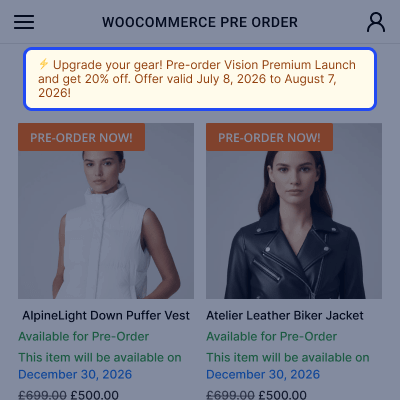
Take orders for new items before the release date to build hype and secure early sales.
-
High Demand Booking
Let customers reserve popular items before they sell out to avoid losing orders.
-
Made To Order Items
Collect a deposit before you start production to reduce your financial risk.
-
Seasonal Launches
Enable early buying for holiday goods so customers secure items weeks in advance.
-
Market Validation
Test how many buyers want a new product before you buy bulk inventory.
-
Restocking Demand
Keep taking orders while waiting for new stock so items are sold before they arrive.
Integrate Pre Order Payment System
The best benefit of the WooCommerce Pre-Order module is for the products which not in stock on the website.
So, the customers can pay in advance and book their items to guarantee assured delivery. The admin can configure the module for the proper workflow like -
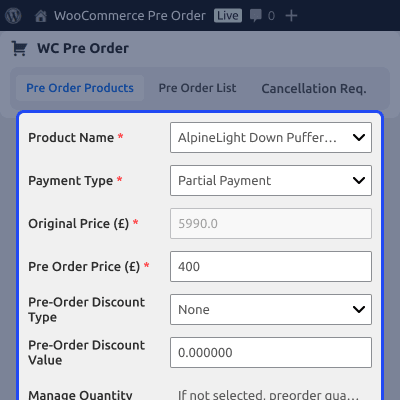
- The payments can be configured in two different ways for the Pre Order Products – Full Payment or Partial Payment.
- If partial payment is selected, the admin can enter the total product price and the Pre Order price.
- The admin can add the stock in date.
- The Pre-order product can be enabled/disabled.
- The admin can set a fixed quantity above which the Pre-orders cannot be placed.

Show Product Availability Date
This Pre Order for WooCommerce plugin works for Simple, Downloadable, Virtual, and Variable types of products.
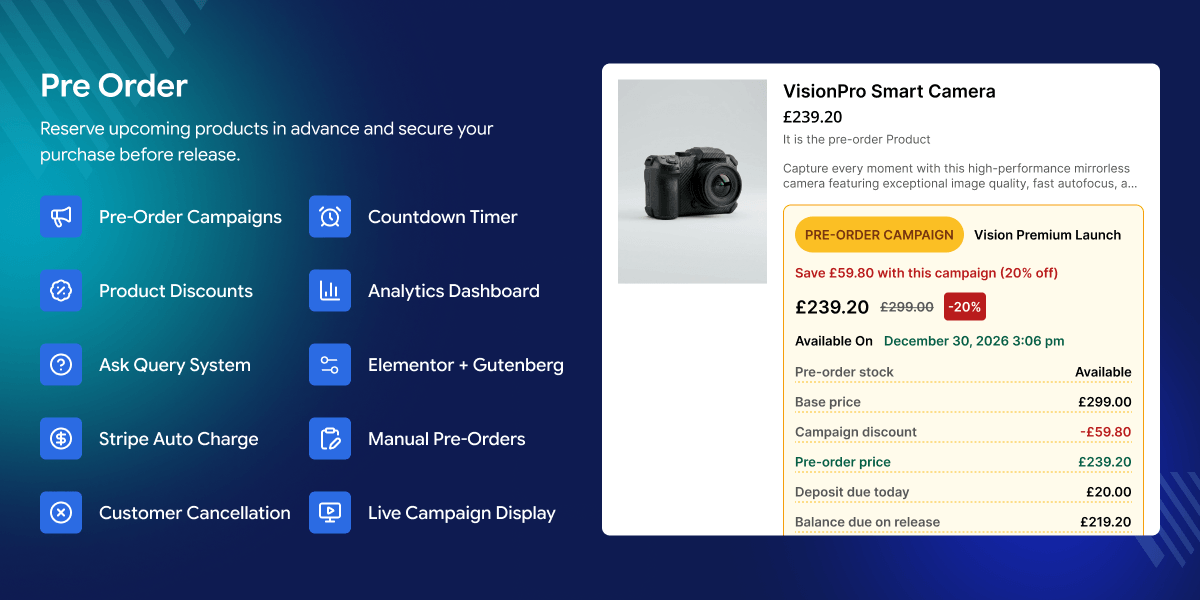
The customers can see the pre-order product details on the product page. The information about the pre-order product includes:
- The customer can see the partial amount which is required to book the product in advance.
- Preorder product inventory will get display on the product page so that the customer should not miss out on the same.
- The preorder countdown timer will also display on the product page.
- Also, the date of pre-order product availability is shown on the product page.

Completing Partial Payment Pre Order
The website's registered customers have the privilege to pre-book the product on the website which out of stock. It provides them the advantage to do not miss on their favorite products.
- The customer needs to login to the website to preorder any product.
- The customer can place the pre-order either by making the full payment or partial payment as per the configuration.
- On the product page, the customers can view the pre-order payment information.
- When the product comes back in stock, the customer receives an email notification.

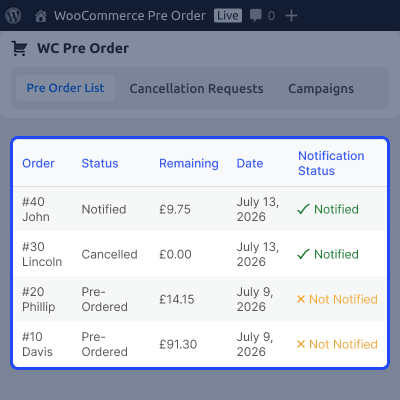
List Of Pre Orders
Once the order has been completed, the customer can see the entire details of a pre-order. The customer can view the following details.
- Customers can view the order number of the Pre-order product.
- The customer can view the status of the order.
- The remaining amount of order can also be checked.
- After the products come back in stock, the customer will be notified through the email.
- The customer can complete the order by navigating back to the respective order and paying up the remaining amount of that order.

Advanced Email Notification System
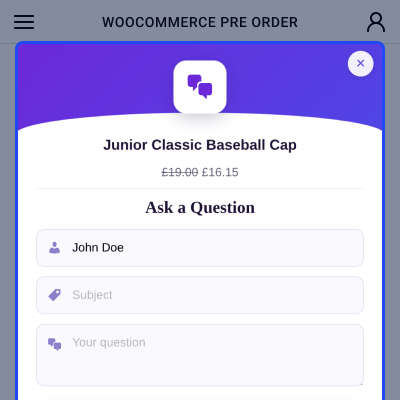
Using this WooCommerce Pre Order Extension the admin can set the email notification mode for the customer to enhance user interaction with the system.
- Each type of notification will be sent to the customers like product in stock, product out of stock, order placed, pre-order remaining amount, and pre-order completion.
- Admin can set these reminders as automatic, manual, or both.
- If it is set on manual then the admin can notify customers manually.
- Admin can notify single or multi-users at a time.
- Admin can also enable/disable the reminder permission.
- A custom dynamic template creation option is also available for the notification template.

Support
For any query or issue, please create a support ticket here http://webkul.uvdesk.com/
You may also check our quality WooCommerce Extensions.
Specifications
Recent Reviews
Write a reviewGood Quality Plugin
Fast support.
Good quality for the plugin price as well.
Very Helpful
Nice & Quick customer support. Resolved all our bugs related to pre order plugin. Very helpful for beginners of WordPress and WooCommerce
Great Plugin
Amazing customer support and great plugin. Support had a conflict but sorted it within 24 hours. I am now looking to customise and keep the plugin always -- Great plugin, great product, and support
Amazing plugin
Amazing plugin. Highly recommended. And a great support team.
Customer Support
Really good plugin and absolutely awesome customer support! The team helped me solve my problems in the blink of an eye :) Big thank you!
Frequently Asked Questions
Move to Cloud Today
AWS Free tier hosting for one year by amazon web services, for more details please visit AWS Free Tier.
GCP Free tier hosting for one year with 300 credit points by google cloud platform, for more details please visit GCP Free Tier.
Azure free tier hosting for one year with 25+ always free services, for more details please visit Azure Free Tier.
In our default configuration we will provide tremendous configuration for your eCommerce Website which is fast to load and response.
Default Configuration Details of Server
- 1 GB RAM
- 1 Core Processor
- 30 GB Hard Disk
- DB with 1 GB RAM and 1 Core Processor
* Server Configuration may vary as per application requirements.
Want to know more how exactly we are going to power up your eCommerce Website with Cloud to fasten up your store. Please visit the Cloudkul Services.
Get Started with Cloud- + Features
- - Bugs
- = What's New =
- * New: Full support for WooCommerce Block-based Cart and Checkout pages. The "Place Pre Order" and "Place Final Order" button labels, deposited/remaining price badges, and stock validation all work seamlessly with the block checkout.
- * New: Pre-order support for variable products and individual variations. Customers can select a variation and place a pre-order just like a simple product.
- * New: Dedicated Pre-Order Products page on the frontend with pagination, displaying all available pre-order products in a shop-like layout.
- * New: Pre-order countdown timer on single product pages with three display styles — Compact, Small Block, and Big Block. Configurable from admin settings.
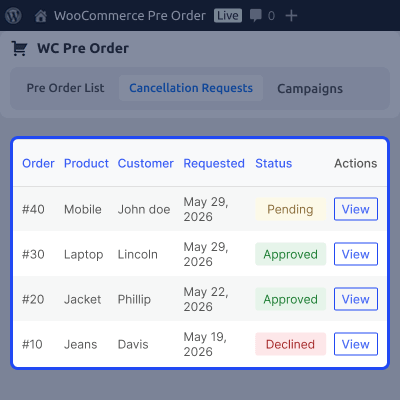
- * New: Richer pre-order status tracking with five states — Pre Ordered, Completed, Cancelled, Notified, and Notified Again — giving admins and customers clearer visibility into the pre-order lifecycle.
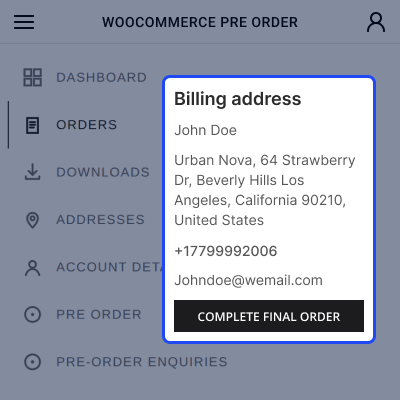
- * New: "Complete Final Order" button on the customer's order view page. After receiving the in-stock notification, customers can click to add the product to their cart at the remaining balance price and complete the payment.
- * New: Pre-order configuration auto-disables when a product comes back in stock, regardless of notification mode (automatic, manual, or both). New visitors immediately see the regular price.
- * New: Option to enable or disable coupon usage for pre-order products from the admin panel.
- * New: "Deposited amount" and "Remaining amount" labels in the cart and mini-cart for pre-order line items.
- = Improved Performance =
- * Improved: All pre-order data now stored in dedicated custom database tables instead of WordPress meta. This eliminates expensive database JOINs on stores with large order volumes.
- * Improved: The "My Account > Pre Orders" page loads significantly faster — uses a lightweight indexed query instead of scanning the entire orders table.
- * Improved: Admin Pre Order List loads directly from the custom table with built-in pagination and search by order ID.
- * Improved: Automatic data migration from the old meta-based storage runs in the background via Action Scheduler after upgrading. No manual steps required.
- = Admin Improvements =
- * Improved: Pre Order List now shows five clear status labels — Pre Ordered, Completed, Cancelled, Notified, and Notified Again — with a notification badge for each row.
- * Improved: "Notify" and "Notify Again" row actions are automatically hidden for completed and cancelled pre-orders.
- * Improved: Bulk notify action shows a clear error message when trying to notify completed or cancelled pre-orders.
- * Improved: Expected availability date on the admin order page now reads from the pre-order configuration instead of legacy order-item data.
- * Fixed: Pre-order quantity was not being saved correctly when products were auto-converted to pre-order on going out of stock.
- * Fixed: Availability date was not migrated properly during the upgrade from older versions.
- * Fixed: Quantity restoration on order cancellation was not working due to incorrect data source.
- = Customer-Facing Fixes =
- * Fixed: Variable product variations can now be added to the cart as pre-orders without the "not enough stock" error.
- * Fixed: Block checkout no longer rejects pre-order products during payment with a "not enough units in stock" error.
- * Fixed: Customers who completed a pre-order cycle now see the regular price when purchasing the same product again.
- * Fixed: "Complete Final Order" button now appears correctly for both customers and admins viewing the order page.
- * Fixed: Cart correctly shows the advance price for initial pre-orders and the remaining balance for final orders.
- * Fixed: The "Pre Order" button text now displays correctly on the shop loop for pre-order products.
- * Fixed: Out-of-stock pre-order products remain visible in the shop catalog when "Hide out of stock items" is enabled in WooCommerce settings.
- * Fixed: Mini-cart price display for pre-order products.
- * Fixed: PHP 8.1 deprecation warning on pre-order product listing page pagination.
- = For Developers =
- * New: Dedicated helper classes for querying custom tables — flexible filtering by order ID, user ID, product ID, status (including array-based IN queries), with pagination and sorting support.
- * New: Playwright end-to-end test suite covering the complete pre-order lifecycle across four phases (product creation, customer pre-order, admin notification, balance payment).
- * Changed: Pre-order status checks now return 'enabled' or empty string. All callers should use 'enabled' === $status instead of wc_string_to_bool().
- * Changed: Store API cart-item extension namespace wc-woocommerce-pre-order exposes is_preorder, preorder_id, and label fields for custom block integrations.
- * Changed: Webpack build produces frontBlock.js with Store API integration. Run npm run build to rebuild
- Added: Compatibility with the latest WooCommerce version.
- Fixed: Security and validation issues.
- Added: Enable customers to place pre-orders and regular products together in a single order.
- Added: Allow customers to add multiple pre-order products in a single order.
- Fixed: Fixed an issue where Pre-Order products were not appearing on the Pre-Order Products page in the admin panel when "Convert to product for Pre-Order" was set to "Automatic," and all quantities of a product were purchased by a user.
- Added: Implemented a tooltip on the "Create Pre-Order" page to provide additional information.
- Added: Script to show plugin updates when a new version is available. It can be updating directly from the plugin page similar to native wordpress plugins.
- Fixed: Issues with searching product in admin for adding to pre-order limited to 10.
- Fixed: Pre order quantity is not decreasing when all or 1 quantity checked out.
- Fixed: Pre order description was not showing on single product page for variable products.
- Fixed: Negative values were accepting in availability date.
- Fixed: Notices when search product does not exist on pre-order page.
- Fixed: Notify option were showing for out of stock products.
- Fixed: Pre order price showing zero in case of automatic conversion.
- Fixed: Email notification was not sending automatically on products comes in stock.
- Fixed: In stock email sending again and again on page refresh after notifying.
- Added: License management feature for using this module. Admin needs to register the module using the Envato Purchase code.
- Fixed: Issue with remaining amount calculation on the final order.
- Added: WooCommerce Cart and Checkout blocks compatibility.
- Added: Link to the product in preorder mail reminder notification.
- Updated: Coding structure and optimized for performance improvements.
- Added: Added: WooCommerce High-Performance Order Storage (HPOS) feature compatibility.
- Added: PreOrder Menu under our global Webkul WC Addons Menu.
- Added: Compatibility up to PHP - 8.3 versions.
- Added: Notify again feature for already notified pre-orders on products in-stock.
- Added: Product name column in the pre-order listing.
- Added: View order link merge tag in in-stock mail notification.
- Changed: Place Order button to 'Place Pre Order' and 'Place Final Order' on checkout.
- Fixed: Issues with variable products adding to pre-order.
- Removed: Unused default pre-order status settings and related code.
- Removed: Support for grouped and external products as it's creating feasibility issues.
- Moved: Pre-orders from the customer list to final WooCommerce order after completing the order on availability.
- Added: Dynamic text for the pre-order button
- Added: Custom message for pre-order product page
- Added: Notification Mode *
- Automatic - Notify customer automatically when the product is in stock *
- Manual - The admin will notify to customer manually
- Both - Both will work. Added: Admin can decide how they can a product be added for pre-order *
- Manual ->
- Admin will add product for pre-order manually
- * Automatic -> Product will automatically add for pre-order
- Added: Admin can decide how a can product be added for pre-order.
- Added: Notification Status ( Admin can decide in which stock status the customer will notify automatically)
- Added: Admin can decide in which product stock status product will add for pre-orders
- Added: AddToCart button with the remaining amount on the customer order view page where the customer can add the same product into the cart instead of going to the product page and then add
- Added: Dynamic mail template. Added: Payment restriction feature for pre-orders.
- Fixed: fatal error and notice error.
- * Added - Compatibility with Woocommerce v6.3.1
- * Added - Pre-order list section in admin end.
- * Added - Orders search and filter in customer Pre Order section.
- * Added - Admin enable/disable preorder product in bulk.
- * Fixed - Coding structure according to WordPress coding standards.
- * Fixed - Compatible with woocommerce 5.9.0 and WordPress 5.9.x
- * Fixed - Time management in admin creates the preorder product.
- Fixed - Admin end Navigation Menu issue.
- Fixed - Mini Cart Pre Order Product Price Change.
- Fixed - Variable Product Pre-order Timmer issue.
- Fixed - Admin Shipping adding issue.
- Fixed - Order cancellation issue.
- Added WooCommerce Pre Order Email Template.
- Added support with WooCommerce Option "Hide out of stock items from the catalog" option enabled.
- Allow Preorder product to add in cart, while other product is already in cart.
- Fixed - checkout issue for WooCommerce 4.x.x version
- Fixed : Pre Order price float value issue fixed.
- Update : post_author check removed for adding pre-order product.
- Added : Added client side validations on add preorder product page.
- Added : Added Final Order button in order view page at customer end.
- Added : Added settings in the backend to enable/disable the emails on the performed action.
- Fixed : Fixed flow of final order after the preorder.
- Fixed : Fixed issue of displaying add to cart button on the grouped products page in guest login.
- Fixed : Fixed issue of displaying a preorder button after countdown expired on the product page.
- Fixed : Fixed compatibility issues with latest WooCommerce(3.6.0).
- Update : Updated pre-order product page view.
- Added : Added feature to add grouped products as a preorder.
- Update : Updated overridden cart as new woocommerce update.
- Update : Overrided woocommerce session.
- Added : Added validations.
- Fixed : Fixed mail issues.
- Fixed : Fixed security issues.
- Update : Added Translation Support.
- Update : Compatible with Woocommerce 3.3.x
- Update : Preorder product acts as standalone product now.
- Update : Compatible with WooCommerce 3.2.x
- Update : Preorder products order listing on customer end.
- Fixed : Datepicker Issue resolved.
- Fixed : Language Translation related issue fixed.
- Update : Compatibility with WooCommerce 3.2.x
- Update : Updated backend setting and cart file.
- Fixed : js issue fixed for variable product
- Fixed : Shipping calculation bug fixed
- Initial release