USD
  • EUR
  • INR
  • USD
Cart
Cart 0
  • You have no items in your shopping cart.
    Odoo Apps Extensions
    Cart
    Cart 0
    • You have no items in your shopping cart.
    Hire a Developer
    ×
    Contact Us!
    Send Again
    Close
    Please Login to Write Your Review
    Odoo Franchise Management System

    Odoo Franchise Management System

    x
    Free

    * Required Fields

    $749.00
    Add To Cart

    Odoo Franchise Management System runs the franchise lifecycle in Odoo, from website applications to agreements, outlets, royalties, audits, and KPIs.


    • Accept franchise applications through a public website form in Odoo.

    • Review applicants in a pipeline from New to Under Review, Verified, and Approved.

    • Create franchise agreements with FOCO, COCO, or FOFO agreement types.

    • Launch a franchisee company, portal user, and POS setup from the agreement.

    • Assign exclusive territories with ZIP codes and route CRM leads to them.

    • Track each outlet from Draft to Location Confirmed, POS Configured, and Active.

    • Compute royalties as percentage, flat fee, tiered, or hybrid franchise fees.

    • Run scored compliance audits with weighted checklists and automatic grades.

    • Enroll franchisees in training programs and track scores and certificates.

    • Send announcements to all franchisees and track each acknowledgement.

    • Monitor applications, sales, outlets, and royalties on the franchise dashboard.

    Odoo Franchise Management System
    Odoo Franchise Management System
    $749.00
    Check How It Works

    Need Help Deciding?

    Support answers within one business day.

    Open a ticket
    $749.00
    Configure and Buy
    X
    • Description
    • Reviews
    • FAQ
    • Customers ()
    • Specifications
    • Cloud Hosting
    • Changelog

    Odoo Franchise Management System is an Odoo module that helps franchisors run their franchise network from one Odoo database. It covers applications, agreements, outlets, royalties, audits, training, and KPIs.

    Prospects apply through a website form, and the head office reviews each application in Odoo. An approved application becomes a franchise agreement, linked to a territory, a franchise plan, and an onboarding plan.

    From a signed agreement, the franchisor launches a franchisee company with its own users, warehouse, and POS configuration. Outlets then move through setup stages with onboarding tasks until they open.

    Royalty invoices pull revenue from POS sales or sale orders and post through Odoo Accounting. Admins set the default plan, renewal reminder, grace period, and upload limits in Franchise Management > Configuration > Settings.

    The app runs on Odoo Community and Odoo Enterprise. It uses Sales, Purchase, Inventory, Accounting, Point of Sale, CRM, Employees, Website, Calendar, and Loyalty, which install along with the module.

    Three default roles keep franchise data apart: Super Admin, Franchisee Owner/Manager, and Franchise Employee. For finer menu and field rights, you can also use Odoo Access Control Management.
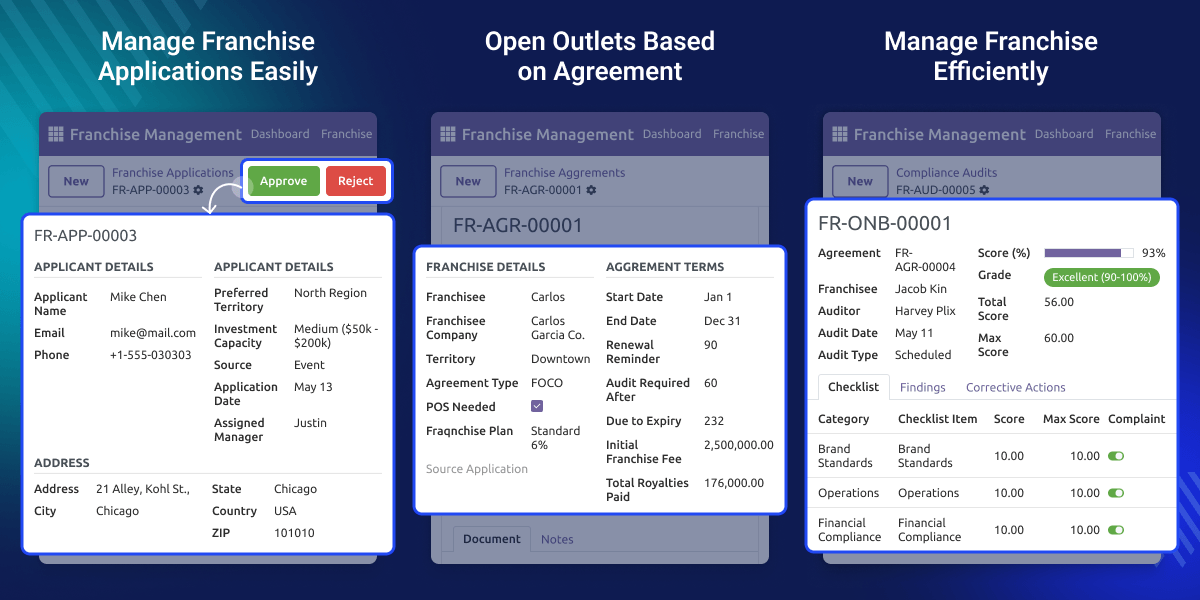
    Odoo Franchise Management System

    Highlighted Features of Odoo Franchise Management System

     Online Franchise Applications

    Prospects apply on the website with territory and investment details, and each entry opens as an application record.

     Agreement-Based Launch

    One agreement creates the franchisee company, portal user, warehouse, and POS setup for the new franchise.

     Exclusive Territory Control

    Territories carry ZIP codes, outlet limits, and a minimum distance, so two franchisees never share an area.

     Automated Royalty Billing

    Royalty invoices read POS or sale order revenue, apply the plan rate, and add marketing fund and late fees.

     Scored Compliance Audits

    Auditors score weighted checklist lines, and the audit grade runs from Excellent down to Critical.

     Franchise Performance Dashboard

    Dashboard cards show applications, agreements, outlets, sales, POS sales, and royalties for any date range.

    Why Do We Need Odoo Franchise Management System?

    A franchise brand signs partners, bills them every month, and checks that each outlet follows brand rules. Doing this across many outlets takes a lot of tracking.

    Standard Odoo has CRM, Sales, Point of Sale, and Accounting, but it has no franchise agreement, territory, or royalty plan record. Teams end up tracking these in spreadsheets.

    Spreadsheets break when revenue must be pulled from each outlet, royalties computed, and audits scored. Missed renewals and wrong invoices follow.

    Odoo Franchise Management System adds these records inside Odoo and links them. An agreement knows its territory, plan, outlets, and invoices, so the data stays in one place.

    In practice, a tiered plan of 7%, 5%, and 4% across revenue brackets is set once on the plan. Each royalty invoice then applies it to the outlet revenue for that period.

    Also, if you want to study franchise data in external dashboards, you can check our module Odoo Power BI Connector.

    Odoo Franchise Management System Use Cases

    •  Restaurant and Food Chains

      Brands run Food Safety & Hygiene training and hygiene audits for every outlet, and bill royalties on POS sales. To reward repeat diners at each outlet, see Odoo POS Loyalty & Rewards Program.

    •  Retail Store Networks

      Retailers give each franchisee a catalog and pricelist, and track outlet sales from the dashboard. To show every outlet on a map, check Odoo Website Store Locator.

    •  Education and Service Franchises

      Coaching and service brands sign partners by territory and bill a flat monthly fee from sale orders.

    •  Regional Master Franchising

      Franchisors split regions into exclusive territories and hand CRM leads in each area to the right franchisee.

    •  Company-Owned and Partner Outlets

      Brands that run FOCO, COCO, and FOFO outlets manage all three models from the same agreement screen.

    Franchise Application Management

    Franchise applications come in from the website form or are added in the Odoo backend. The head office moves each one through a clear review pipeline.
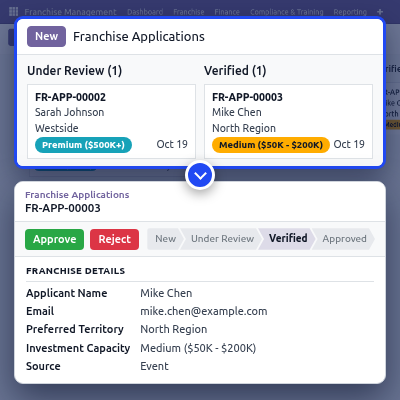
    • Publish an Apply for a franchise page at /franchise/apply on Odoo Website.
    • Capture personal details, address, preferred territory, and investment capacity.
    • Set the source as Website, Direct / Walk-in, Referral, or Event.
    • Move applications through New, Under Review, Verified, Approved, or Rejected.
    • Approve an application to start its franchise agreement in one click.
    • Limit uploads by size and applications per hour from one IP address.
    Franchise Application Management

    Franchise Agreement and Territory Setup

    The franchise agreement holds the contract terms for each franchisee. Each agreement is tied to a territory, a franchise plan, and the outlet limits the franchisor allows.
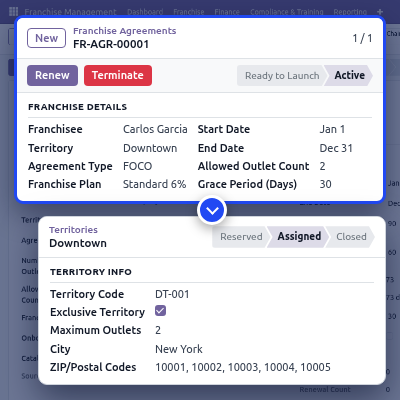
    • Choose the agreement type FOCO, COCO, or FOFO and a Child or Parallel company structure.
    • Set start and end dates, initial franchise fee, renewal reminder, and grace period.
    • Limit the number of POS outlets and allowed outlets per agreement.
    • Track states from Draft to Sent for Signing, Ready to Launch, and Active.
    • Mark a franchise territory as exclusive with ZIP codes, maximum outlets, and minimum distance.
    • Send renewal requests for approval and keep the full renewal chain.
    Franchise Agreement and Territory Setup

    Franchise Outlet Onboarding and Launch

    Each franchise outlet follows a set of opening stages. An onboarding plan adds the tasks the franchisee must finish before the outlet goes live.

    Once active, outlets record sales through Odoo Point of Sale. For a closer look at POS sales by outlet, you can also check Odoo POS Dashboard.
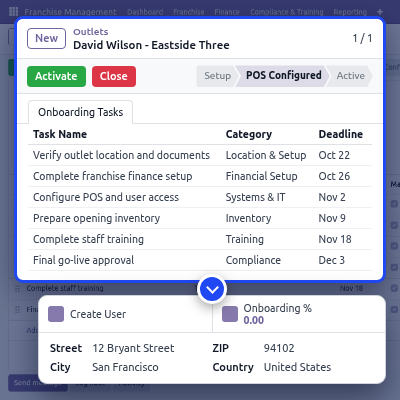
    • Move outlets through Location Confirmed, Setup, Inventory Ready, Staff Trained, and POS Configured.
    • Add onboarding tasks with category, deadline, assignee, and a mandatory flag.
    • Group tasks by Legal & Documentation, Training, Systems & IT, and Marketing & Launch.
    • Create outlet users and link each outlet to its POS configuration and warehouse.
    • Suspend or close an outlet when the franchise relationship changes.
    Franchise Outlet Onboarding and Launch

    Franchise Plan and Royalty Invoice

    Franchise plans define how each franchisee pays the brand. Royalty invoices apply that plan to the revenue of a period and create the accounting invoice.
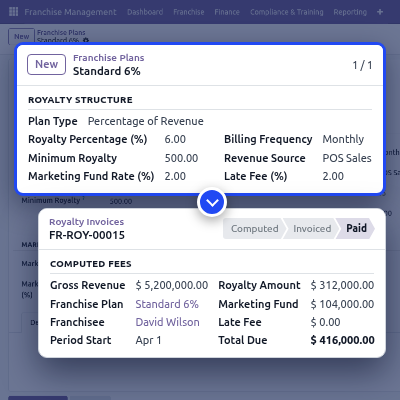
    • Pick Percentage of Revenue, Flat Fee, Tiered (Revenue Brackets), or Hybrid plans.
    • Add revenue tiers with their own royalty rate and a minimum royalty.
    • Bill Monthly, Quarterly, or Annually with payment due days and a late fee.
    • Fetch revenue from POS Sales, Sale Orders, or Manual Entry.
    • Add a marketing fund as a percentage of revenue or a flat fee.
    • Move invoices from Draft to Computed, Invoiced, and Paid.
    Franchise Plan and Royalty Invoice

    Compliance Audit and Training Records

    Compliance audits check whether franchisees follow brand rules. Training enrollments record what each franchisee and staff member has learned.
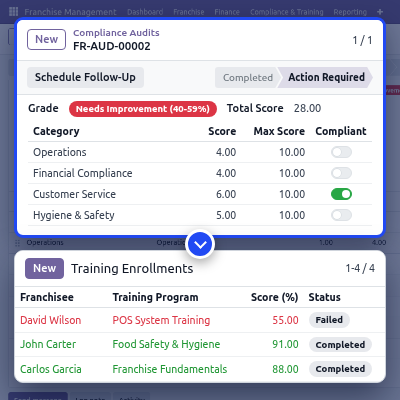
    • Plan Scheduled, Surprise, Self-Assessment, or Follow-Up audits.
    • Score checklist lines by category, weight, and maximum score.
    • Grade audits from Excellent (90-100%) to Critical (<40%) automatically.
    • Log findings and corrective actions, then schedule a follow-up audit.
    • Enroll franchisees in Initial, Refresher, Certification, Compliance, or Product training.
    • Record training scores, pass status, and certificate expiry dates.
    Compliance Audit and Training Records

    Franchise Communications Hub

    The communications hub sends head office messages to franchisees from Odoo. Each message can ask for an acknowledgement, so the brand knows who has read it.

    A Promotion / Campaign message often goes with an outlet offer. For coupon codes at the counter, you can also use Odoo POS Coupons And Vouchers.
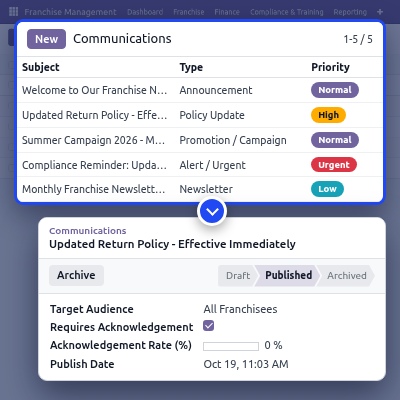
    • Send an Announcement, Policy Update, Promotion / Campaign, Alert / Urgent, or Newsletter.
    • Target All Franchisees, Specific Franchisees, or a territory.
    • Set priority to Low, Normal, High, or Urgent.
    • Track the acknowledgement rate for every published message.
    • Attach files and set publish and expiry dates.
    Franchise Communications Hub

    Franchise Dashboard and KPI Tracking

    The Admin Dashboard shows the whole franchise network on one screen. The Franchise Dashboard shows the same view for one franchisee company and its outlets.
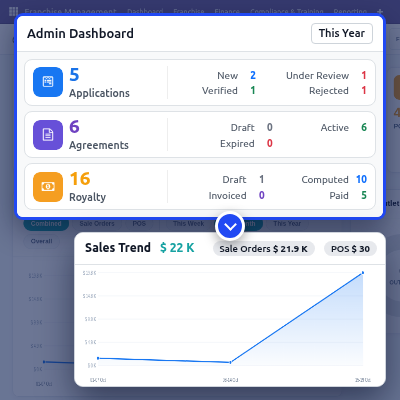
    • View cards for applications, agreements, outlets, sales, POS sales, and royalties.
    • Filter by This Week, This Month, This Year, Last Month, or a custom range.
    • Compare sale orders and POS sales in the Sales Trend chart.
    • Define KPIs with target, frequency, and a data source such as POS Sales Total.
    • Analyse agreements, royalties, audits, and KPIs in the Reporting menu.
    Franchise Dashboard and KPI Tracking

    Support

    For any query or issue, please create a support ticket here http://webkul.uvdesk.com/. 

    You may also check our top-quality Odoo Apps.

    Specifications

    Product Version1.0.0
    Released4 months ago
    Last UpdatedOctober 23, 2026 (1 day ago)
    Supported Versions8.x  9.x  10.x  11.x  12.x  13.x  14.x  15.x  16.x  17.x  18.x  19.x  20.x  

    Ratings

    We'd love to hear your thoughts! Share your feedback and help us craft an even better experience tailored just for you.

    Write a review

    Frequently Asked Questions

     What does Odoo Franchise Management System do?
    Odoo Franchise Management System manages franchise applications, agreements, territories, outlets, royalty invoices, audits, training, and KPIs in Odoo. The head office runs the whole franchise network from one database.
     
     Which Odoo editions does the franchise module support?
    The franchise module works on both Odoo Community and Odoo Enterprise editions.
     
     Which Odoo apps are needed for franchise management?
    The module needs Sales, Purchase, Inventory, Accounting, Point of Sale, CRM, Employees, Website, Calendar, and Loyalty. Odoo installs these apps along with the module.
     
     Can prospects apply for a franchise on the website?
    Yes. Prospects fill in the Apply for a franchise form on Odoo Website, and each submission becomes a franchise application in the New state.
     
     How are franchise royalties calculated?
    Royalties follow the franchise plan on the agreement. The plan can be a percentage of revenue, a flat fee, tiered revenue brackets, or a hybrid of flat fee and percentage.
     
     Where does the royalty invoice get its revenue?
    The franchise plan sets the revenue source as POS Sales, Sale Orders, or Manual Entry. Revenue already invoiced in an earlier period is netted off automatically.
     
     Does the module create a separate company for each franchisee?
    Yes. The launch step on an agreement creates the franchisee company with its currency, chart of accounts, users, warehouse, and POS configuration.
     
     Can two franchisees get the same territory?
    No, not when the territory is marked exclusive. Exclusive territories also check a minimum franchise distance between locations.
     
     What happens when a franchise agreement expires?
    The agreement moves to Up for Renewal before its end date and can run through a grace period. A renewal request can also be created automatically before expiry.
     
     Can franchisees see only their own data?
    Yes. Franchisee Owner/Manager and Franchise Employee roles see only the records of their own company and outlets.

    Specification

    Detailed technical features and requirements to help you understand the module’s capabilities and ensure smooth integration with your system.

    Cloud Hosting

    Detailed technical features and requirements to help you understand the module’s capabilities and ensure smooth integration with your system.

    Default Configuration Details of Server

    1 GB
    RAM
    1 Core
    Processor
    30 GB
    Hard Disk
    1 GB RAM & 1 Core Processor
    Database

    Want to know more how exactly we are going to power up your eCommerce Website with Cloud to fasten up your store

    * Server Configuration may vary as per application requirements.

    Change Logs

    Not Available


