UnoPim Shopify Connector Pro adds market catalogs, catalog prices, real-time product sync, and scheduled exports to the UnoPim Shopify connector.
- Create Shopify Region and B2B market catalogs from inside UnoPim.
- Set adjustment or fixed catalog prices from UnoPim price attributes.
- Import Shopify catalogs and price list prices back into UnoPim.
- Sync a product to Shopify as soon as an admin saves it.
- Publish related, complementary, and bundle products to Shopify.
- Export images and videos by URL, including YouTube and Vimeo links.
- Send price and dimension data as money and measurement metafields.
- Filter exports by locale, attribute, family, category, and completeness.
- Track every catalog change on the catalog history tab.
To use this module, it is mandatory to install the UnoPim Shopify Connector.
- Description
- Reviews
- FAQ
- Customers ()
- Specifications
- Cloud Hosting
- Changelog
UnoPim Shopify Connector Pro is a paid add-on for the UnoPim Shopify connector. It turns on the catalog, sync, and export features that the free connector shows but does not run.
Catalogs are built in UnoPim and tied to one Shopify credential and one currency. A catalog is either a Region market catalog or a B2B company-location catalog.
Each catalog names a price attribute and a compare-at attribute. Admins pick an adjustment price list with a percentage decrease, or fixed prices read from UnoPim.
Saved products reach the store in seconds. A 10-second debounce per product keeps a burst of edits down to one push, and every push runs as a queued job.
Export profiles can also run unattended. Products, categories, metafields, metaobjects, and catalogs follow a preset schedule or a custom cron expression.
Additionally, if you want to keep using the free import and export jobs that this add-on builds on, then check UnoPim Shopify Connector.
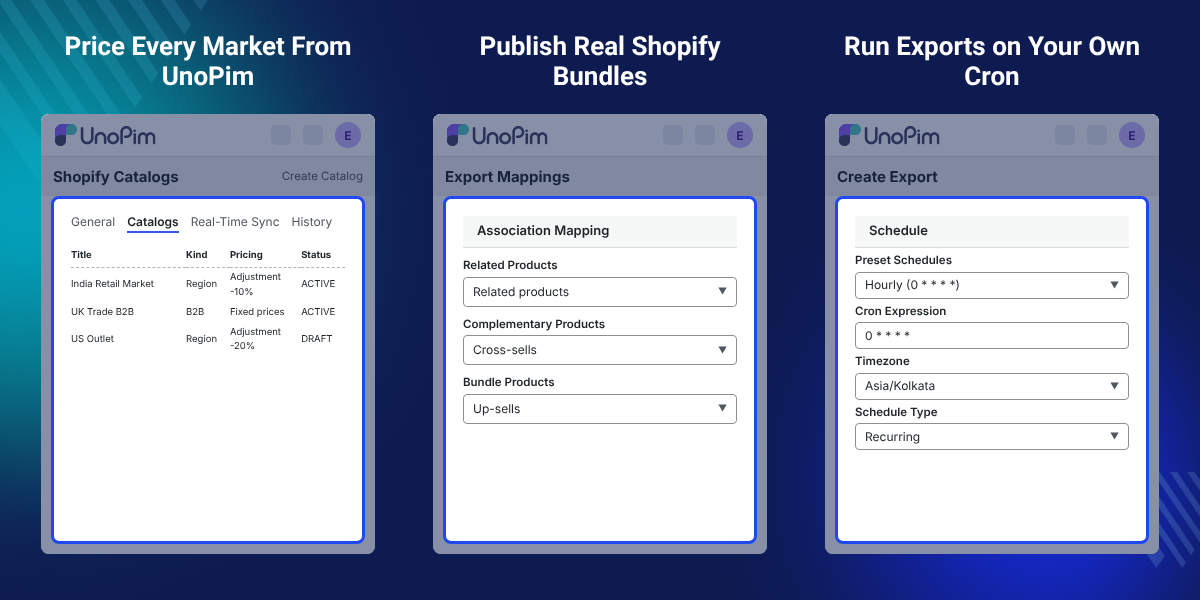
Highlighted Features of UnoPim Shopify Connector Pro
Market and B2B Catalogs
Build Region and B2B catalogs in UnoPim, each tied to one Shopify credential and one currency.
Catalog Price Lists
Push adjustment or fixed price lists, and read Shopify prices back onto UnoPim price attributes.
Real-Time Product Sync
Send a product to Shopify as it is saved, with a 10-second debounce per product.
Scheduled Exports
Run an export profile on a preset rhythm or a custom cron, in its own timezone.
Associations and Bundles
Publish related, complementary, and bundle products as real Shopify relationships.
External Media by URL
Export images and videos from a URL attribute, with YouTube and Vimeo sent as video.
Money and Measurement Fields
Send prices as money metafields and dimension, volume, and weight as measurement metafields.
Advanced Export Filters
Narrow an export by locale, attribute, family, category, completeness, and time window.
Why Do We Need UnoPim Shopify Connector Pro?
Shopify prices a product one way per market unless a catalog and a price list exist. A store selling into several regions keeps those price lists by hand.
The free UnoPim Shopify connector moves catalog data, but leaves catalogs, bundles, and timed runs switched off. Someone still opens an export job on every price change.
UnoPim Shopify Connector Pro removes that step. Catalogs, prices, associations, and media are maintained in UnoPim, and the store picks them up on save or on schedule.
The detail that saves the most time is small. When a Shopify catalog, price list, or publication is deleted behind UnoPim, the next export recreates it instead of failing the job.
Also, if you want to hold product images and videos in one library before they reach Shopify, you can check our module UnoPim DAM.
UnoPim Shopify Connector Pro Use Cases
-
Sell Into Several Regions
A brand selling in three regions keeps one catalog per market. Each catalog carries its own currency and price list.
-
Run B2B Price Lists
A wholesaler builds B2B catalogs for company locations. Trade prices stay in UnoPim and reach the right buyers only.
-
Keep a Large Catalog Current
A catalog team edits products all day. Each saved product reaches Shopify within seconds, with no export job to start.
-
Export Overnight
A store runs its full product export at night. The schedule uses the store timezone and skips a run that is still working.
-
Sell Kits and Sets
A kit seller keeps components as associations in UnoPim. Pro publishes them as Shopify bundles with quantities.
-
Use Hosted Product Media
A supplier hosts images on its own CDN. The URL attribute sends them to Shopify without a second upload.
Shopify Market and B2B Catalogs
Shopify market catalogs are built and kept current from UnoPim. The Catalogs screen lists every catalog held against a credential, with title, status, kind, currency, market count, pricing summary, and sync state.
Catalog create asks for a title only, so a catalog can be drafted in one click. If you sell the same catalog on WooCommerce, you can check our module UnoPim WooCommerce Connector.
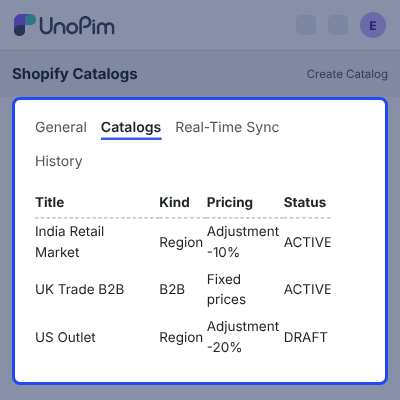
- Choose Region catalogs for Shopify region markets, or B2B catalogs for company-location markets.
- The market picker offers only markets that match the catalog kind.
- Set title, status, markets, currency, price list name, and auto-publish per catalog.
- Catalog titles stay unique per credential, and a catalog needs a three-letter currency.
- Market lists are cached for 15 minutes per credential, so large market sets stay quick.
- Row actions and mass delete follow the catalog edit and delete permissions.

Catalog Prices and Pricing Strategy
Each catalog holds its own pricing strategy. An adjustment price list applies a percentage decrease, validated between 0 and 100, while a fixed price list reads values from UnoPim price attributes.
Catalog export sends catalog, publication, and price list in that order, and fixed prices go out in chunks of 250.
To load price data into UnoPim from spreadsheets first, then check UnoPim Custom XLSX Connector.
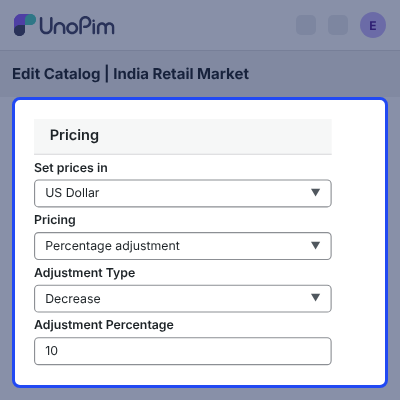
- Name a price attribute and a compare-at attribute per catalog.
- Both fields accept real UnoPim price attributes only.
- Exports fall back to the export mapping when a catalog leaves the fields empty.
- Catalog price import writes Shopify price list prices back onto UnoPim price attributes.
- Pick overwrite or keep existing before an import runs, and only fixed prices come back.
- Pre-flight checks block a catalog with no market, no currency, or no adjustment type.

Real-Time Product Sync to Shopify
Real-Time Sync pushes a product on update, and after a bulk edit. A 10-second debounce per product keeps a burst of saves down to one push.
Pricing work done in the store is worth protecting, so you can also check our module UnoPim Dynamic Pricing Rule.
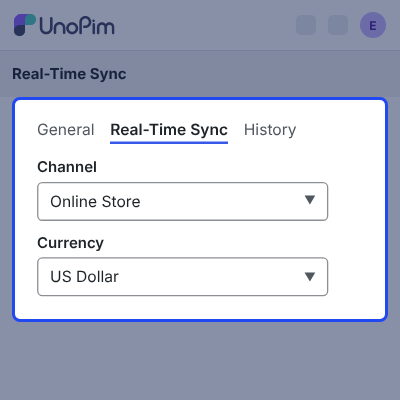
- Pick the channel and the currency once on the Real-Time Sync screen.
- Turn real-time sync on or off per Shopify credential.
- Only products that already hold a Shopify mapping are pushed.
- A variant is pushed through its parent product.
- Sync turns itself off and logs a warning when a credential loses its default locale.
- Jobs run with 3 attempts and a 10s then 60s backoff.

Scheduled Shopify Exports
Any Shopify export profile can carry a schedule and run without an admin. A dispatcher checks every minute, on one server and without overlap, and starts the jobs that are due.
Schedules cover product, category, metafield, metaobject, and catalog exports. If the same catalog also has to reach Google, then check UnoPim Google Shopping Connector.
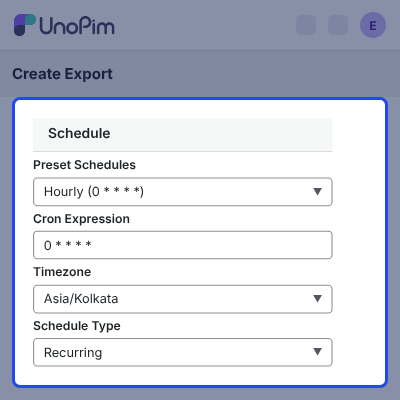
- Pick a preset rhythm or write a custom cron expression.
- Give each schedule its own timezone, checked against real timezone names.
- A one-time schedule disables itself after it runs.
- A profile is skipped while its last run is still pending, validating, processing, linking, or indexing.
- Runs are attributed to the admin who set the schedule, so history stays readable.
- A running task scheduler and a queue worker are needed for timed runs.

Product Associations and Shopify Bundles
UnoPim association types map to three Shopify destinations on the export and import mapping screens. Related and complementary products land in Shopify recommendation metafields, and bundle products become real bundles.
Both directions are covered, so relationships built in Shopify come back into UnoPim as associations.
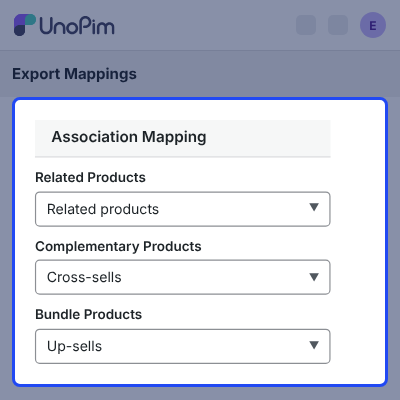
- Map related, complementary, and bundle products from UnoPim association types.
- Recommendations are written as product reference lists through a bulk mutation.
- The phase retries when a linked product is not in Shopify yet.
- Bundles carry up to 30 components, with option selections and quantity per component.
- Bundle creation is polled up to 10 times at 1.5-second intervals.
- Existing Shopify bundles are read back in batches of 100 products.

External Media Export by URL
Images and videos that sit outside UnoPim are exported by link. Admins nominate one URL attribute for images and one for video on the export mapping screen.
If you would rather publish files already held in UnoPim as public links, then check UnoPim Public Image URL.
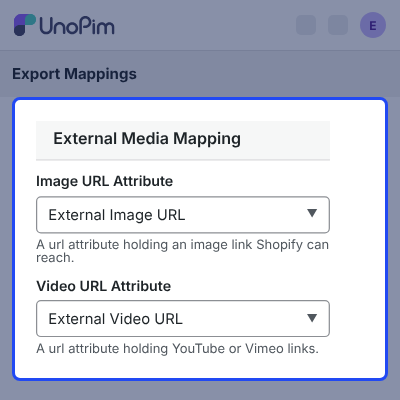
- Only attributes validated as URLs can be picked, so a wrong mapping is caught early.
- YouTube and Vimeo links are sent to Shopify as external videos.
- Any other http or https link is sent as an image.
- Host noise such as www., m., and player. is normalised before the check.
- A URL the store already holds is skipped instead of uploaded twice.
- Alt text is built from the product SKU and the attribute the link came from.

Money and Measurement Metafields
Price and dimension data reach Shopify as typed metafields, not plain text. A UnoPim price attribute goes out as a money value with an amount and a currency code, read from the export job.
Dimension, volume, and weight values go out with the unit mapped to Shopify vocabulary, list values included.
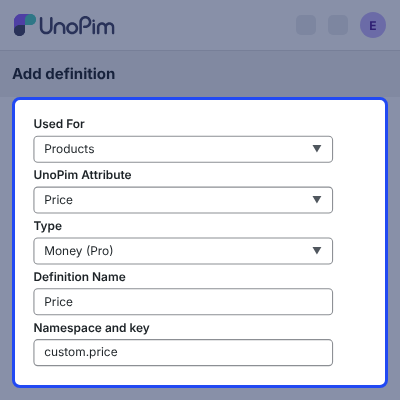
- A money metafield that cannot be resolved is dropped, and the product still exports.
- Imported measurement values map the Shopify unit back to the matching UnoPim unit.
- Measurement definitions imported from Shopify become numeric text attributes in UnoPim.
- The Shopify definition is stored, so the next export matches it.
- Metaobject fields handle money and measurement the same way products do.
- Metaobject entry values are checked as numbers against the field minimum and maximum.

Advanced Shopify Export Filters
The Shopify product export carries a filter set that only this add-on consumes. Large catalogs can be cut down to the locales, attributes, and products a run needs.
Translation work benefits from locale filters, so you can also check our module UnoPim DeepL Translation Module.
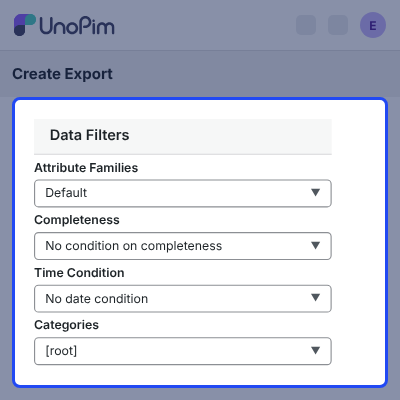
- Export chosen locales only; the Shopify default locale is always kept.
- Narrow attributes while keeping SKU, status, the mapped title source, and every variant axis.
- Filter by attribute family, category, and completeness level.
- Set a time condition: last N days, since the last completed export, or between two dates.
- Choose whether media and associations ride along with the product data.
- Add custom per-attribute conditions, and pick currencies on the metaobject export.

Complete UnoPim Shopify Connector Pro Feature List
Catalogs and Market Pricing
- Create Region and B2B catalogs per Shopify credential, each with one currency and one price list
- Pick an adjustment strategy with a percentage decrease between 0 and 100, or fixed prices from UnoPim
- Set a price attribute and a compare-at attribute per catalog, with fallback to the export mapping
- Export catalog, publication, and price list in order, and repair records deleted inside Shopify
- Import Shopify catalogs by reference, so a re-import updates instead of duplicating
- Import price list prices with an overwrite or keep existing choice
Sync Automation
- Push products to Shopify on create, on update, and after a bulk edit
- Debounce each product for 10 seconds so a burst of saves becomes one push
- Stop real-time sync and log a warning when a credential loses its default locale
- Schedule product, category, metafield, metaobject, and catalog exports by preset or cron
- Give each schedule a timezone, and disable a one-time schedule after it runs
- Skip a profile whose previous run is still working, so runs never pile up
Associations, Bundles and Media
- Map related, complementary, and bundle products from UnoPim association types
- Write recommendations to Shopify product reference metafields through a bulk mutation
- Build Shopify bundles with up to 30 components, option selections, and per-component quantity
- Poll asynchronous bundle creation up to 10 times at 1.5-second intervals
- Export external images and videos by URL, with YouTube and Vimeo detected as video
- Skip a URL the store already holds, and build alt text from the SKU and the attribute
Metafields and Data Types
- Export price attributes as Shopify money metafields with amount and currency code
- Export dimension, volume, and weight as measurement metafields with normalised units
- Import measurement definitions as numeric text attributes and store the Shopify definition
- Reject a measurement field with no unit, and check entry values against minimum and maximum
Export Filters and Scoping
- Filter an export by locale, attribute, attribute family, category, and completeness
- Resolve a time condition into an updated-after and updated-before window
- Add custom per-attribute conditions, and choose currencies on the metaobject export
- Write imported prices to channel-and-locale, channel, locale, or common attribute scope
Admin, History and Reliability
- Manage catalogs from a searchable grid with row actions, mass delete, and permission gates
- Audit every catalog change with the user who made it, shown on the catalog history tab
- Keep Shopify references, last synced time, and last error out of the audit trail
- Run catalog exports in batches of 20, imports in 50, and price imports in 100
- Send every operation through Admin GraphQL with a 120-second timeout and 3 retries
Support
For any query or issue, please create a support ticket here http://webkul.uvdesk.com/. You may also check our all UnoPim Extensions.
Specifications
Frequently Asked Questions
Specification
Detailed technical features and requirements to help you understand the module’s capabilities and ensure smooth integration with your system.
Cloud Hosting
Detailed technical features and requirements to help you understand the module’s capabilities and ensure smooth integration with your system.
Move to Cloud Today
We’re partnered with top-tier, trusted providers!
Default Configuration Details of Server
RAM 1 Core
Processor 30 GB
Hard Disk
Database
Want to know more how exactly we are going to power up your eCommerce Website with Cloud to fasten up your store
* Server Configuration may vary as per application requirements.
Change Logs
- - Feature Add (+)
- - Feature remove (-)
- - Bug Fixed (!)
- - Modification (*)
- + Catalogs & market pricing — create Shopify catalogs from UnoPim (region and B2B), with their own markets, currency and pricing: a fixed price list built from UnoPim price attributes, or a percentage adjustment, plus a per-catalog compare-at price switch. Catalogs and their prices can also be imported back.
- + Real-time sync — a saved product reaches the store within seconds, enabled per credential.
- + Scheduled exports — an export profile can run itself on a recurring schedule, at a one-time moment, or on a custom cron expression.
- + Advanced export filters — locales, attributes, attribute families, categories, completeness, currencies, change dates, attribute conditions, and switches for media and associations.
- + Product associations & bundles — related, complementary and other association types, and bundle components, are exported to Shopify and read back on import.
- + Measurement and money support — measurement attributes are sent as Shopify weight, unit price and metafields, and Shopify's money type is available on metafields and metaobject fields.
- + External media — image and video URLs are sent to Shopify without being downloaded first.
- + Supported UnoPim version: 3.1.x
- + Supported PHP version: 8.4.1 or higher
- + Supported Laravel version: 13.x
- + Requires the UnoPim Shopify Connector


