- Description
- Reviews
- FAQ
- Customers ()
- Specifications
- Cloud Hosting
- Changelog
ERPNext Website Loyalty Management is an ERPNext app that adds a points program to a Webshop store. Customers collect loyalty points on the orders they place and spend them later as a discount.
The store team decides how points are earned with an earning rule. Each rule gives a set number of points for every block of spend, such as one point per 100.
Redemption rules decide what loyalty points are worth. One point can equal one unit of currency, or any ratio the store chooses. An optional minimum order amount keeps points off small orders.
Logged-in shoppers see their balance and the points the current order will earn in the Webshop cart. They type the points to use, click Redeem, and the Grand Total drops at once.
The discount travels with the order to the Quotation and the Sales Order. On submit, the app records the points redeemed and earned as loyalty transactions, all managed from the Website workspace.
Additionally, if you want repeat buyers to check out faster with a saved address, then check ERPNext Website Customer Address Book.
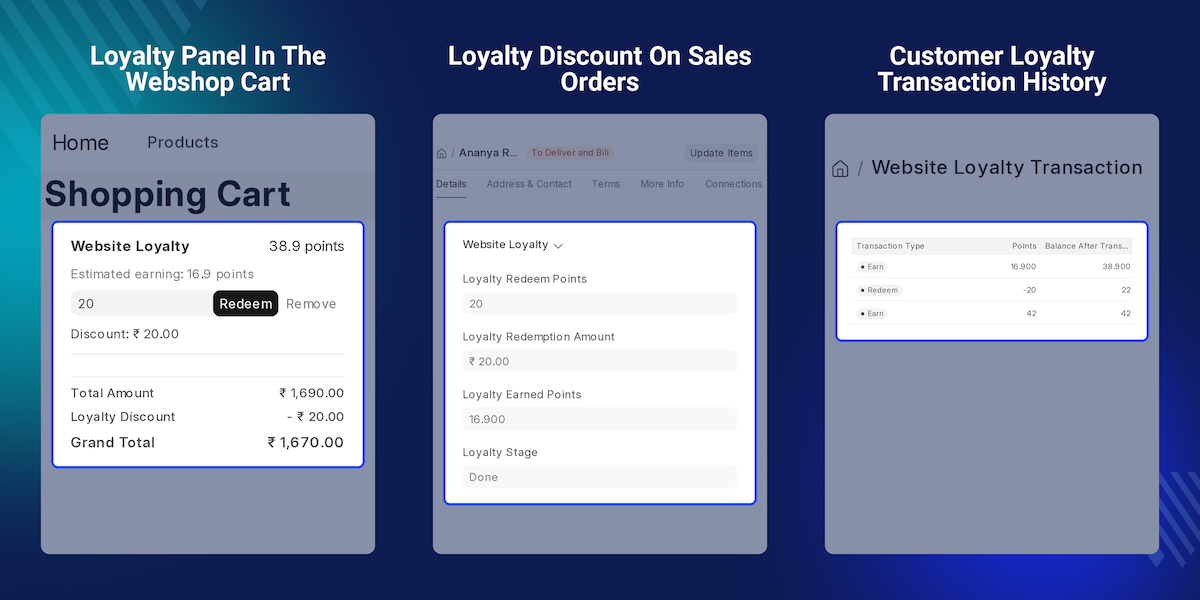
Highlighted Features of ERPNext Website Loyalty Management
Spend Based Points
Award points in proportion to what the customer spends on each Webshop order.
Targeted Earning Rules
Limit a rule to one Item Group or Customer Group, with start and end dates for a seasonal offer.
Flexible Point Value
Set how many points buy how much discount, with an optional minimum order amount.
Discount Cap Per Cart
Maximum Cart Redemption Percent stops points from covering more than a set share of the order.
Loyalty Panel in Cart
Shoppers see their balance, the points this order earns, and the discount beside the Payment Summary.
Automatic Order Processing
Submitting a Sales Order records the points earned and redeemed, with no manual entry.
Reversal on Cancellation
Cancelling a Sales Order takes back the points earned and returns the points spent.
Point Expiry
Set Points Expiry Days, and earned points stop counting toward the balance after their expiry date.
Why Do We Need ERPNext Website Loyalty Management?
Small online stores want regular buyers to come back. Yet a default ERPNext Webshop has no simple way to reward a repeat Sales Order or show buyers their points.
The usual workaround is a coupon sent by email. It is easy to forget, gives the same discount to every buyer, and never builds a balance a customer can watch grow.
Tracking rewards by hand is worse. Someone has to total each customer's orders and work out the points owed. Every cancelled Sales Order then needs a manual fix outside ERPNext.
This app fills that gap. Earning rules award points on each order, and redemption rules turn them into a discount. Every change lands in the customer's loyalty transactions.
Buyers spend points they can see. With a 100 to 1 earning rule, a 4,200 cart shows 42 estimated points before checkout, right beside the Redeem button.
Also, if shoppers have product questions before they spend points, you can check our extension ERPNext Website Product FAQ.
Webshop Loyalty Points Use Cases
-
Rewarding a Regular Coffee Buyer
One coffee store gives a point per 100 spent. Its monthly bean buyers watch the balance grow and use it on their fourth order.
-
Promoting a New Product Range
Homeware shops can add an earning rule for a Kitchen Item Group with a two-month date range. Only kitchen products then earn points during the launch.
-
Rewarding Wholesale Customers Only
Suppliers limit an earning rule to a Wholesale Customer Group, so only trade accounts collect points. To show those buyers their own prices, see ERPNext Website Customer Group.
-
Protecting Margin on Small Orders
Gift shops can cap the cart discount at 20 percent and set a minimum order amount. Points then never wipe out the profit on a small basket.
Loyalty Program Settings
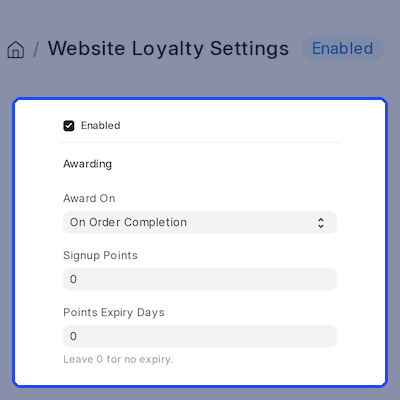
Loyalty Settings holds the main switches of the points program on one page in the Website workspace. Tick Enabled to turn loyalty points on for the whole Webshop store.
The same page sets Points Expiry Days and Maximum Cart Redemption Percent. Stores can let points last forever or expire them, and cap how much of a cart points pay for.
- One Enabled switch turns the whole points program on or off.
- Points Expiry Days sets how long earned points stay valid.
- Leave Points Expiry Days at 0 for points that never expire.
- Maximum Cart Redemption Percent caps the loyalty discount.
- Install creates default settings, one earning rule, and one redemption rule.
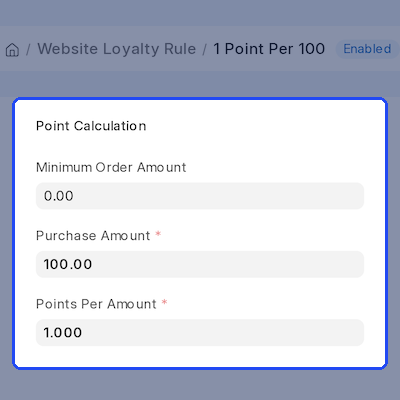
Amount Based Earning Rules
An earning rule gives points for every block of spend. Enter a Purchase Amount and Points Per Amount, such as 100 and 1, and each Sales Order earns points to match.
Each rule can also carry a Minimum Order Amount, a date range, and an Item Group or Customer Group filter. When several rules match, the lowest Priority wins. To grow basket size, see ERPNext Frequently Bought Together Products.
- Points are worked out from the order amount and the rule ratio.
- A minimum order amount keeps small orders from earning points.
- Item Group filters count only the matching items in the order.
- Customer Group filters reward one type of buyer at a time.
- Valid From and Valid Upto dates run time-limited offers.
- The lowest Priority number decides between matching rules.
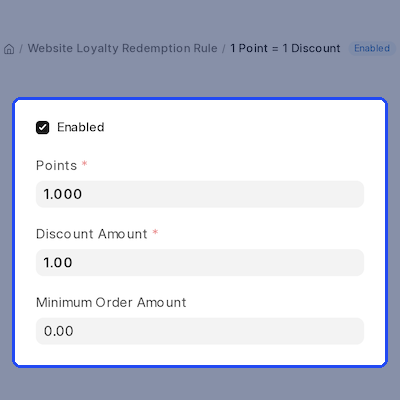
Point to Discount Redemption Rules
Redemption rules say what loyalty points are worth. Set the Points and the Discount Amount, and the app converts any balance into money off the order.
The Minimum Order Amount keeps the rule off small baskets, and a date range limits it to a period. To set item minimums too, see ERPNext Website Minimum Order Quantity.
- Points and Discount Amount set the value of each point.
- The default rule makes one point worth one unit of currency.
- A minimum order amount applies before points can be used.
- Start and end dates limit when the redemption rule applies.
- The redeemable points never exceed the customer's balance.
Loyalty Panel in the Webshop Cart
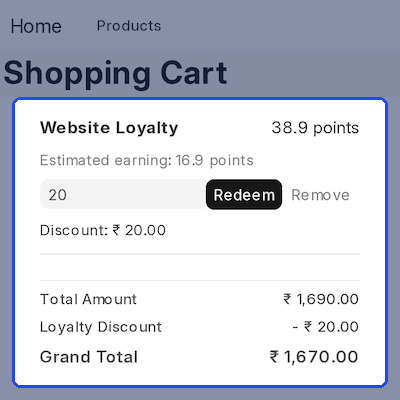
The Website Loyalty panel sits in the Payment Summary of the Webshop cart. Logged-in shoppers see their points balance and the estimated points this order will earn.
The shopper types the points to use and clicks Redeem. The cart then shows the Total Amount, a Loyalty Discount line, and the new Grand Total. Remove takes the points back off.
- The panel shows the current point balance of the customer.
- Estimated earning tells the shopper what this order will add.
- Redeem applies points and Remove clears them in one click.
- The Payment Summary shows a separate Loyalty Discount line.
- Asking for more than the allowed points shows a clear message.
- Guests do not see the panel until they log in.
Loyalty Discount on Quotations and Sales Orders
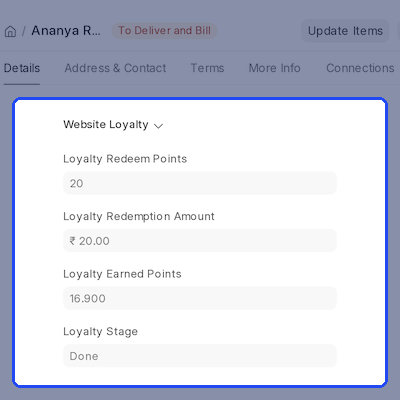
The Quotation and the Sales Order each get a Website Loyalty section. It holds the Loyalty Redeem Points, Loyalty Redemption Amount, Loyalty Earned Points, and Loyalty Stage.
The redeemed value is applied as a discount on the Net Total, so ERPNext taxes and totals stay correct. When the Sales Order is submitted, the earned and redeemed points are posted for the customer.
- The loyalty discount is applied on the Net Total of the order.
- Quotation and Sales Order show the points and discount used.
- Loyalty Earned Points is filled in when the order is submitted.
- Loyalty Stage moves from Draft to Done, or to Cancelled.
- A Gift Card coupon discount stays in place when points are removed.
Customer Loyalty Transaction History
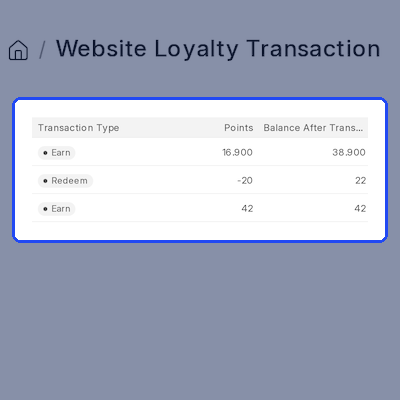
Every point movement is saved as one of the customer's loyalty transactions. Each entry shows the Transaction Type, the Points, and the Balance After Transaction.
Each entry links back to the Sales Order that created it. If that order is cancelled, a Reversal entry keeps the balance in line with real orders. To collect reviews from these buyers, see ERPNext Product Review After Purchase.
- Earn, Redeem, and Reversal entries are kept for every customer.
- A running Balance After Transaction appears on each entry.
- Each entry links to the Sales Order and Quotation behind it.
- Earned points carry an Expiry Date when expiry is set.
- System Manager and Website Manager roles can view and manage entries.
Complete ERPNext Website Loyalty Management Feature List
Program Setup & Settings
- Turn the points program on or off with one Enabled switch in Loyalty Settings
- Manage settings, rules, and transactions from the Website workspace sidebar
- Get default settings, one earning rule, and one redemption rule on install
- Set Points Expiry Days, or leave it at 0 so points never expire
- Cap the loyalty discount with Maximum Cart Redemption Percent
Earning & Redemption Rules
- Award points by Purchase Amount and Points Per Amount, such as 1 point per 100
- Filter earning rules by Item Group or Customer Group, with Priority to break ties
- Set the point value with Points and Discount Amount, one to one by default
- Add a Minimum Order Amount and a date range to any rule
- Never redeem more points than the customer's balance
Webshop Cart Experience
- Show balance and estimated earnings in the Website Loyalty panel
- Redeem or remove points from the cart with one click
- List Total Amount, Loyalty Discount, and Grand Total as separate lines
- Hide the panel from guests until they log in
Orders & Loyalty Transactions
- Apply the loyalty discount on the Net Total of the Quotation and Sales Order
- Post Earn and Redeem entries on submit, and Reversal entries on cancel
- Keep a running Balance After Transaction linked to the source order
- Give System Manager and Website Manager roles access to loyalty records
Support
For any query or issue, please create a support ticket here http://webkul.uvdesk.com/.
You may also check our top-quality ERPNext Modules.
Specifications
Frequently Asked Questions
Specification
Detailed technical features and requirements to help you understand the module’s capabilities and ensure smooth integration with your system.
Cloud Hosting
Detailed technical features and requirements to help you understand the module’s capabilities and ensure smooth integration with your system.
Move to Cloud Today
We’re partnered with top-tier, trusted providers!



Default Configuration Details of Server
RAM 1 Core
Processor 30 GB
Hard Disk
Database
Want to know more how exactly we are going to power up your eCommerce Website with Cloud to fasten up your store
* Server Configuration may vary as per application requirements.
