Odoo Headless Theme Momentum
Odoo Headless Theme Momentum is a Next.js storefront for Odoo fashion and lifestyle stores. It renders catalog, cart, checkout and CMS pages from the Odoo REST API.
- Let admins change brand colours, logo and announcement text inside Odoo.
- Switch currency in the header and re-price catalog, cart and checkout.
- Filter the catalog on price and on Odoo attribute aggregations.
- Show swatch, button, radio and dropdown option selectors on the product page.
- Open a slide-over cart drawer after every add to bag.
- Run 5 checkout steps for guests and 4 steps for signed-in customers.
- Merge a guest cart into the customer cart when a shopper signs in.
- Serve the storefront from Cloudflare Workers with KV-backed caching.
- Refresh cached storefront data from Odoo through a revalidation webhook.
Regular Price: $499.00
Special Price $249.00
- Description
- Reviews
- FAQ
- Customers ()
- Specifications
- Cloud Hosting
- Changelog
Odoo Headless Theme Momentum is an Odoo headless storefront built on Next.js and React. Odoo stays the source of truth for catalog, pricing, stock, carts, orders, CMS pages and navigation.
Every page reads from the Odoo Headless REST API. Server components draw the homepage, category listings and product pages. Client components run the filters, the cart and the checkout steps.
Shoppers meet an editorial layout with a mega menu, a search overlay, a filter drawer and a slide-over bag. Orders, addresses and wishlist items land back in Odoo on the same customer record.
Store owners drive the look from the back office. Odoo publishes 18 colour tokens, the store logo, the favicons, the announcement text and the default meta title, description and keywords.
This headless eCommerce theme needs Node 20.9 or later and deploys to Cloudflare Workers through OpenNext. Cache windows run from 60 seconds on the homepage to 3600 seconds on the footer.
Additionally, if you need the Odoo side of this setup, then check Odoo Headless E-commerce. It manages the banners, carousels, mega menu and CMS pages.
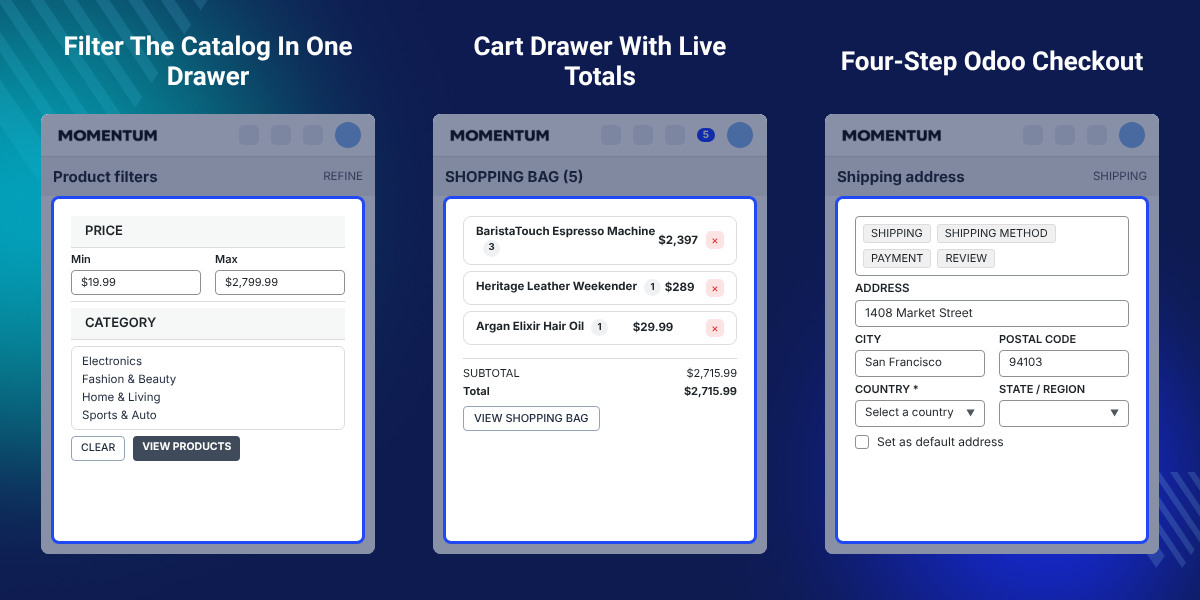
Highlighted Features of Odoo Headless Theme Momentum
Dynamic Homepage Sections
Eleven homepage sections render only when Odoo returns data for them. A store with a partial payload still reads as a finished page.
Back-Office Theming
Odoo publishes 18 colour tokens that the storefront writes during server rendering, so the first paint already carries the brand palette.
Live Currency Switching
A header switcher re-prices the homepage, the listings, the product page, the cart and the checkout in whichever currency Odoo publishes.
Self-Healing Cart
An expired or missing Odoo cart id gets replaced with a fresh cart. The request that failed then runs once more, with no visible error.
Guest And Member Checkout
Guests move through 5 checkout steps and signed-in customers move through 4, because the information step drops out for a known shopper.
Edge Delivery
Cloudflare Workers serve the pages with a KV-backed incremental cache and Smart Placement, which runs the Odoo calls close to the origin.
Why Do We Need Odoo Headless Theme Momentum?
Odoo Website gives a shop one templating layer. A new layout means editing QWeb templates and pushing a fresh build to the Odoo instance itself.
That couples the shop front to the ERP release cycle. Marketing waits on developers for a banner swap, and every design change carries downtime risk on the whole instance.
Momentum splits the two. The front end is a Next.js app on Cloudflare Workers, and Odoo keeps the data. A palette or banner change ships without touching the ERP.
Colour values arrive from store-config as colors.tokens. The theme writes them as inline CSS custom properties on the html element during server rendering. No default palette ever flashes.
Also, if you want to open the same catalog to several sellers, you can check our module Odoo Multi Vendor Marketplace.
Odoo Headless Theme Momentum Use Cases
-
Fashion And Apparel Stores
Editorial banners, full-bleed imagery and swatch selectors suit clothing catalogs where the look of the page sells as hard as the price.
-
Cross-Border Selling
Shops that price in several currencies get a header switcher, and each change re-fetches listings, product data, cart and checkout from Odoo.
-
Campaign-Led Merchandising
Marketing teams stage a drop by filling banner, carousel and offer payloads in Odoo. One call to the revalidation webhook publishes the lot at once.
-
Mobile-First Catalogs
Grids run 2 columns on a phone and 4 on a desktop. Card images load through an observer with a 256 px margin ahead of the viewport.
-
ERP-Only Content Teams
Teams that work inside Odoo all day keep pages, footer groups and navigation there. There is no second content system to learn or to license.
Odoo-Driven Homepage Sections
The homepage is built from 11 sections that read one Odoo payload. Each section disappears when its data is empty, so the page never shows an unfinished block.
Banner destinations follow the bannerType value, which routes a tile to a product, a CMS page or a category listing. Additionally, if you want the same catalog inside a native app, then check Odoo Mobile App Builder.

- Rotate the hero every 4.5 seconds, with dot indicators, arrows and a pause on focus.
- Rotate the promotion banner every 5 seconds with its own dots and arrows.
- Show featured, explore and recently viewed carousels on Swiper, 2 to 4 products per view.
- Lay out brand collection tiles on a 12-column grid with per-banner background and text colour.
- Defer below-the-fold sections with CSS content-visibility to protect the LCP score.
- Skip every GSAP animation and carousel autoplay when the visitor asks for reduced motion.

Product Listing Page Filters And Sorting
The product listing page carries a sticky control bar. That bar holds a live product count, removable filter chips, a filter button and a sort dropdown.
Filters open in a slide-over drawer that traps focus, closes on Escape and locks body scroll while it is open. Also, if you publish printed or PDF catalogs from the same products, you can check Odoo Product Catalogs.
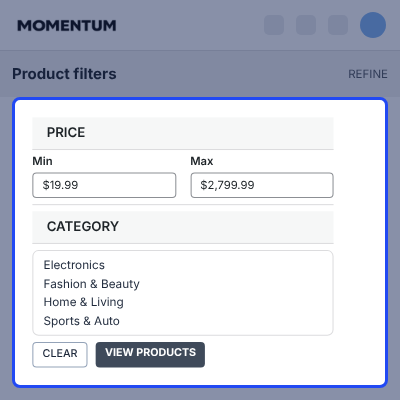
- Set a price range with minimum and maximum inputs, validated for negatives and for min above max.
- Pick attribute values that Odoo returns as aggregations, up to 14 options for each attribute.
- Apply a draft selection only on View products, or reset every choice with Clear.
- Sort on any Odoo sort field, expanded into A to Z, Z to A, Low to high and High to low.
- Page the grid 12 products at a time, with the current page mirrored into the URL.
- Fall back to a skeleton grid while fetching, a retry button on error and a Clear Filters empty state.

Product Page Variant Options
Each product page pairs a Swiper gallery with a sticky buying panel. Odoo decides how every option group draws itself, and the panel follows that instruction.
Picking one attribute reconciles the rest to a valid in-stock combination and swaps the gallery image to match. Also, if you sell those variants together as a set, you can check Odoo Website Product Pack.
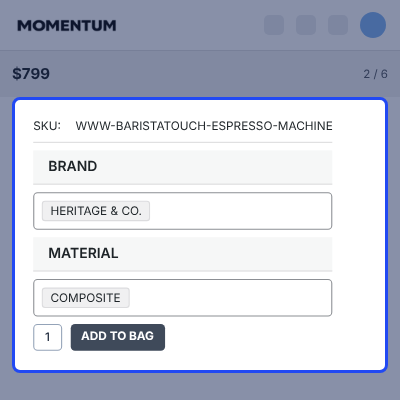
- Draw option groups as swatch chips, pill buttons, radio lists or a native select.
- Switch a group above 6 values to a dropdown so the panel stays readable.
- Disable any value that has no matching variant behind it.
- Update the SKU and the price as soon as the shopper lands on a new variant.
- Deduplicate gallery images across main, gallery, variant and option-value sources.
- Show up to 4 related products, matched on category or collection.

Cart Drawer And Shopping Bag
A cart drawer slides in after every add to bag and can also be opened from the header bag icon. The full bag page repeats the same lines with larger imagery and a sticky summary.
Totals come from the Odoo prices object where it is present, and are computed locally only when it is not. Additionally, if you run discount codes on those carts, then check Odoo Website Coupons & Vouchers.
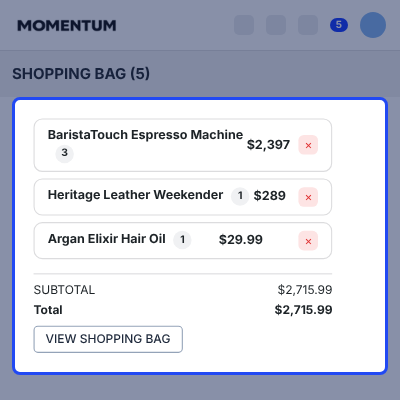
- Step a line quantity up or down, where a decrement at 1 removes the line.
- Create an empty Odoo cart automatically on the first add to bag.
- Replace a cart that Odoo reports as expired, missing or inaccessible, then retry once.
- Apply a promo code from the bag page and report the result through a toast.
- Announce every cart change to screen readers through a polite live region.
- Suspend cart sync right after an order so a stale bag cannot reappear.

Multi-Step Odoo Checkout
Checkout runs as a step sequence over the Odoo cart. A step unlocks only after Odoo confirms the one before it, and Zod validates each form before the shopper moves on.
A saved draft returns the shopper to the right step after a refresh. The theme restores it only when the draft matches the current cart.
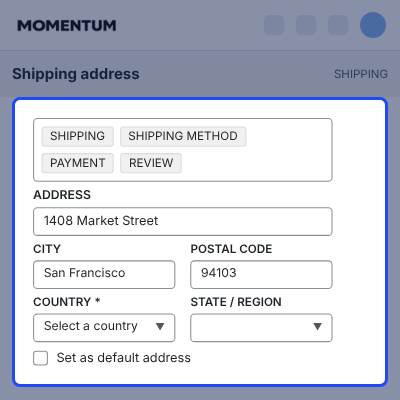
- Give guests Information, Shipping, Shipping Method, Payment and Review.
- Offer signed-in customers their saved address book as selectable cards with a Default badge.
- Send only the address_id for a saved address, so Odoo links it instead of duplicating it.
- Load regions from the chosen country and require one only where that country has regions.
- List the shipping and payment methods Odoo returns, with the first option pre-selected.
- Block Place Order until the payment step has produced a transaction_id.

Back-Office Theming And Multi-Currency
Branding and money both come from Odoo. The palette, the logo, the favicons and the announcement text are back-office fields, and the currency list arrives with them.
Colour values pass a format check first. A typo in Odoo drops back to the compiled default instead of breaking the page. Also, if you run several storefronts from one Odoo database, you can check Odoo Multi Website.
- Map 18 tokens, from background and foreground through accent, muted, danger and star.
- Accept hex, rgb, hsl, oklch and named colours, and reject anything else.
- Read older palettes through the legacy colour keys when a backend predates colors.tokens.
- Persist the chosen currency in cookies and localStorage so the server render already matches.
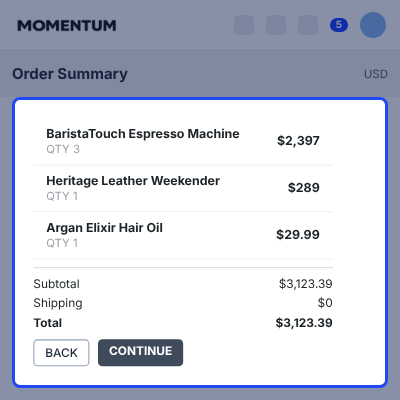
- Send X-Odoo-Currency on every request and format prices with Intl.NumberFormat.
- Re-theme Swiper and the toast layer from the same set of tokens.

Complete Odoo Headless Theme Momentum Feature List
Odoo Headless Storefront Experience
- Sticky header with store logo, search overlay, currency switcher, wishlist count and bag count
- Three-level mega menu built from the Odoo category tree, with up to 2 image tiles per menu
- Mobile drawer with the full category tree, currency switcher and account shortcuts
- Announcement bar, footer link groups and copyright text, all sourced from Odoo
- Branded 404 and error pages with working Retry, Home and Shop actions
- Toast notifications and a polite live region themed from the store design tokens
Catalog And Product Discovery
- Category, search and full-catalog listings on one view, with a hero band per category
- Price and attribute filters, removable chips, and a sort list expanded into both directions
- Product cards with hover image, colour swatches, quick add, wishlist heart and sale pricing
- Route and image prefetching on card hover, focus or press for near-instant product pages
- Gallery with thumbnail rail, image counter, keyboard control and deduplicated sources
- Canonical slug redirects on category and product routes, with a 404 on an unknown key
Cart, Checkout And Orders
- Cart drawer and bag page over one Odoo cart, mirrored in Redux and localStorage
- Self-healing cart recovery, single-flight cart creation and post-order sync suspension
- Promo code form with pending state and success or error feedback
- Five-step guest checkout, four-step customer checkout, and a draft tied to the current cart
- Country to region cascade, saved-address reuse by id and an optional default-address flag
- Order success page that clears every trace of the completed cart
Customer Account And Wishlist
- Login and signup with the minimum password length Odoo publishes
- Guest cart merged into the customer cart at sign-in, with a warning toast if the merge fails
- Dashboard tiles for order and address counts, the latest order and a profile summary
- Four-stage order tracker from Placed to Delivered, with a dedicated cancelled banner
- Address book with add, edit and remove, blocked on the default and the last address
- Wishlist grid with optimistic updates and tombstones that stop a removed item reappearing
Back-Office Control And SEO
- Eighteen colour tokens, logo, favicons, store name, announcement and copyright from Odoo
- CMS pages rendered from Odoo through a tag allow-list and an href protocol check
- Per-route metadata with title, description, keywords, canonical URL and Open Graph images
- Noindex on search, login, signup, cart and checkout, and html lang from the Odoo locale
- Revalidation webhook that expires named cache tags on demand, up to 32 tags per call
- Thirty Odoo endpoints across storefront, catalog, auth, cart, checkout, customer and wishlist
Next.js Storefront Performance And Security
- Cloudflare Workers deployment with KV incremental cache, Smart Placement and worker cache
- WebP images at quality 90, priority hero loading and low-priority lazy loading elsewhere
- Revalidation windows from 60 seconds on the homepage to 3600 seconds on footer and CMS
- Server-only client token, a 30-endpoint proxy allow-list and origin checks on every mutation
- HttpOnly session cookie, a 1 MB body cap, JSON content-type enforcement and no-store on private data
- Focus traps, Escape handling, 44 px touch targets and full reduced-motion support
Support
For any query or issue, please create a support ticket here CREATE A TICKET HERE
You may also check our other top-quality Odoo Modules.
Specifications
Frequently Asked Questions
Support
For any query or issue, please create a support ticket here http://webkul.uvdesk.com/.
You may also check our top-quality Odoo Apps.
Specification
Detailed technical features and requirements to help you understand the module’s capabilities and ensure smooth integration with your system.
Cloud Hosting
Detailed technical features and requirements to help you understand the module’s capabilities and ensure smooth integration with your system.
Move to Cloud Today
We’re partnered with top-tier, trusted providers!
Default Configuration Details of Server
RAM 1 Core
Processor 30 GB
Hard Disk
Database
Want to know more how exactly we are going to power up your eCommerce Website with Cloud to fasten up your store
* Server Configuration may vary as per application requirements.


