USD
  • EUR
  • INR
  • USD
Cart
Cart 0
  • You have no items in your shopping cart.
    Akeneo Extensions
    Cart
    Cart 0
    • You have no items in your shopping cart.
    Hire a Developer
    ×
    Contact Us!
    Send Again
    Close
    Please Login to Write Your Review
    Pimcore Salesforce Connector

    Pimcore Salesforce Connector

    x
    Free

    * Required Fields

    $499.00
    Add To Cart
    Annual Billing

    Pimcore Salesforce Connector connects Pimcore 12 with Salesforce for secure, bidirectional product and CRM data synchronization.


    • Sync product and CRM data between Pimcore and Salesforce in both directions.

    • Import Salesforce products, accounts, contacts, leads, and opportunities.

    • Export Pimcore records back to Salesforce with upsert support.

    • Map Pimcore classes to Salesforce objects without code changes.

    • Configure one shared field mapping for both import and export.

    • Connect through OAuth2 Client Credentials with a Consumer Key and Secret.

    • Store the Salesforce Consumer Secret encrypted at rest with libsodium.

    • Run sync jobs asynchronously and watch live progress in Pimcore Studio.

    • Stop, retry, and review every completed synchronization run.

    • Validate fields against the connected Salesforce org schema before each call.

    • Give users granular permissions for credentials, mappings, and job runs.

    • Manage credentials, mappings, imports, and exports from the Studio UI.

    Pimcore Salesforce Connector
    Pimcore Salesforce Connector
    $499.00
    Check How It Works
    $499.00
    Configure and Buy
    Annual Billing
    X
    • Description
    • Reviews
    • FAQ
    • Customers ()
    • Specifications
    • Cloud Hosting
    • Changelog

    Pimcore Salesforce Connector is a Pimcore 12 bundle that links Pimcore with Salesforce through the REST and SOQL Data API. It handles two-way data sync for products and core CRM records.

    Admins import Product2, Account, Contact, Lead, and Opportunity records into mapped Pimcore classes. Product prices are read from the standard PricebookEntry during a product import.

    Pimcore records travel back to Salesforce with upsert support. The connector matches an existing record through stored ID mappings or a business match field before it creates anything new.

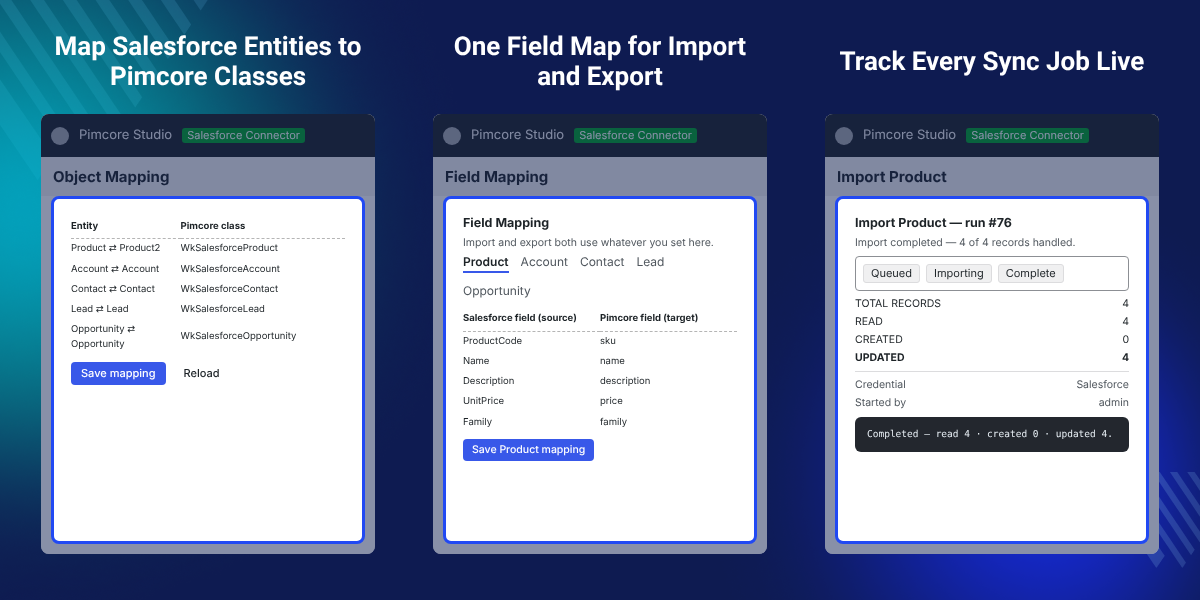
    Object and field mappings are configurable. You pick the Pimcore class for each Salesforce entity, then use one shared field map for both directions of the sync.

    Every run goes through an asynchronous Reader-Processor-Writer framework. Studio shows live progress, activity logs, record counts, a Stop control, and a Retry option.

    Also, if you want to connect Pimcore with an ERP system and sync catalog data with it, you can check our Pimcore Odoo Connector.
    Pimcore Salesforce Connector

    Highlighted Features of Pimcore Salesforce Connector

     Bidirectional Data Sync

    Move supported Salesforce records into Pimcore, and send Pimcore data back to Salesforce.

     Dynamic Object Mapping

    Choose the Pimcore class used for each Salesforce entity, with no fixed class references.

     Shared Field Mapping

    Pair Pimcore fields with Salesforce fields once, then use that map for both directions.

     Product Price Sync

    Read prices from the Salesforce standard price book, and write them back through Product2.

     Match Before Create

    Find an existing Salesforce record through ID mappings or a match field before creating one.

     Studio Job Management

    Start runs, watch the activity log, stop a queued or active job, and retry a failed run.

    Why Do We Need a Pimcore Salesforce Connector?

    Moving product and CRM data between Pimcore and Salesforce by hand creates duplicate records and repeated data work.

    Default Pimcore and Salesforce setups ship no shared field map, no two-way job engine, and no match-before-create step. Teams fill that gap with spreadsheets and manual re-keying.

    This connector links both systems and automates supported transfers through configurable mappings and queued jobs. Catalog and CRM data stay aligned without a person copying rows.

    One practical detail decides most failed syncs: a Salesforce org that lacks an optional field such as AccountNumber or MobilePhone.

    The connector describes each sObject first, drops the missing field from the SELECT, and falls back to the Salesforce record Id as the match key.

    Additionally, if you want to publish the same Pimcore catalog to an online store, you can check our Pimcore BigCommerce Connector.

    Pimcore Salesforce Connector Use Cases

     Product Catalog Synchronization

    Import Salesforce Product2 records into Pimcore, then export the updated product data back.

     CRM Data Import

    Bring Accounts, Contacts, Leads, and Opportunities into their mapped Pimcore classes.

     Product Data Export

    Send Pimcore products to Salesforce using Product2 upsert and full price book support.

     Automated Data Jobs

    Run manual or repeated transfers through the asynchronous sync job framework.

    Salesforce Product Import and Export

    Salesforce Product2 records move both ways. On import, the connector reads product data through paged SOQL requests and matches on SKU and ProductCode.

    Prices come from the standard PricebookEntry and are flattened onto the Pimcore product. The Salesforce Family value can derive or link a Pimcore category. For a headless commerce catalog, you can also check our Pimcore Commercetools Connector.
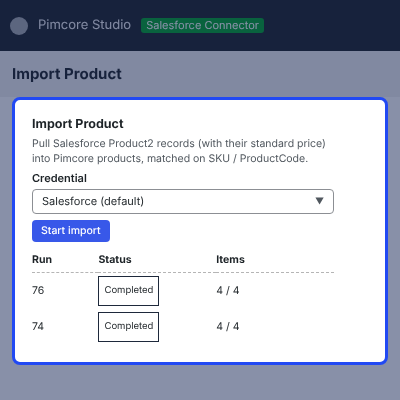
    • Import Product2 records through paged SOQL requests.
    • Read the product price from the standard price book.
    • Link a Salesforce Family value to a Pimcore category.
    • Upsert Pimcore products back to Salesforce Product2.
    • Find or create the matching PricebookEntry on export.
    • Strip unsupported and read-only fields before each request.
    Salesforce Product Import and Export

    Salesforce CRM Record Synchronization

    Accounts, Contacts, Leads, and Opportunities import from Salesforce and export from Pimcore. Each entity uses the Pimcore class you selected on the Object Mapping screen.

    Field mappings define how values move between the two systems. Contact and Lead match on Email, Account matches on Account Number, and Opportunity matches on Name. To load records from a file instead, you can check our Pimcore DataImport Bundle.
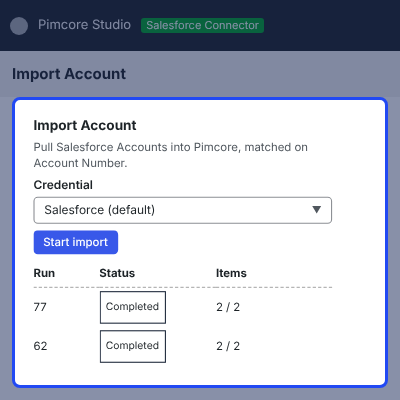
    • Sync Salesforce Accounts with a mapped Pimcore class.
    • Sync Contacts and Leads matched on their Email value.
    • Sync Opportunities with stage and close date defaults.
    • Configure a separate field mapping for every entity.
    • Match on a business field before any record is created.
    • Apply create-only defaults so an update never blanks a value.
    Salesforce CRM Record Synchronization

    Dynamic Object and Field Mapping

    The Object Mapping screen sets which Pimcore class represents each Salesforce entity. The five supported pairs are Product2, Account, Contact, Lead, and Opportunity.

    Field Mapping pairs a Pimcore field with a Salesforce field. One saved map drives both import and export, so the two directions can never drift apart. To fill mapped fields with generated copy, you can check our Pimcore Product Enrichment Agent.
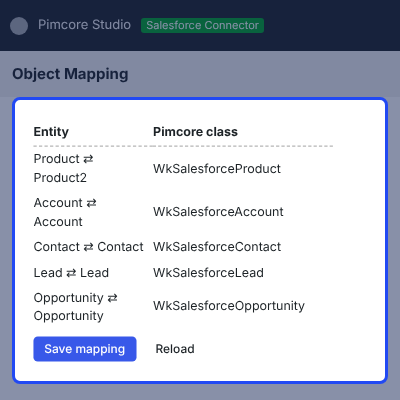
    • Select the Pimcore class for each Salesforce entity.
    • Pick a standard field or type a custom API name.
    • Map a custom Salesforce field such as Brand__c.
    • Auto-create a mapped Pimcore field that does not exist yet.
    • Keep the match key fixed so records pair on every run.
    • Save one mapping per entity from its own tab.
    Dynamic Object and Field Mapping

    Secure Salesforce Authentication

    The connector authenticates with OAuth2 Client Credentials through a Connected or External Client App. A credential holds a Name, My Domain URL, Consumer Key, Consumer Secret, and API version.

    Consumer Secrets are stored with libsodium encryption and are never returned as plaintext. Any legacy plaintext credential can be migrated to encrypted storage.
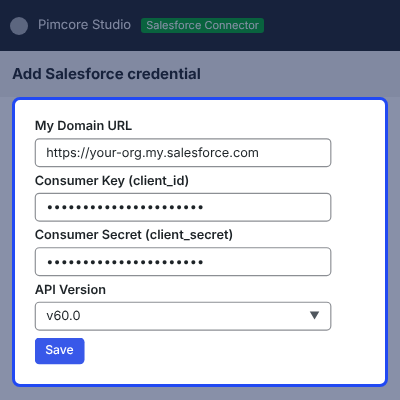
    • Authenticate through the OAuth2 Client Credentials flow.
    • Enter the My Domain URL, Consumer Key, and Consumer Secret.
    • Pick the Salesforce REST API version, such as v62.0.
    • Test the credential against Salesforce before it is saved.
    • Leave the secret blank on edit to keep the stored value.
    • Refresh the bearer token once after a 401 response.
    Secure Salesforce Authentication

    Asynchronous Sync Jobs and Job History

    Imports and exports run as queued jobs on a Reader-Processor-Writer framework with its own Salesforce sync transport. Studio never blocks while a run is in progress.

    Each run records how many records it read, created, and updated, beside a timestamped activity log. The job history combines import and export runs across every entity. For the same job view against a WordPress store, check our Pimcore WooCommerce Connector.
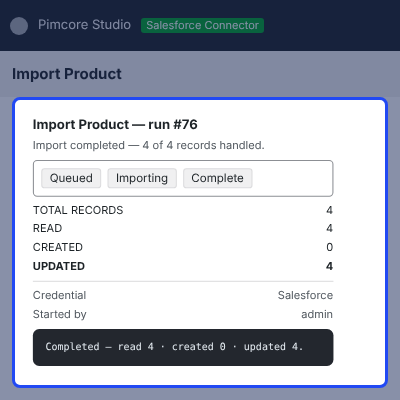
    • Queue an import or export from its entity screen.
    • Track records read, created, and updated per run.
    • Follow the live activity log line by line.
    • Stop a job while it is queued or already running.
    • Retry a run from the job history screen.
    • See the credential and the user who started each run.
    Asynchronous Sync Jobs and Job History

    Salesforce Schema Validation

    Two Salesforce orgs rarely expose the same fields. The connector describes each sObject before it builds a request, so it only ever asks for fields that exist on the org.

    Missing optional fields drop out of the SELECT statement and out of the write payload. A field the org lacks can no longer return an INVALID_FIELD error mid-run.
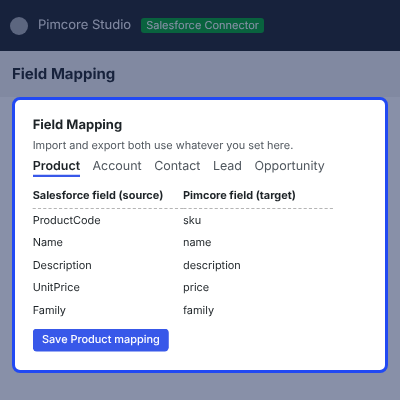
    • Describe the real Salesforce object schema per run.
    • Remove unavailable fields from the SOQL query.
    • Remove unsupported fields from the write payload.
    • Fall back to the Salesforce record Id as the key.
    • Update by Id when the match field is missing.
    • Keep repeat imports idempotent with no duplicates.
    Salesforce Schema Validation

    Studio UI for Pimcore Salesforce Integration

    Pimcore Studio carries a Salesforce Connector menu with pages for Credentials, Object Mapping, Field Mapping, Import, and Export. Import and Export open one screen per entity.

    Admins add, edit, test, activate, and delete credentials from the grid. Every run screen shows recent runs with status, item counts, and timestamps. To translate the synced content, you can check our Pimcore DeepL Translation Connector.
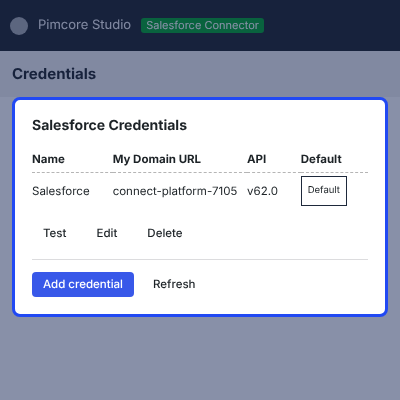
    • Open Credentials to add or test a Salesforce connection.
    • Set the Pimcore class per entity on Object Mapping.
    • Configure field pairs per entity on Field Mapping.
    • Start an import or export from its entity screen.
    • Open any run to read its counts and activity log.
    • Confirm before a credential is deleted.
    Studio UI for Pimcore Salesforce Integration

    Granular Access Permissions

    The connector ships separate permission keys for credentials, mappings, imports, exports, and jobs. They appear under a Salesforce Connector category in Users and Roles.

    Levels cover view, manage, execute, test, and stop. The backend stays the authority, so an ungranted action is refused even if a button is visible.
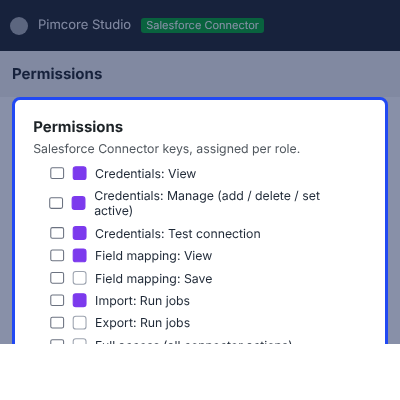
    • Grant or withhold access to Salesforce credentials.
    • Restrict who can change object and field mappings.
    • Control who may execute an import run.
    • Control who may execute an export run.
    • Restrict who can stop a running job.
    • Separate connection test rights from management rights.
    Granular Access Permissions

    Complete Pimcore Salesforce Connector Feature List

    Core Synchronization

    • Sync Product2, Account, Contact, Lead, and Opportunity records in both directions
    • Import through paged SOQL requests built from the fields the org exposes
    • Export through upsert, so a second run updates rather than duplicates
    • Read product prices from the standard PricebookEntry and flatten them onto the product
    • Write prices back to the standard price book with a find-or-create step
    • Derive or link a Pimcore category from the Salesforce Family value

    Object and Field Mapping

    • Pick any Pimcore class per Salesforce entity from the Object Mapping screen
    • Pair standard or custom Salesforce fields with Pimcore fields per entity
    • Drive both import and export from one shared field map
    • Auto-create a mapped Pimcore field that does not yet exist on the class
    • Set a business match key per entity, such as Email or ProductCode
    • Select the Salesforce REST API version per credential

    Authentication and Security

    • Connect through OAuth2 Client Credentials on a Connected or External Client App
    • Store the Consumer Secret libsodium-encrypted, never as returned plaintext
    • Migrate legacy plaintext secrets to encrypted storage with a console command
    • Validate credentials against Salesforce before they are saved
    • Keep the stored secret when the field is left blank on edit
    • Route every call through one REST client with token refresh and error formatting

    Jobs and Monitoring

    • Run every transfer asynchronously on a Reader-Processor-Writer framework
    • Track read, created, and updated counts for each run
    • Follow a timestamped activity log with INFO, SUCCESS, and error lines
    • Stop a job that is queued or already running
    • Retry any run from the unified job history
    • Record the credential and the user who started each run
    • Index imported objects as the job runs, so they appear in the tree at once

    Reliability and Schema Handling

    • Describe each sObject and use only the fields the connected org has
    • Drop missing optional fields from queries and payloads instead of failing
    • Fall back to the Salesforce record Id when the match key is unavailable
    • Apply create-only defaults so an update never overwrites a live value with a blank
    • Strip Salesforce read-only fields from every write
    • Collect per-record problems as warnings so one bad row cannot sink a run

    Access Control and Permissions

    • Assign view, manage, execute, test, and stop rights per connector area
    • Deny any route that is not explicitly mapped to a permission
    • Install the permission set with a single console command
    • Expand an umbrella grant into granular keys when a user is saved
    • Gate navigation and buttons in Studio, with the backend as the authority

    Setup and Architecture

    • Install tables, permissions, and the object mapping seed in one bundle install step
    • Create every DataObject class and register its Studio search index by command
    • Run without any other Webkul bundle, since the sync framework ships inside
    • Test a connection from the Studio UI or from the command line
    • Extend the lean installer-created classes with your own fields in Studio
    • Uninstall within scope, removing connector tables while imported data stays

    Support

    For any query or issue, please create a support ticket here http://webkul.uvdesk.com/

    You may also check our quality Magento 2 Extensions.

    Specifications

    Product Version1.0.0
    Released17 days ago
    CategoryAkeneoPimcore
    Last UpdatedSeptember 2, 2026 (17 days ago)
    Supported VersionsPimcore  12.x  

    Ratings

    We'd love to hear your thoughts! Share your feedback and help us craft an even better experience tailored just for you.

    Write a review

    Frequently Asked Questions

     What does Pimcore Salesforce Connector do?
    Pimcore Salesforce Connector links Pimcore 12 with Salesforce for two-way synchronization of products, accounts, contacts, leads, and opportunities. It runs every transfer as a background job inside Pimcore Studio.
     
     Which Salesforce records can be synchronized?
    The connector supports Product2, Account, Contact, Lead, and Opportunity records. Each one can be imported from Salesforce and exported from Pimcore.
     
     Can I sync data in both directions?
    Yes. Salesforce-to-Pimcore imports and Pimcore-to-Salesforce exports both run, and both read the same shared field mapping.
     
     Does it support Salesforce product prices?
    Yes. A product import reads the price from the standard PricebookEntry, and a product export writes it back to the standard price book.
     
     Can I choose Pimcore classes for Salesforce objects?
    Yes. The Object Mapping screen lets you select a Pimcore class for each supported Salesforce entity, with no code change.
     
     How are duplicate records prevented?
    The connector checks its stored ID mapping or the configured business match field before it creates a Salesforce record. A match means the existing record is updated in place.
     
     Are Salesforce credentials stored securely?
    Yes. The Consumer Secret is stored with libsodium encryption and is never returned as plaintext. A console command migrates any legacy plaintext secret.
     
     Can missing Salesforce fields break synchronization?
    No. The connector describes the connected org first and removes any unavailable field from the query and the write payload before the call is sent.
     
     Can I monitor synchronization jobs?
    Yes. Every run screen lists recent runs, and opening one shows record counts, an activity log, the credential used, and Stop and Retry controls.
     
     Can users have different connector permissions?
    Yes. Separate keys control credentials, mappings, imports, exports, jobs, connection tests, and stop actions. An ungranted action is refused by the backend.
     
     Does uninstalling the connector remove imported data?
    No. The uninstall is scoped to connector credentials, ID mappings, config rows, and tables. Imported business data stays in Pimcore.
     
     Does the connector require another bundle?
    No. It is self-contained, and the sync framework and connector services ship inside the bundle itself.

    Specification

    Detailed technical features and requirements to help you understand the module’s capabilities and ensure smooth integration with your system.

    Cloud Hosting

    Detailed technical features and requirements to help you understand the module’s capabilities and ensure smooth integration with your system.

    Default Configuration Details of Server

    1 GB
    RAM
    1 Core
    Processor
    30 GB
    Hard Disk
    1 GB RAM & 1 Core Processor
    Database

    Want to know more how exactly we are going to power up your eCommerce Website with Cloud to fasten up your store

    * Server Configuration may vary as per application requirements.

    Change Logs

    • - Feature Add (+)
    • - Feature remove (-)
    • - Bug Fixed (!)
    • - Modification (*)
    Version 1.0
    • Initial Launch
    • Added Pimcore Studio plugin with credentials, object mapping, field mapping, import/export screens, and unified job history.
    • Added Salesforce to Pimcore import for Product2, Account, Contact, Lead, and Opportunity.
    • Added Pimcore to Salesforce export for Products, Accounts, Contacts, Leads, and Opportunities.
    • Added two-way synchronization for five Salesforce entities with business-key matching.
    • Added OAuth 2.0 Client Credentials authentication with automatic token refresh.
    • Added encrypted storage for Salesforce Consumer Secrets using libsodium encryption.
    • Added org-schema resilient synchronization using Salesforce describe metadata.
    • Added Salesforce REST API and SOQL support with configurable, version-pinned API versions.
    • Added fully dynamic Object Mapping for selecting Pimcore classes per entity.
    • Added bidirectional Field Mapping with dynamic Pimcore fields and Salesforce read-only field handling.
    • Added idempotent ID mapping to prevent duplicate records and support self-healing after remote record removal.
    • Added background import and export jobs with live progress, read/create/update counts, stop, retry, and unified job history.
    • Added Credentials CRUD with edit, connection testing, activation, deletion, and API version selection.
    • Added granular ACL permissions and CSRF protection for Salesforce connector API routes.
    • Added installer scripts, CLI commands, worker setup, class creation, permission installation, and migration helpers.


